From time to time, I scratch my head and ask myself: Gee, that file icon looks interesting and different, what does it mean? What I’m wondering about is on Eclipse Icon Decorators. Label and Icon Decorations allow additional information to be displayed in an item’s label and icon. Very powerful. But as with many powerful things: if you don’t know it, it might cause harm or confusion. Unfortunately, that’s not so easy to find out.
Tag Archives: Building
FreeRTOS with GCC, Cortex-M0+ and Kinetis KL25Z Freedom Board
Yesterday was my ‘lucky day’: My Kinetis-L Freedom board arrived :-). This board is really nice and features the KL25Z from the recently announced Kinetis L Family. And guess what is the first thing I want to flash on that processor? Yep: some FreeRTOS tasks. But to get there, a few important things have to be sorted out:
5 Best Eclipse Plugins: #1 (Eclox with Doxygen, Graphviz and Mscgen)
The #1 award in my list goes to Eclox+Doxygen+Graphviz+Mscgen. Yes, it is a single Eclipse plugin (Eclox) for Doxygen, and with two other powerful tools. It solves a typical engineering problem: “How to document my project? And how to keep it up-to-date?”.
Like many other engineers, I do not like to write documentation. Because it is painful. I want to write code and program. Writing documentation for it should be fun too. And it should solve the problem that the documentation does not match what has been implemented. I’m a big fan of the ‘single source’ concept: information has to be in a single place, and not copied and distributed among different places. And here my #1 helps me doing this.

Percepio FreeRTOS+Trace V2.2.2 released
Percepio has released a new V2.2.2 library of FreeRTOS+Trace (see Tracing with FreeRTOS+Trace from Percepio). The new release comes with many improvements. The trace recording is optimized for more efficient recording and longer trace with the same amount of memory.
Note: Because the trace data structure is changed and optimized, I need the latest tool on the PC/host from http://www.percepio.com.
I have updated the Percepio Processor Expert component to generate and use the new trace library V2.2.2. This includes the new settings in the component properties as shown below:
Continue reading
Debug vs. Release?
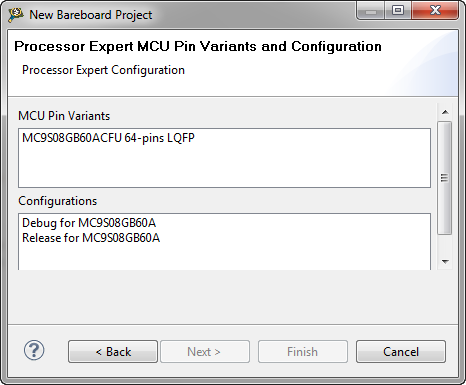
When I create a project with CodeWarrior for MCU using Processor Expert and S08GB60, I’m asked if I want to have a Debug and/or Release configuration:
Debug or Release? For an embedded microcontroller? Does this make any sense?
MQX Eclipse Working Sets
Working Sets are a very useful feature in the Eclipse Framework (see Working Sets Explained). But: with a standard Eclipse distribution it is not possible to import or export working sets. The good news is: the AnyEdit plugins (see 5 Best Eclipse plugins) provides that missing functionality. The other good news is: Buried in the Freescale MQX 3.8 distribution for Eclipse CodeWarrior, there is an even better implementation for the Eclipse Working Sets.
CRC Calculation with MCU10
With USB goes medical I have a serial-to-USB (CDC) support for my TWR-S08MM128 board. What makes these devices targeted for medical applications interesting for other applications are features like bootloader support and a CRC (Cyclic Redundancy Check) engine. But how can I generate the required CRC numbers with MCU10?
Templates and Stationeries with MCU10.2
Classic CodeWarrior used the concept of ‘Stationeries’ or ‘Project Templates’: If I have a project which you want to use as a starting point for ‘Create new project’, then I moved that project into the ‘Stationery’ sub-folder of my classic CodeWarrior. When I did a File > New Project…, it showed up in the project wizard:
This is very useful if I have my corporate template or using projects in a classroom environment. How can I do this in eclipse and CodeWarrior for MCU10.2?
Using Parallel Builds: what is optimal?
One of the new features in CodeWarrior for MCU10.2 is the ability to build in parallel. Does not sound exciting? Well, when I tried this the first time in MCU10.2, I noticed immediately the reduction in build time: twice as fast compared to MCU10.1!!!. Wow! This improvement is based on using a make utility which can spawn multiple jobs on multicore host machines. CodeWarrior tries to use an optimized setting to make the build as fast as possible using parallel builds. The question is: is it really optimal?
Symbol defined or not, that’s the question
I just ran into this problem: I know I have this file in my project, but still the linker complains that it cannot find the symbols: “Symbol X is undefined”? It must be something obvious, but somehow I cannot see it?