Processor Expert is great: it generates initialization code and driver sources for me. This makes it a great knowledge and source base for non-Processor Expert projects too. Wondering how to initialize the SCI? What are again the register settings to use the CPU with a 6 MHz clock rate using an external crystal in low power mode? Lets generate a Processor Expert project to find out. Then copy-past the drivers or parts of it into my non-Processor Expert project. But How to do this?
Tag Archives: Building
Linting without a plugin
With “Eclipse and PC-lint: Linticator” I have a plugin to lint my sources in a comfortable way. But I can do this as well without a plugin. For this I use a batch file with a build configuration, plus settings to get the PC-lint messages into the Problems view. Yes, this does not sound easy, but is very doable and straight forward once I have set it up. It gives me complete control on every little detail. Here is how I do it… Continue reading
Eclipse and PC-lint: Linticator
PC-lint from Gimpel has set the standard for static code analysis: it is used by many companies developing safety critical applications. Additionally PC-lint can check the MISRA rules which are standard for many coding guide lines. PC-lint has detected many subtle bugs in my sources. Thank you, PC-lint!
CodeWarrior classic provided a plugin for the PC-lint compiler: To bad that this does not exist in the eclipse based CodeWarrior. You might think that given PC-lint so popular, there should be an eclipse plugin available? Yes, there are many attempts on this: all of them did not work well enough for me. The good news: There is the Linticator eclipse plugin. The bad news: it is not for free.
Problem Occurred: Flash programming with overlapping memory
My post in “An error occurred…”: Applied Debugging Rules gives some hints about how to isolate and solve some debugging problems. But here is a case where the tips did not help: I had this dialog with “Failed to resume target process” for my HCS08 project again:
Fixing the Eclipse Index
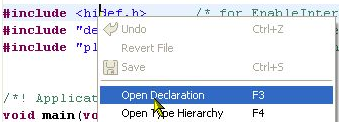
One of the greatest features in Eclipse is the Indexer: it parses automatically my code in the background. It creates all the needed information so I can browse around my sources. I can use the Open Declaration context menu in the source code:
Copy my Project
I’m using Subversion to keep track of changes in my eclipse MCU10 projects. That allows me to get back in time without the need to make copies of my project. But sometimes I do need to make a copy of my project: because I want to use a project as a base and then do something different with it. To make a copy of a project is simple, but requires some more steps if I’m using Target Tasks. Here is how I do this… Continue reading
Dissection of MCU10 Projects
Creating an eclipse managed make project with MCU10 is easy: Starting the wizard with File > New > Bareboard Project and after a few clicks I have a project. I don’t need to worry about all the files in the project structure, until……..well, until I need to put the files into a VCS.
No rule to make target
This error message is something I see nearly every day in the Problems View:
mingw32-make: *** No rule to make target ….
Quickstart for Processor Expert in Eclipse
Ok, you are probably new to Eclipse, and want to do the fun part: Creating an Eclipse Processor Expert project in CodeWarrior for MCU10.2. Cool! Here are some steps and tips to make it smooth from the beginning…
Configurations with Processor Expert
I have to make an application configuration decision: Using USB CDC or RS-232?
In the lab I use a Tower system which offers both RS-232 and USB connectivity. It uses a FSShell component to communicate with a terminal on the host. Typically this is using an RS-232 serial cable connected to the host. Well, the challenge is that today most notebooks do not have a serial port any more. But they have USB.