Copy my CodeWarrior Project

I have a project working, and then I want to do a copy. Unfortunately, this is not as simple as it should be :-(. In order to copy a project with all the settings, some knowledge about the internals of the project structure is required, which is the topic of this post.

In “Copy my Project” I was using a ColdFire V2 project which is not an easy case, as is using a Target Task to flash the microcontroller. Fortunately, all other targets in CodeWarrior for MCU are *not* using target tasks :-). With little help and preparation, a copy a project is not that difficult to do.  I’m showing how to do this with the FRDM-KL25Z project I have created in this post.

Continue reading

Removal of Processor Expert for a Project

Yes, I’m using Processor Expert *a lot*. But there might be reasons to go without it. Because then I really want to do it the hard-hard-hard core way. Or maybe because I have configured my system, and want to freeze my code. And nothing prevents me to do it ‘my way’.

In any case, it is easy to transform a CodeWarrior Processor Expert project, and then decide to remove that technology from it, and go further with the ‘traditional’ technology.

Continue reading

A Library with ARM gcc and Eclipse

When I create a new bare-board project with the Eclipse based CodeWarrior 10.3 for my FRDM-KL25Z board and GNU gcc, then the ‘Library’ option is grayed out:

Library Option in New Project Wizard

Library Option in New Project Wizard

This does *not* mean that libraries cannot be built :-). In fact it is very easy to do this with the GNU tools and Eclipse, and here is how….

Continue reading

Compiler Defines and Eclipse Editor Highlighting

In this post I have found settings for Eclipse Indexer to show the state if defines correctly. Usually I have something like this in my projects:

debug me

debug me

So I define the macro DEBUG_ME on the compiler command line. And it is cool to see that the Eclipse editor correctly grays out the code which is not enabled. But for this the Eclipse Editor view needs to know about the macro, but how does this work?

Continue reading

Processor Expert, gcc C++ and Kinetis-L with MQXLite

The Kinetis-L is a 32bit microprocessor family, based on ARM Cortex M0+. It comes with ARM gcc in CodeWarrior. Although the Kinetis-L does not have much RAM, it is very possible to use gcc with C++, especially as a programmer I keep the limited RAM amount in mind. So I thought I try C++ and Processor Expert for my Kinetis-L KL25Z Freedom board.

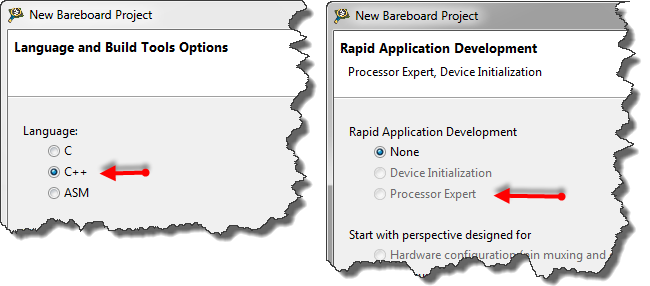
If I select C++ as language in the New Bareboard Project Wizard of CodeWarrior, then I cannot select Processor Expert or Device Initialization:

C++ in the New Project Wizard

C++ in the New Project Wizard

That makes somewhat sense, as Processor Expert creates normal C code and C files, but no C++. Still, what if I need C++? This is doable, but with anything advanced, I need to know exactly what I want and what I do. Here is the ‘How to use C++ with Processor Expert’.

Continue reading

S-Record, Intel Hex and Binary Files

My earlier posts were around the Kinetis gcc compiler which comes with CodeWarrior for MCU10.3. MCU10.3 comes as well with the Freescale Kinetis compiler as in MCU10.2. In “S-Record Generation with gcc for ARM/Kinetis” I explored how to generate S19 or other output files with gcc. However, you only can produce one file format at a time. What if I need multiple formats or a different format. What if I need to do the same with non-gcc build tools? S-Records are usually easy as supported in the linker. Other formats need a bit more plumbing. So this post is how I can create and manipulate the different output formats, so I can use it with a bootloader.

Continue reading

Code Size Information with gcc for ARM/Kinetis

Working with the Freescale S08 and S12 build tools, there is something I really appreciated: that the linker reports on the console the code size of the application:

S08 Linker reporting the code size

S08 Linker in Eclipse reporting the code size

This is especially handy as it allows you to see the impact on code size immediately e.g. if I change a compiler option or do a source code change. Simple and easy. Yes, I could get that kind of information from the linker map file too. But this means I need to open that file, scroll down/etc: many steps just to find out the code size.

Continue reading

S-Record Generation with gcc for ARM/Kinetis

With my Freedom KL25Z board I’m using the GNU/gcc build tools and Eclipse/CodeWarrior. When I wanted to create an S19 file of my application using the GNU tools, this was not that easy to find out. So here are the steps to do this:

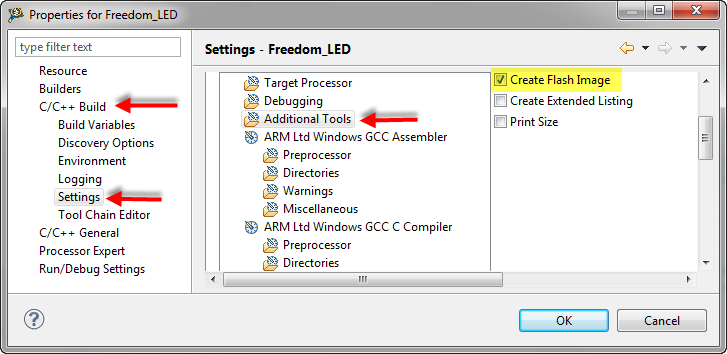
I open the project setting using the menu Project > Properties and go to C/C++ Build > Settings > Additional Tools and enable’Create Flash Image‘:

Additional Tools gcc Settings

Additional Tools gcc Settings

Continue reading

Tutorial: Enlightning the Freedom KL25Z Board

The schematics for the Freedom board is now available on the element14 Freedom Board site (you need to log into the element14 community first) as FRDM-KL25Z Schematics (SPF-27556_D).pdf (314.7 K)). So time to write a tutorial how to use the LED on that board.

❗ Note: since this tutorial, the LED component has been simplified. So some of the steps below are much simpler and easer. Please see LED’s for Kinetis, simplified | MCU on Eclipse. I have updated this post with the new instructions and images.

In “FreeRTOS with GCC, Cortex-M0+ and Kinetis KL25Z Freedom Board” and “A Shell for the KL25Z Freedom Board” I have used that board with an RTOS: FreeRTOS. But it is really easy to use that board without an RTOS (‘bare metal’) too. In this tutorial I’m providing step by step instructions to use the RGB LED on the Freedom KL25Z board with Processor Expert and the open source LED component.

Continue reading