Reducing the build time with gcc for ARM and CodeWarrior

Eclipse based CodeWarrior for MCU10.3 comes with gcc build tools for Kinetis/ARM cores. While it features the parallel build make, I noticed that especially for larger projects build times are not as fast as it should be. The good news is: I was able to cut down my build time to less than half with a simple change :-).

When I looked at the output folder where all the object and make files are stored by Eclipse, I noticed that it has as well the listing files generated:

Listing Files in output folder

Listing Files in output folder

Continue reading

Free Static Code Analysis with Eclipse

I know for myself: the earlier I’m able to fix a bug, the better. So I’m always grateful for things which help me to find issues in my sources as early in the development process as possible. Eclipse and CodeWarrior already help me to find syntax errors in my code while I’m typing:

Eclipse highlighting syntax error

Eclipse highlighting syntax error

With the built-in syntax checker of Eclipse, this helps me many times to get things right without the need to build my code with the compiler. But when I’m able to compile successfully my code, this does not mean it is without bugs. It would be good to catch as many errors *before* downloading and running it on the target.

Continue reading

Migrating Kinetis-L Projects from Beta to Final MCU 10.3

I have successfully used CodeWarrior for MCU10.3 beta version for many projects. With the advent of the final CodeWarrior for MCU10.3, I want to migrate my existing projects to the new and final version. First: my existing projects work as well in the final version, which is good news. But there are two things to change to take advantage of the final 10.3:

  1. Linker file memory split
  2. ARM Micro Trace Buffer (MTB) support

Continue reading

Reducing Code Size with gcc and EWL

If you have not noticed: the final CodeWarrior for MCU10.3 has been released on the Freescale web :-).

It comes with a few changes compared to the 10.3beta release, and one is about the library configuration. I noticed that new projects created with the wizard are around 4 KByte larger than I expect them to be. For example my rather simple application below uses 8 KByte of code, where my expectation would be in the range of around 4 KByte:

   text       data        bss        dec        hex    filename
   8644         24       1108       9776       2630    Freedom_2x16_HTA.elf

Continue reading

Debugging Hard Faults on ARM Cortex-M

It is as bad as this: my application stopped in an unhandled interrupt service routine:

Cpu_Interrupt
Cpu_Interrupt

That does not tell much. I’m using Processor Expert generated code, and with this all my ‘unhandled’ vectors are pointing the same handler:

Continue reading

Thumbs up with Assembly on ARM Cortex

Sometimes it is necessary to write an interrupt service routine in assembly language. This is the case as well for the ARM Cortex-M0+ which is found in the KL25Z on my Freedom board. But there is something important about the ARM Cortex architecture: Thumb Mode.

Thumb mode the ‘ARM way’ to reduce the code size with a reduced (16bit wide) instruction set. The ARM architecture can implement a ‘mixed’ mode, on a function level. To distinguish between ‘normal’ ARM functions and ‘thumb’ functions, the processor is checking if the LSB (Least Significant Bit) of a function pointer (or function call destination) is set. So a jump address of 0x410 is for a ‘normal’ function, while a function jump to the address 0x411 (even if the function is located at the address 0x410) denotes a ‘thumb’ function.

Continue reading

Optimizing the Kinetis gcc Startup

The GNU gcc tool chain integration in CodeWarrior/Eclipse MCU10.3 has a nice feature to show the code and data size of my application after linking (see this article how to enable this). So if I create an ’empty’ project with the wizard, get the code and data size without consulting the linker map file:

Console View with Code and Data Size

Console View with Code and Data Size

But wait! 2604 bytes of code for almost doing nothing? That’s not what I want! There are ways to get that puppy much, much slimmer. Down to 284 bytes :mrgreen: .

Continue reading

Defining Variables at Absolute Addresses with gcc

Many compilers offer a way to allocate a variable at an absolute address. For example for the Freescale S08 compiler, I can place my variable at a given address:

unsigned char buf[128]@0x2000;

This is very useful (and needed) e.g. if the hardware (like USB) needs a buffer at given address. The advantage of the above (non-ANSI and thus not portable) syntax is that I can define a variable at an absolute address, without the need to allocate it in the linker.

I wanted to do something similar with gcc for Kinetis/ARM, and searched many forums on the internet. Obviously, I’m not alone with this question. The solution I have found comes close to what I use e.g. for the S08 compiler.

Continue reading

Foreign Characters for the Eclipse Build System

Having a problem with Eclipse and building files with foreign characters in the file name? If you are developing software, then read and follow this advice:

“Do ❗ NOT ❗ use foreign characters in file names, paths or for anything else!”

What I mean with ‘foreign characters’ are things like éöüàäü, or simply anything which is outside the 7bit ASCII or Windows-1252 code page table, even if they are allowed by the file system of your operating system (e.g. Windows).

Or in other words: only use these characters for file or directory names:

abcdefghijklmnopqrstuvwxyzABCDEFGEHIJKLMNOPQRSTUVWXYZ1234567890_

Continue reading

Speeding up the Debug Launch in CodeWarrior

Whenever I do a debug launch in the Eclipse based CodeWarrior, it takes some time until actually I’m ready to step through my code on the target. Yes, a good part of that is by Eclipse. But another part is that Eclipse helps me to do stupid things (which is a good thing). But say if I know what I’m doing, I could remove some of that safety belts and still doing fine. But only if I know what I’m doing.

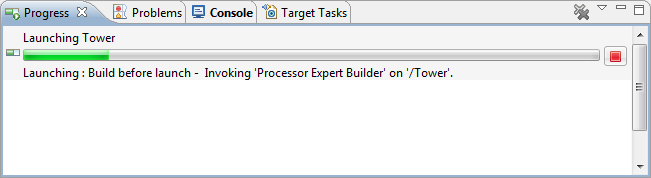
A good indicator where Eclipse is spending time is to have a look in the Progress View:

Progress information during launch

Progress information during launch

It shows an interesting information: ‘Build before Launch’….

Continue reading