Processor Expert components have an interesting concept: Events. Events are shown in green color with the ‘E’ (for Event):
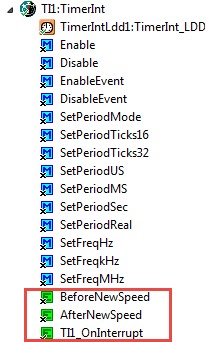
TimerInt Component with Events

Processor Expert components have an interesting concept: Events. Events are shown in green color with the ‘E’ (for Event):
TimerInt Component with Events
Freescale had announced at FTF back in April this year that they will use Kinetis Design Studio and the Kinetis SDK for all new Kinetis devices. The switch from CodeWarrior to Kinetis Design Studio (see “Comparing CodeWarrior with Kinetis Design Studio“) was not much of big deal for my projects (although CodeWarrior still has better features), and projects are rather easily portable. However, the move to the Kinetis SDK has been massively disruptive: Before it was easy to move projects from one device to another with Processor Expert, even from S08 to ColdFire to Kinetis. Now with the Kinetis SDK everything is very different. At least Freescale now officially supports FreeRTOS, and for myself as a big fan of that open source RTOS, that was some good news.

Blinking Red LED with FreeRTOS Task using Kinetis SDK, FreeRTOS and Processor Expert
So in this tutorial I’m showing how FreeRTOS can be used with the Kinetis Design Studio. That makes at least using the Kinetis SDK bit more familiar to me :-).
A young engineer was crossing a road one day when a frog called out to him and said, “If you kiss me, I’ll turn into a beautiful princess.” He bent over, picked up the frog and put it in his pocket.
The frog spoke up again and said, “If you kiss me and turn me back into a beautiful Princess, I will stay with you for one week.” The young engineer took the frog out of his pocket, smiled at it and returned it to the pocket.
Continue reading
Winter made its heavy entry in Switzerland last night, covering my home with 5 centimeter of wet and heavy snow. High areas received up to 1 meter which caused a lot of problems. Instead of sharing that rather unpleasant snow (I am more of the glaring white powderish snow person), I can share how things looked before: Colorful trees with snow-covered mountains in the back, cattle still can have a mouth of green grass. I already guessed on Sunday that this will not last for long…

Cattle and Mountains
The PCB’s for the Sumo robot (see “New Sumo Robot Assembled, and looking good!“) arrived. It is the ‘production’ version of that shield I have shown in “Sensor and Communication Shield for Sumo Robot” which adds following to the robot:
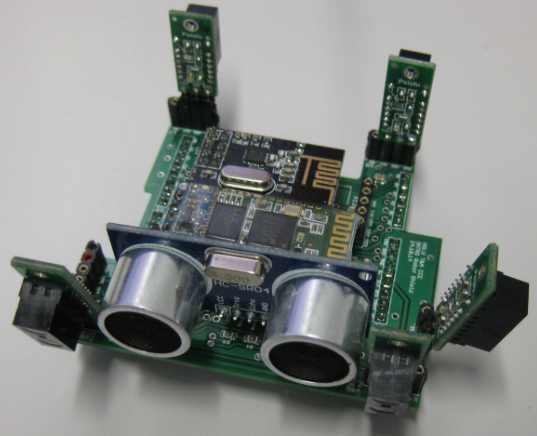
Sensor Shield
Every season has its special colors. I very much like the warm colors of the Fall season. Maybe this was the weekend before we will get snow into the lower areas. Soon everything will be covered by cold snow….

Lake View
Happy Falling 🙂
I’m very proud what our students can accomplish: they broke today the previous world record for acceleration in an electrical car:
From 0 to 100 km/h (62.1371 miles/h) in 1.785 seconds 🙂
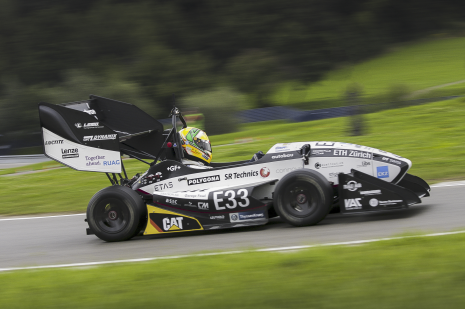
World Record Acceleration (Source: AMZ Racing)
It only took 30 meters runway to reach 100 km/h :-).
Details: https://www.ethz.ch/en/news-and-events/eth-news/news/2014/11/Grimsel_bricht_Weltrekord.html
Happy Accelerating 🙂
I think the biggest frustration point for any new or even seasoned engineer is the debugging phase: my application finally builds fine, but I’m not able to connect and download it to the target board :-(. In my view the debugging part is the most fragile part of the development process. I’m always very relieved if I can connect to a brand new board, because I know if it does not work, then the problem could be a very bad one, costing my several hours or even days to overcome it.

Remote Communication Error, what now?
Newer microcontroller have increase RAM areas, making it suitable to run the application from RAM instead of FLASH. For the FRDM-K64F board and the Kinetis Design Studio (V1.1.1), I have explored how to run the application out of RAM instead of FLASH memory, both for P&E and Segger connections.

MK64FN1M0VLL12
The cool thing with Processor Expert is that it gives me guidance through the settings. And there is a nice (rather hidden feature) which proposes me values I can enter:
💡 First, switch to the non-Tabs (classic) view, as the classic view is using the screen real estate better, and shows you *all* the information needed, and does not hide some.
So if you have some values to correct because other settings have changed:
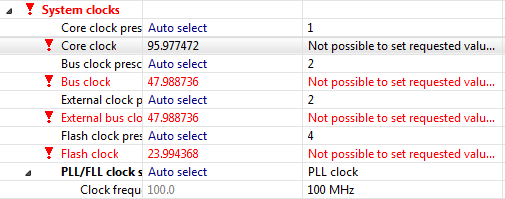
Values to Enter
 MCU on Eclipse