Three men: a project manager, a software engineer, and a hardware engineer are helping out on a project. About midweek they decide to walk up and down the beach during their lunch hour. Halfway up the beach, they stumbled upon a lamp. As they rub the lamp a genie appears and says “Normally I would grant you three wishes, but since there are three of you, I will grant you each one wish.”
Continue reading
McuOnEclipse Component Sources in Dedicated GitHub Repository
From time to time it is good to do some cleanup work: what has grown organically sometimes needs some cuts and moves. The same applies to the McuOnEclipse GitHub repository (https://github.com/ErichStyger/mcuoneclipse) which has grown to 522 MByte, 8364 files and 1444 folders. I already moved out the Processor Expert component releases (see “McuOnEclipse Releases on SourceForge“). Time to cleanup and move something else: the Processor Expert component sources.
Updated McuOnEclipse Components: USB for KL24Z, FatFs v0.10c, Shell Backspace and FreeRTOS Trace Hook Configuration
I have received several requests to post a quick note when there is a new release (16-Nov-2014) of the McuOnEclipse components on SourceForge (see “McuOnEclipse Releases on SourceForge“). I have published today a new release, and with following major improvements:
- USB support for Kinetis KL24Z
- FatFs now features the latest Elm-Chan v0.10c release
- Backspace support in Shell
- Configuration item in FreeRTOS for Percepio Trace Hooks
Tutorial: How to Erase the FLASH with the GNU GDB debugger
I have several applications where I store application specific information in the microcontroller FLASH memory (see “Configuration Data: Using the Internal FLASH instead of an external EEPROM“). I have run into issues recently with the Segger J-Link GDB server as by default it does *not* erase all the FLASH memory. So the question is: How can I erase all (or part) of the FLASH memory with GDB (e.g. in Kinetis Design Studio or in Eclipse)?
Engineering Joke of the Week: The Train Ticket
On a train to a large computer convention, there was a bunch of engineers and a bunch of managers. Each of the managers had a train ticket. The group of engineers had only ONE ticket for all of them. The managers started laughing, figuring the engineers were going to get caught and thrown off the train.
When one of the engineers, the lookout, said, “Here comes the conductor,” all of the engineers went into the bathroom. The managers were puzzled.
Continue reading
Adding Processor Expert to Atollic TrueSTUDIO
For me as an Eclipse and Processor Expert lover, a press release that Atollic supports Processor Expert catched my eye :-). So there is yet another way to use Processor Expert: with a commercial Eclipse IDE provided by Atollic (atollic.com/).
Time to check it out…
Symphony in White
Image
Recovering the FRDM-K64F Bootloader, or: Cloning the Program of a Microcontroller
The Freescale FRDM-K64F and FRDM-K22F have a different OpenSDA (v2) firmware on it: unlike the earlier (v1), that firmware is open and not protected which is a great thing. However, it has the disadvantage if you use the wrong SWD/JTAG header on your board, the bootloader on the K20 OpenSDA microcontroller is gone 😦
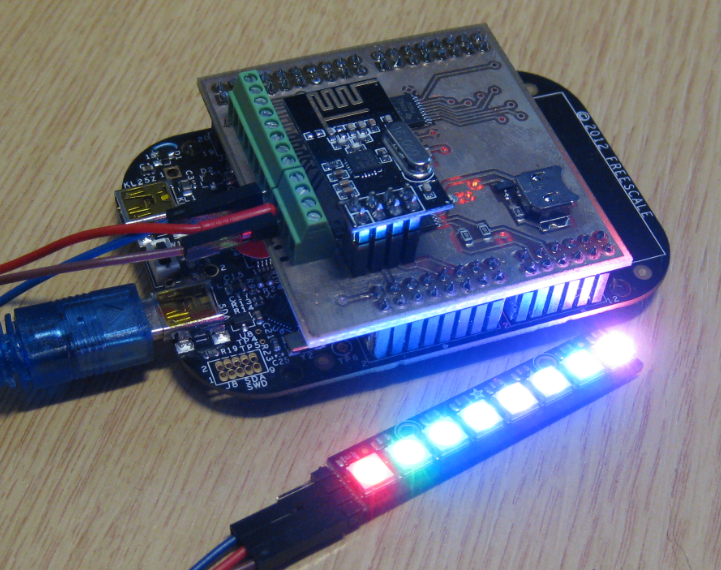
NeoShield: WS2812 RGB LED Shield with DMA and nRF24L01+
In my earlier post I used a hacked together shield for building a clock based on Adafruit’s NeoPixel/WS2812 (“LED Clock with Kitchen Hot Pan Protector“). The new design supports now 8 parallel data streams, integrated realtime clock and wireless connectivity with the nRF24L01+ module.
Using Keil μVision 5 with Processor Expert
I happily used the Keil v4.71.2.0 μVision tools for a few small projects (see “Using Keil µVision (ARM-MDK) with Processor Expert Driver Suite“) with the ‘lite’ edition (32kByte code size limitation). This weekend I wanted to move to the new v5.12.05 version.
And there were indeed several things which are different. So this is post is about getting this version getting up and running as the v4.7 one.