Please Check Your License

The good thing with many vendors is: they offer development tools free of charge. And the limitations are typically reasonable for many projects. The Eclipse based CodeWarrior for MCU10 is not an exception: it comes in a free (‘Special’) Edition which allows up to 128 KByte of code to download for my ARM/Kinetis projects.

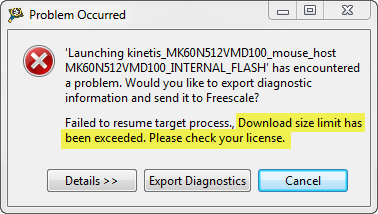
But, when I tried to debug an Example I have downloaded from the web, I get this dialog:

“Download size limit has been exceeded. Please check your license.”

Download Size Limit Has Been Exceeded

Download Size Limit Has Been Exceeded

Continue reading

CodeWarrior Flash Programming from a DOS Shell

I can do test automation or standalone flash programming using the Debugger Shell. But this requires me to use a view inside of Eclipse. What would be nice is to do such things from a lower level: from a Windows Command window (CMD or DOS Shell). This is possible with usage of Eclipse/CodeWarrior in command line mode.

Continue reading

Standalone Flash Programmer

In Scripting, the Debugger Shell and Debugger Shell: Test Automation I was exploring how to use the Debugger Shell for automation. For my lectures at the university I need to program multiple boards with the same application. I don’t want (and need) a debugger for this: all what I need is a ‘Standalone Flash Programmer’: the ability to flash one or multiple boards without debugging.

Continue reading

Show Workspace Location in the Title Bar

A central concept of the Eclipse framework is the concept of a workspace. The workspace holds project and project references, among with other settings. I’m using multiple workspaces all the time, and in parallel. How to know which workspace I’m using? By default, the CodeWarrior Eclipse IDE main window comes up like this:

Default CodeWarrior Eclipse Main Frame

Default CodeWarrior Eclipse Main Frame

Continue reading

Icon and Label Decorators in Eclipse

From time to time, I scratch my head and ask myself: Gee, that file icon looks interesting and different, what does it mean? What I’m wondering about is on Eclipse Icon Decorators. Label and Icon Decorations allow additional information to be displayed in an item’s label and icon. Very powerful. But as with many powerful things: if you don’t know it, it might cause harm or confusion. Unfortunately, that’s not so easy to find out.

Continue reading

Debugger Shell: Test Automation

The development cycle does not end with debugging. Debugging is something manual, but for testing and automation I want to develop scripts I can run in an automated fashion. For this I use a tool in CodeWarrior: the Debugger Shell as command line debugger and using TCL as scripting language. This gives me a powerful way into automation and scripting with the debugger: from basic access to memory, to stepping and controlling the execution up to programming the flash memory.

Continue reading

Software and Hardware Breakpoints

Using breakpoints is central part of debugging. I’m usually debugging my applications in flash memory. Because nearly all the microcontrollers I use have on-chip flash memory, and have more flash than RAM. With debugging in flash I limited by the number of hardware breakpoints. And here is the advantage with debugging code in RAM: availability of ‘unlimited’ software breakpoints. But how does this all works, and how to make efficient usage of hardware breakpoints?

Continue reading

Watching Static Variables

Debugging static variables, especially ‘static locals’ is sometimes challenging. Especially ‘static local’ debugging depends on the compiler capability how they are encoded in to the object file. I have found out that at least with CodeWarrior for MCU and ARM/Kinetis this works straight forward. Only ‘Watch Expressions’ need special attention.

Continue reading

Switching Source Files in the Eclipse Editor (CTRL+TAB)

Ever wondering what could be a keyboard shortcut for something in Eclipse? In my post on 10 Best Eclipse Shortcuts the question came up how to traverse through all the open files in the editor. Finding a shortcut is easy if you know the The Mother of all Eclipse Shortcuts :-). I press CTRL+3 and enter a search term like ‘switch’, and it shows me all shortcuts with ‘switch’ in the description:

CTRL plus 3 shows all shortcuts

CTRL plus 3 shows all shortcuts

Continue reading

Filter my Problems

In CodeWarrior and Eclipse, the Problems view shows all kind of messages, from all open projects in the workspace. That way I have especially all the build messages in one view. The Problems view keeps the messages listed, until I have them resolved. By default, if I have multiple projects open in my workspace, it will show all the messages of all projects:

Problems View with Multiple Messages and Projects

Problems View with Multiple Messages and Projects

With many messages and many projects, that might be overwhelming, as messages can be mixed for different projects and files, especially with parallel build enabled. How to change the settings to have the messages listed just for a single project?

Continue reading