MCUXpresso IDE: S-Record, Intel Hex and Binary Files

This is another article about the NXP MCUXpresso IDE (see “MCUXPresso IDE: Unified Eclipse IDE for NXPs ARM Cortex-M Microcontrollers“), this time it is about Post-build steps. Post-build steps are custom actions which can be executed after the build (or link phase), and are typically used to generate S-Record, Binary or Intel Hex files (see “S-Record, Intel Hex and Binary Files“).

Post Build Steps Details

Post Build Steps Details

Continue reading

Tutorial: Using Eclipse with NXP MCUXpresso SDK v2 and Processor Expert

To me, software and tools are by far more important than the microcontroller. Because the silicon is a ‘one time kind of thing’, where the software has to be maintained and working over a longer time. And at least my software usually needs to be ported to a new device, so portability and available software and tools are critical to me.

The combination of MCUXpresso SDK (formerly Kinetis SDK) and Processor Expert is unfortunately not supported by NXP. But I have found a way to get them work together in a nice way, and this article is about making that combination possible :-).

SDKv2 Project with Processor Expert

SDKv2 Project with Processor Expert which is supposed not to work together

Continue reading

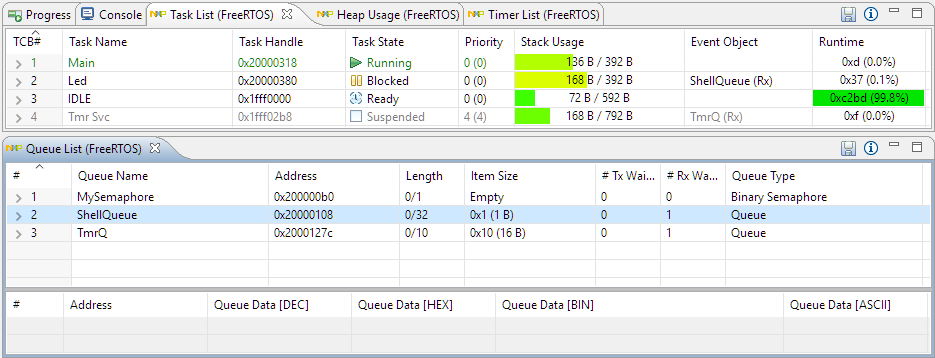
Better FreeRTOS Debugging in Eclipse

With debugging FreeRTOS applications in Eclipse, it is a big to have views available showing all the threads, queues, timers and heap memory allocation. One of the best Eclipse plugins are the one NXP provides for FreeRTOS: they are free of charge and give me pretty much everything I need. However, if you are not that familiar with FreeRTOS itself, here are a few tips to get more out of the plugins.

Better FreeRTOS Debugging in Eclipse

Better FreeRTOS Debugging in Eclipse

Continue reading

Percepio FreeRTOS Tracealyzer Plugin for Eclipse

Good news for everyone using Eclipse, FreeRTOS and Percepio Tracealyzer: Percepio has released an Eclipse plugin which makes snapshot tracing very easy and convenient using the a GNU gdb debugger in Eclipse like Kinetis Design Studio:

Eclipse with Percepio Tracealizer

Eclipse with Percepio Tracealyzer

Continue reading

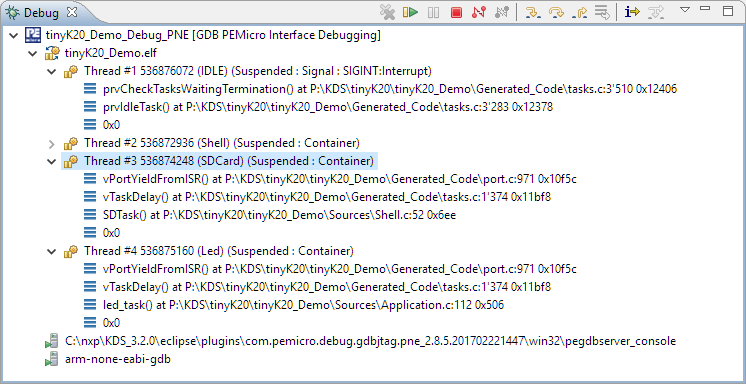
P&E ARM Cortex-M Debugging with FreeRTOS Thread Awareness and Real Time Expressions for GDB and Eclipse

P&E has a new version of their GDB/Eclipse debug plugins available on their Eclipse update site, and it comes with to great features: Real Time Expressions (show variables while target is running) and  FreeRTOS thread awareness 🙂

FreeRTOS Thread Awareness

FreeRTOS Thread Awareness

Continue reading

Tips for Making Copy of Eclipse CDT Projects Easier

Instead creating a new project from scratch, often it is simpler to copy an existing Eclipse CDT project, then change it and go on.  To copy-past the a project in Eclipse:

  1. Select the project in the Project Explorer View (CTRL-C on Windows)

    Copy of a project

    Copy of a project

  2. Then paste it in the Project Explorer View (CTRL-V on Windows), and I can specify the new name:

    Paste of Project

    Paste of Project

However, to make that process simpler, a few things have to be done right in the ‘source’ project first.

Continue reading

Remote Board Debugging: J-Link Remote Server with Eclipse

For a CubeSat project we only have a single board available. But multiple universities and developers need to have access to that board for developing and debugging the firmware. We cannot easily ship around the board: that takes a lot of time and during shipment nobody can use the board.

There is a nice feature in the Segger J-Link software which allows to share the debug connection over the network: the J-Link Remote Server. It even works nicely between different networks without complicated firewall setup:

Connected in Tunnel Mode

Connected in Tunnel Mode

Continue reading

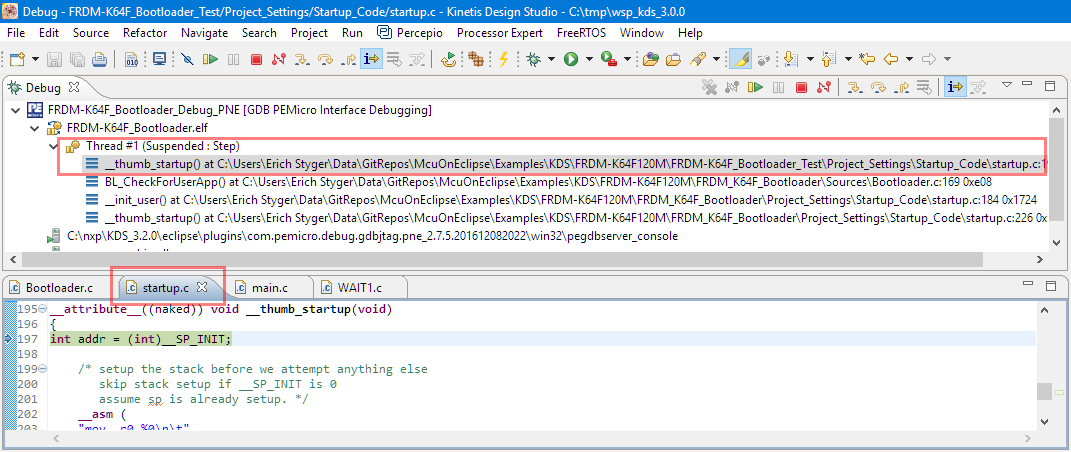
“No source available”, or how to Debug Multiple Binaries with GDB and Eclipse

When working and debugging a bootloader, debugging can be a challenge: During debugging the bootloader, a new binary gets loaded into the microcontroller address space which is unknown to the debugger. As soon as I step into the newly loaded binary, I only see assembly code, with that ugly “No source available” in Eclipse:

No Source Available, debugging in assembly

No Source Available, debugging in assembly

But wait: GDB is able to do pretty much everything you can imagine, so here is how to debug multiple binaries with GDB and Eclipse, and to turn the above into something which is easy to debug:

Debugging with Symbolics

Debugging with Symbolics

Continue reading

Reprogramming the Mikroelektronika Hexiwear Dockingstation

The Hexiwear docking station would have a nice feature: it has embedded a debug circuit (OpenSDA). That way I would not need an external debug probe to debug the Hexiwear. However, a debug probe is required to reprogram the docking station itself:

Repgrogramming the Mikroelektronika Docking Station

Repgrogramming the Mikroelektronika Docking Station

Continue reading