One new feature in CDT 8.4 or later is the ability to see the instruction opcode in the disassembly view:
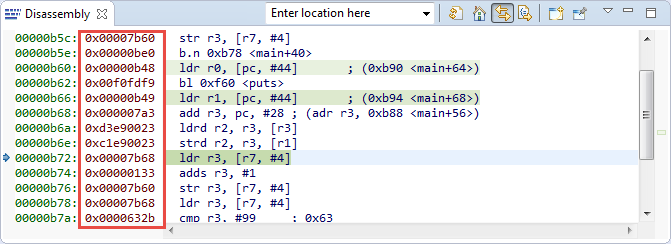
Opcodes in Disassembly View

One new feature in CDT 8.4 or later is the ability to see the instruction opcode in the disassembly view:
Opcodes in Disassembly View
One of the great features in CodeWarrior for MCU10.x is the ability to read memory/variables while running (see “Live View for Variables and Memory“). This technology of ‘live view’ is based on the CodeWarrior debugger engine. How can I do something like this with stock GDB and Eclipse? What I need is a periodic update of variables/expressions/memory while the program on the board is running, without the need to stop the board with the debugger first:

periodic auto-display output
Key to successfully implementing embedded applications these days is to have detailed visibility into what is going on with the application on the board. For this, I’m using the FreeRTOS+Trace from Percepio to inspect the runtime behaviour. Stop-Mode debugging is very useful, but visibility into the runtime is even more important. FreeRTOS+Trace is a tool to accomplish this, but it requires to dump the data off the target to the host (see “Updated Percepio Tracealyzer and Trace Library to Version V2.7.0“). Usually, I’m using the GDB debugger for this, and that works for shorter trace sequences like a few seconds. Yes, I can combine them, but it painful to stop, dump and continue. So what if I could collect trace for several minutes or hours without the need to stop the application? Why not stream the data to the host directly?
So here is it: I’m now able to get almost unlimited trace streaming off the target, witout user intervention. I can trace my application for hours 🙂

Trace Recording for almost one hour
I have used semihosting more and more in my projects. However, there are several disadvantage of using it:
The good news is that Segger supports with their debug probes a faster approach with what they name Real Time Terminal (RTT). And it even runs without a debugger attached to the board: all what I need is a Segger J-Link probe (or Segger J-Link OpenSDA) plus a telnet client.
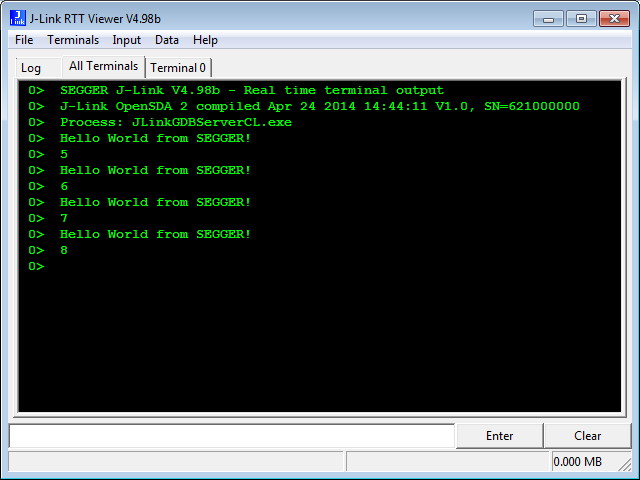
Segger RTT Viewer
In “A Processor Expert Component to Help with Hard Faults” I’m using a C handler with some assembly code, created with Processor Expert, to help me with debugging hard faults on ARM Cortex-M. Inspired by a GNU gdb script here, I have now an alternative way. As this approach is using the GDB command line approach, it works both with an Eclipse GUI and with using GDB in command line mode only :-).

I have a challenge for you: Can you spot the problem in the following source?
TMOUT1_CounterHandle TMOUT1_GetCounter(TMOUT1_CounterType nofTicks){ TMOUT1_CounterHandle handle; CS1_CriticalVariable(); handle = 0; if (nofTicks==0) { nofTicks = 1; /* wait at least for one tick, otherwise will timeout immediately */ } CS1_EnterCritical(); while (!TMOUT1_FreeCounters[handle] && handle<TMOUT1_NOF_COUNTERS) { handle++; } if (handle<TMOUT1_NOF_COUNTERS) { TMOUT1_FreeCounters[handle]=FALSE; TMOUT1_Counters[handle] = nofTicks; } CS1_ExitCritical(); if (handle==TMOUT1_NOF_COUNTERS) { return TMOUT1_OUT_OF_HANDLE; } return handle;}No? Well, I have not spotted the problem the first time neither. However, a reader of this blog did: he used a cool tool named ‘cppcheck’: that tool reported the following:
There are cases when I need to do a reset of the device by software. For example I have loaded the application image with the bootloader, and then I need to perform a reset of the microcontroller to do a restart. As a human user I can press the reset button on the board. But how to do this from the software and application running on the board, without user manual intervention? Or if I simply want to reset the system for whatever reason?

Thanks for all the feedback and suggestions so far on the tinyK20 project! I’m proud to present the next iteration of the universal microcontroller & debugger board based on the Freescale Kinetis K20 USB microcontroller:

tinyK20 Board
What makes Eclipse great: using open source tools there are a lot of tools and techniques available which usually are only provided for desktop development.
A while back I described how to do code coverage with Eclipse Kepler and the GNU ARM Embedded (launchpad) tools (see “Code Coverage for Embedded Target with Eclipse, gcc and gcov“). With Kinetis Design Studio out, time to do the same with that Eclipse distribution, especially as Freescale is now using the stock GNU ARM Embedded tools too.

Coverage with multiple Files
Freescale has released the v3.0.0 version of the Kinetis Design Studio: this one comes with a great positive change: instead of a custom toolchain, it is coming with the standard GNU ARM Embedded (launchpad) toolchain from ARM. Beside of better code density and less RAM needed, there is one change which affects semihosting. Previously, semihosting was enabled by default in the V2.0.0 libraries. Now semihosting needs to be turned on. This post is how to do this.

Semihosting Console with Output in Eclipse
 MCU on Eclipse