mbed for the Freedom Board

I knew about mbed already for some time: watching students using it for an NXP enabled board. Pretty cool stuff: mbed is an online IDE and compiler with tons of software libraries for the supported platform. So I was dreaming to have something like this for my own boards like the Freedom board. But because mbed only supported two dedicated NXP boards, that was a road block.

But then mbed announced recently that the mbed SDK is open source. Wow, that is interesting! And finally the announcement last week: mbed supports the KL25Z Freedom Board. Now they have my attention :-).

Continue reading

The Quotation Problem

Maybe this article gets the attention of a local optometrist or eye shop: I have a business opportunity for you! ;-).

I ran into a weird problem: I received an ARM GNU gcc project which failed during the generation of the S19 file in strange way:

'Executing target #80 Freedom_Zumo.siz'
'Invoking: ARM Ltd Windows GNU Create Flash Image'
“C:/Freescale/CW MCU v10.3\eclipse\../Cross_Tools/arm-none-eabi-gcc-4_7_3/bin/arm-none-eabi-objcopy”  -O srec Freedom_Zumo.elf "Freedom_Zumo.hex"
' '
Der Befehl "“C:" ist entweder falsch geschrieben oder
konnte nicht gefunden werden.
mingw32-make: *** [Freedom_Zumo.hex] Error 1

Continue reading

USB MSD Host for the Freedom Board

Sometimes things take longer than anticipated. And this is definitely the case for my USB MSD Host project where I wanted to use a USB memory stick with the Freedom FRDM-KL25Z board.

Memory Stick attached to the Freedom Board

Memory Stick attached to the Freedom Board

But finally, I have things working. At least most of the time ….

Continue reading

Switching Processor Package in Processor Expert

When I create a new project for the KL05Z with Processor Expert, then it shows up as 48 pin LQFP package in the project:

48pin LQFP Package in Components View

48pin LQFP Package in Components View

However, when I look at my board, it has a KL05Z32 in a LQFP package with 32 pins:

FRDM-KL05Z Board

FRDM-KL05Z Board

Continue reading

Tutorial: Using the ARM CMSIS Library

One of the great advantage of using an ARM core as on my FRDM-KL25Z board is that I can leverage a lot of things from the community. And one big thing around ARM is CMSIS (Cortex Microcontroller Software Interface Standard). It is an industry wide software library for the ARM Cortex microcontroller. Using the CMSIS libraries and interfaces will make it easier to port applications within the ARM Cortex family.

CMSIS Version 3 Block Diagram (Source: Arm.com)

CMSIS Version 3 Block Diagram (Source: Arm.com)

Continue reading

Creating and using Libraries with ARM gcc and Eclipse

In ‘A Library with ARM gcc and Eclipse’ I was using the CodeWarrior MCU10.3 beta version to create a library project. At that time I had to do things manually. Now with the final MCU10.3 there is an option in the New Project Wizard which makes things easier:

Library Creation

Library Creation

This will create a library (or better: an archive) with gcc for me. But how to use it from another project?

Continue reading

Tutorial: Printf() with (and without) Processor Expert

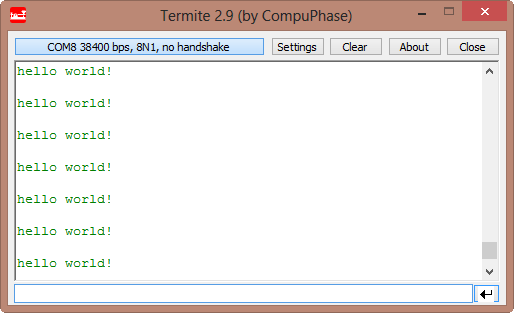
In this post I tapped into how to print messages to a console using  the Kinetis/Freedom board. I’m not a fan of printf() for multiple reasons: It is simply a bad thing for embedded systems programming. But as many have asked for it, here is how to say “hello” from the Freedom Board using printf():

Hello World on the Terminal

Hello World on the Terminal

Continue reading

Tutorial: IAR + FreeRTOS + Freedom Board

Maybe Eclipse is ‘too much’, and you are looking for something different? The cool thing with Processor Expert is that while this is Eclipse based, you can use it easily with other tool chains like IAR Embedded Workbench. So you have the choice, and I have explored things a little with porting FreeRTOS for Cortex-M0+ to IAR :-).

IAR Embedded Workbench with FreeRTOS

IAR Embedded Workbench with FreeRTOS

In this tutorial I’m showing how use IAR with FreeRTOS and the Freedom FRDM-KL25Z Board, using Processor Expert components.

Continue reading

Reducing the build time with gcc for ARM and CodeWarrior

Eclipse based CodeWarrior for MCU10.3 comes with gcc build tools for Kinetis/ARM cores. While it features the parallel build make, I noticed that especially for larger projects build times are not as fast as it should be. The good news is: I was able to cut down my build time to less than half with a simple change :-).

When I looked at the output folder where all the object and make files are stored by Eclipse, I noticed that it has as well the listing files generated:

Listing Files in output folder

Listing Files in output folder

Continue reading