How can I open a project folder location in the system explorer?
Starting with Eclipse Oxygen, the project properties have a button for this in the Resource settings:

Show in System Explorer

How can I open a project folder location in the system explorer?
Starting with Eclipse Oxygen, the project properties have a button for this in the Resource settings:
Show in System Explorer
By default, the NXP S32K144EVB and microcontroller is using a 5V supply voltage and logic levels which is great for noisy environment or any 5V devices. Many of my displays and sensors use 3.3V logic levels, so I would have to use a level shifter from 5V to 3.3V. There is another way: to change the board for 3.3V logic levels so I can use directly things like a SSD1306 display.
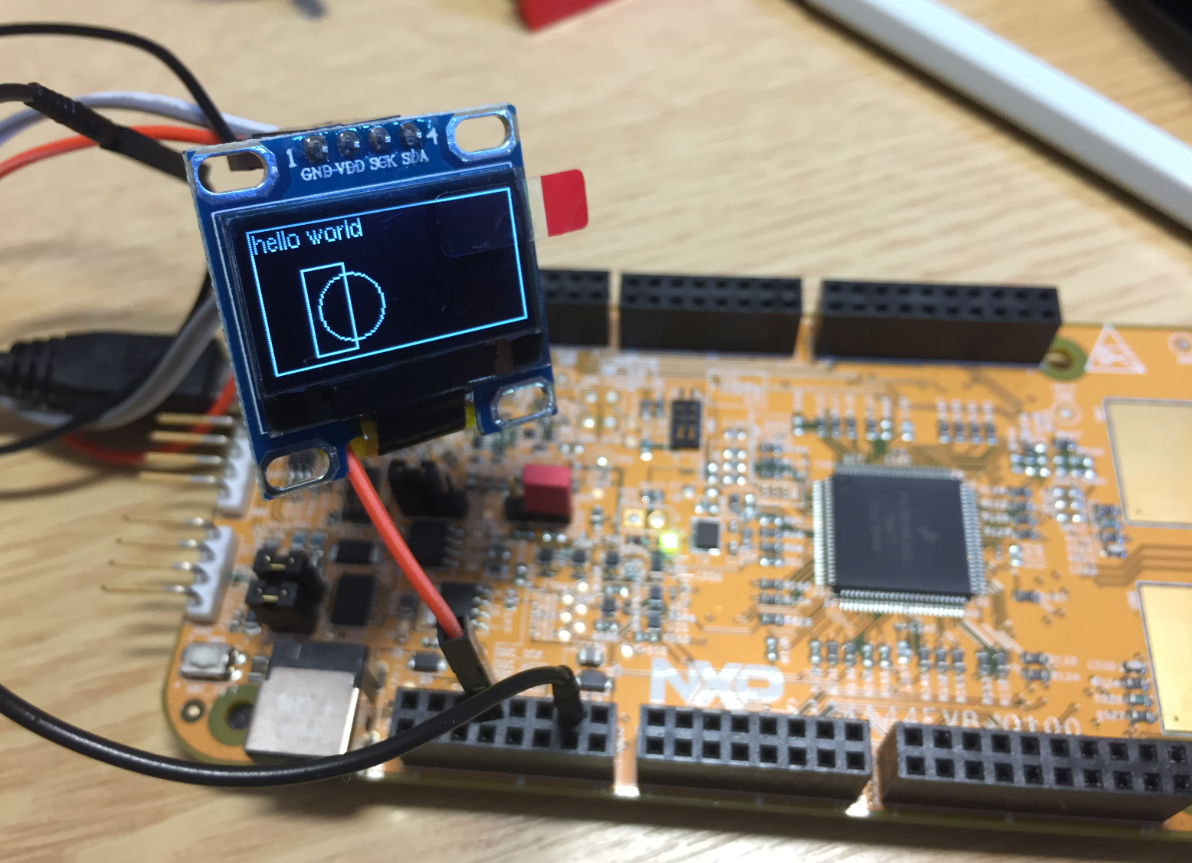
S32K144EVB with OLED SSD1306 using 3.3V Logic Levels
In “Tutorial: FreeRTOS 10.0.1 with NXP S32 Design Studio 2018.R1” I showed how to use a custom FreeRTOS with the S32 Design Studio (ARM). The OSIF (OS Interface) provides an operating system and services abstraction for the application which is used by other S32K SDK components:

OSIF in S32K for ARM Eclipse Project
“There is no ‘S’ for Security in IoT” has indeed some truth. With all the connected devices around us, security of code should be a concern for every developer. “Preventing Reverse Engineering: Enabling Flash Security” shows how to prevent external read-out of critical code from device. What some microcontroller have built in is yet another feature: ‘Execute-Only-Sections‘ or ‘Execute-Only-Memory‘. What it means is that only instruction fetches are allowed in this area. No read access at all. Similar like ‘read-only’ ‘execute-only’ it means that code can be executed there, but no other access from that memory is allowed.
Locked Code
In this article I describe the challenges for a toolchain like the GNU gcc, and how to compile and link code for such an execute-only memory.
In many cases it is very useful to see the generated assembly code produced by the compiler. One obvious way to see the assembly code is to use the Disassembly view in Eclipse:

Disassembly View
But this requires a debug session. An easier way is to use command line options to generate the listing file(s).
In the C programming language it is good practice to pass values by reference (using a pointer), especially for large set of data. For example the following function takes a message string and pointer to integer data which then is printed to the console:
static void printData(const char *msg, const int *intBuf, size_t bufSize) {
  puts(msg); /* print message */
  for(int i=0; i<bufSize;i++) {
    printf("buf[%i] = %i\n", i, intBuf[i]);
  }
}
By default, the FreeRTOS threads do not show up with the SEGGER J-Link debug connection in the Eclipse based NXP S32 Design Studio IDE. But don’t worry: Here is how to get it working with SEGGER J-Link debug connection:

FreeRTOS Threads in Eclipse Debug View
The ARM DWT (Data Watchpoint and Trace) is an optional feature of the ARM-Cortex-M, and many Cortex-M3, M4 and M7 devices have it implemented. With it comes a cycle counter which counts the cycles spent. In Cycle Counting on ARM Cortex-M with DWT I described an approach how the application on the target can access the cycle counter.
The MCUXpresso IDE shows that cycle counter in the Eclipse Registers view:
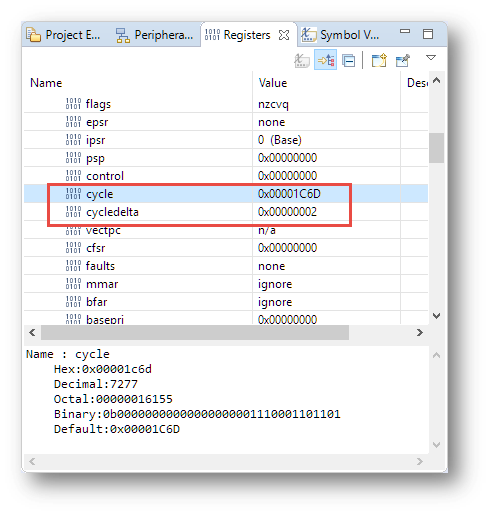
Cycle Counter in Register View
Is BLACK the color of the season? My students really seem to love these ‘dark’ Eclipse themes. Well, I tried ‘dark’ themes in the past, but I have not been vey excited about it. Somehow I preferred more the ‘black on white background’ thing. But: I have now managed to install the ‘Darkest Dark’ Eclipse theme into the NXP MCUXpresso 10.2 IDE for my daily work, and I feel it hurts my eyes less? Maybe I’m getting older? Or could it really be that ‘dark’ look and feel?

Darkest Dark Theme with MCUXpresso IDE
Find out for yourself in the following article….
By default, the GNU compiler (gcc) optimizes each compilation unit (source file) separately. This is effective, but misses the opportunity to optimize across compilation units. Here is where the Link Time Optimization (LTO, option -flto) can help out: with a global view it can optimize one step further.
The other positive side effect is that the linker can flag possible issues like the one below which are not visible to the compiler alone:
type of '__SP_INIT' does not match original declaration [enabled by default]

Warning by LTO
 MCU on Eclipse