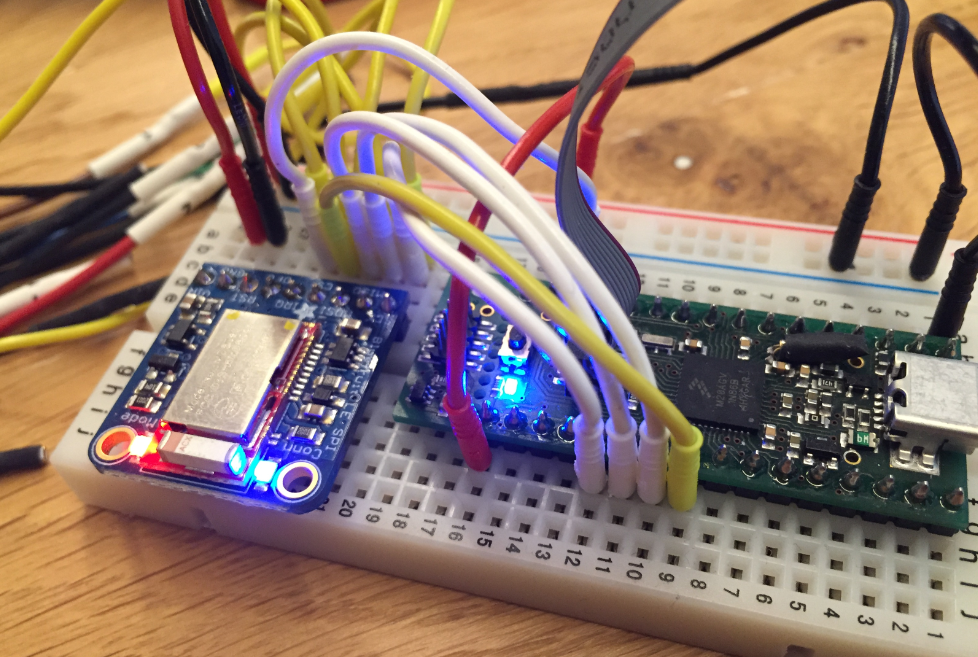
In many of my embedded projects I’m using successfully the Nordic Semiconductor nRF24L01+ (see “Tutorial: Nordic Semiconductor nRF24L01+ with the Freescale FRDM-K64F Board“) and the HC-06 Bluetooth transceivers (see “Getting Bluetooth Working with JY-MCU BT_BOARD V1.06“) for wireless communication. However, the nRF24L01+ is using a proprietary protocol, and the HC-06 does not work with Apple products (it does very well with Android devices). To close that gap I decided to add Bluetooth Low Energy (BLE, or Bluetooth 4.x). So this post is about how to add Bluetooth Low Energy (BLE) to NXP (formerly Freescale) Kinetis devices:
Tag Archives: software project
Blinky LED with openHAB on Raspberry Pi
In my earlier post I showed how I have installed the open source openHAB home automation system (see “Installing openHAB Home Automation on Raspberry Pi“). In this post I show how to control a local LED on the Raspberry Pi with openHAB home automation system: how to control any GPIO pin on the Raspberry Pi from remote:
Autostarting openHAB on Raspberry Pi
In “Installing openHAB Home Automation on Raspberry Pi” I have set up openHAB on a Raspberry Pi 2. But when I reboot it, I need to start openHAB manually. This post is about how to start openHAB automatically after a reboot.
Installing openHAB Home Automation on Raspberry Pi
I’m currently building a home automation project around Raspberry Pi: I want to be able to monitor and control things like the lights, garage doors and the heating system both at home and from remote. I already have added a touch screen to one of my Raspberry Pi 2 computers (see “Adding a Touch LCD to the Raspberry Pi 2“). This article is about how to install the openHAB on that Raspberry so it can be the brain of the automation system.
Linting with Eclipse and the GNU ARM Embedded Launchpad Compiler
For a space project we have to make sure that things are not failing while our hardware orbits around the Mother Earth. Therefore we are using different static and dynamic analysis tools, and one of it is using PC-lint from Gimpel to catch as many errors and bugs as possible. For that project, we are using Eclipse with the GNU ARM Embedded (launchpad) ARM compiler and Eclipse as IDE with the GNU ARM Eclipse plugins. There are commercial plugins available for linting with Eclipse (e.g. Linticator), but with a few tweaks it is possible to lint with Eclipse free-of-charge. So this article is about how to lint an Eclipse (Freescale/NXP Kinetis Design Studio) project with PC-Lint.
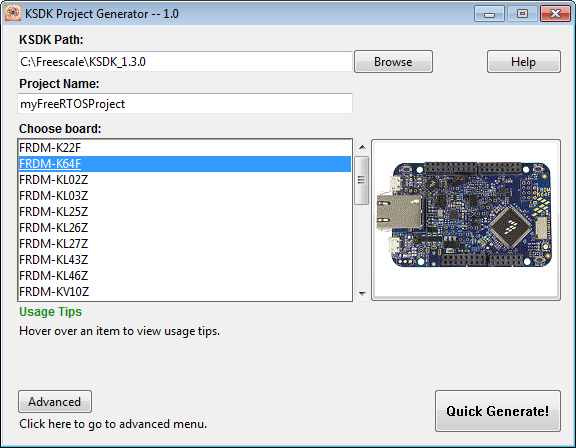
Tutorial: FreeRTOS Projects with Kinetis SDK V1.3 and the SDK Project Generator
This tutorial describes how to create a Kinetis SDK V1.3 project using the Freescale project generator in Kinetis Design Studio.
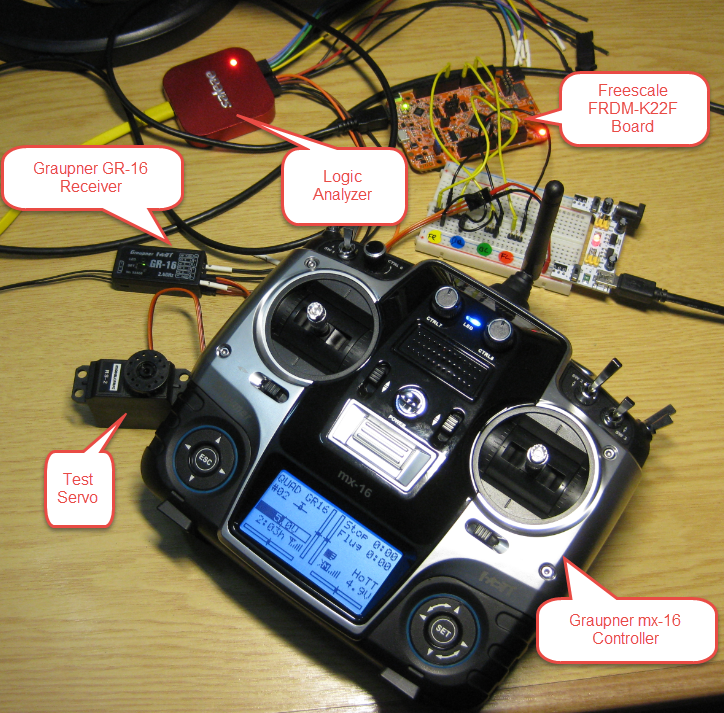
Kinetis Drone: Remote Controller with SUMD
The bad news: my ESC (see “Kinetis Drone: Graupner ESC S3055 Failure“) for my Kinetis drone is still not repaired :-(. Anyway, I have plenty of other things to make for my drone project. One is to work on the remote controller:
Tutorial: lwip with FreeRTOS and the Freescale FRDM-K64F Board
This tutorial is about how to create a lwIP project with FreeRTOS using the Kinetis SDK V1.3.0 with Kinetis Design Studio on the Freescale FRDM-K64F board.
McuOnEclipse Components: 17-Oct-2015 Release
On SourceForge I have published an update of the McuOnEclipse software components, with following major changes:
- FreeRTOS updated to version V8.2.2 which comes with TLS (Thread Local Storage) support and GDB debug helpers.
- Percepio Trace updated to V3.0.2 with the release of Segger Real Time Terminal (RTT) for continuous trace streaming.
- FSL_USB_Stack with alternate USB initialization to deal with an issue in combination with the Kinetis SDK v1.3.0
- GenericI2C and GenericSWI2C have added support for custom I2C bus handling.
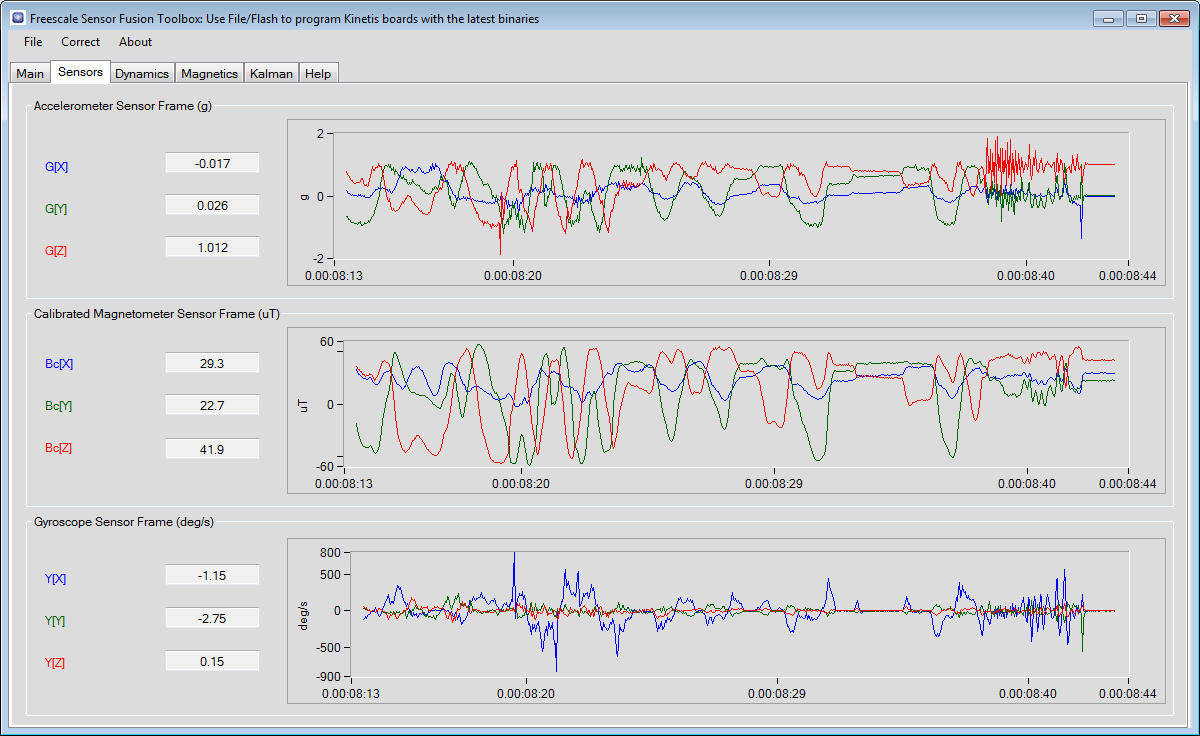
Kinetis Drone: Sensor Fusion Toolbox
Flying a quadrocopter without some sensor and microcontroller intelligence will be a challenge. Definitely I will need some intelligent sensor data to help me out :-). Luckily, there is a Freescale ‘Sensor Fusion Toolbox’ and Library which gives me a nice start and visibility into the sensors I plan to use: