In this semester course, students (and myself too, of course :-)) are building a Mini Sumo Robot. That robot is using the Freescale FRDM-KL25Z board with an ARM Cortex-M0+ on it. Today I’ll give an introduction to the ARM core to the class, and timing is right: this morning I have found an excellent overview about ARM microcontroller and tools written by Jay Carlson.: Getting Started with ARM Microcontrollers.
Category Archives: Thoughts
Zumo Robot Chassis PCB arrived!
Excellent news: I received this week the 40 INTRO Zumo Robot Base/Chassis PCBs, ready to bring the Zumo Robot project based on the FRDM-KL25Z board from Freescale to the next level:
The Freescale OpenSDA Trap: “No Device Available”, or something like that….
Self-Motivation: I write this post in the hope to cut the number of ‘please help me’ emails in my inbox ;-):
If you want to debug one of the Freescale boards with OpenSDA (FRDM-KL25Z, FRDM-K20, FRDM-KL05Z, FRDM-KL46Z48M, FRDM-KL02Z, TWR-KL47Z48M, …), and if you get this dialog …
… then read on.
Fail! The Zumo Shield Blade Problem
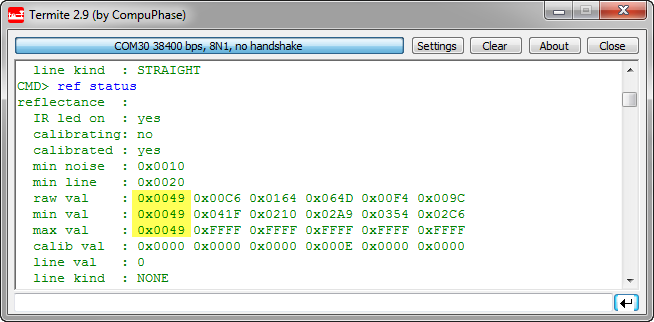
Ahhhhrg! I admit: I’m not immune to all the silly problems an engineer can face in his life. And sometimes it is about the most basic things. This morning was again such a day: One of the infrared sensors of my Zumo Robot reported wrong values:
USB for the Freescale ARM Kinetis KL46Z and K21D50M
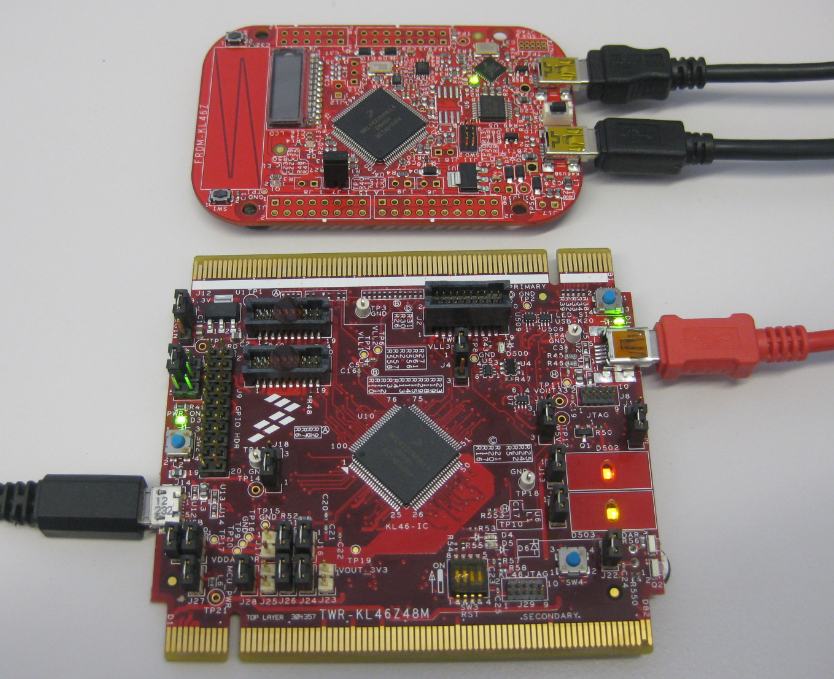
As I was so pleased with the FRDM-KL46Z board, that I have ordered the Tower version of it, the TWR-KL46Z48M:
What I missed so far was USB support for the KL46Z. So time to have a quick look at board(s) and to add USB support for it.
A 5V Freedom Board? FRDM-KE02Z
Looks like a flood of new Freedom boards is coming out 🙂 : I have found out about this new one: The FRDM-KE02Z.
“Volatile” can be harmful…
What could be wrong with this code:
volatile uint16_t myDelay; void wait(uint16_t time) { myDelay = 0; while (myDelay<time) { /* wait .... */ } } void TimerInterrupt(void) { myDelay++; }?
DIY Free Toolchain for Kinetis: Part 1 – GNU ARM Build Tools
This is the first part of a multi-part tutorial on setting up a free and functional GNU gcc + Eclipse + debugger environment for use with the Freescale FRDM-KL25Z board.
List of Tutorials
- Part 1: Setting up ARM GNU tool chain
- Part 2: Setting up Eclipse IDE
- Part 3: Setting up the debugger (P&E and Segger)
- Part 4: Setting up Processor Expert
- Part 5: Setting up FreeRTOS Kernel Awareness
- Part 6: Linux Host Support with OpenOCD and CMSIS-DAP
- Part 7: GNU ARM Eclipse Plugins
- Part 8: Processor Expert with GNU ARM Eclipse Plugins
- Part 9: DIY Free Toolchain for Kinetis: Part 9 – Express Setup in 8 Steps
- Part 10 – Project Creation with GNU ARM Eclipse 2.1.1
In this first part, I’m showing how to install the GNU ARM tool chain to build a ‘blinking LED’ application for the FRDM-KL25Z. With 100% free tools 😉
Hacking the Heating System for Cooling – Geothermal Drilling with extra Benefits
Summer finally has arrived in Switzerland. Yes, I live in a moderate climate zone, but if the outside temperature goes above 28-30° Celsius as these days, then sleeping at night is not that comfortable as it should be in my view. Luckily, I’m in a good constructed house with good insulation, so it takes a few days until it heats up. But I love to keep the temperature below 25° Celsius, especially at night. I do have a heating system which combines geothermal and solar heating. The question is: how can I use it for cooling during hot summer days? The solution: some extra plumbing, a Freescale Tower system and the Freescale FRDM-KL25Z board 🙂
Software Engineering for Embedded Systems
Yesterday was a great day: The book “Software Engineering for Embedded Systems” finally arrived 🙂 :
Why I’m excited about this? Because I had the honor to contribute a chapter to that book 🙂