McuOnEclipse Components: 25-Sept-2017 Release

I’m pleased to announce that a new release of the McuOnEclipse components is available in SourceForge. In this release more ARM Cortex devices/vendors are supported with different SDKs, plus it comes with several FreeRTOS enhancements for debugging highly optimized code.

SourceForge

SourceForge

Continue reading

Using Multiple Memory Regions with the FreeRTOS Heap

ARM Cortex-M microcontrollers can have multiple memory controllers. This is a good thing as it allows the hardware to do multiple parallel memory read/writes. However this makes the memory map more complicated for the software: it divides the memory into different regions and memory segments.  This article is about how to enable FreeRTOS to use multiple memory blocks for a virtual combined memory heap:

FreeRTOS with Segmented Heap Memory

FreeRTOS with Segmented Heap Memory

Continue reading

Troubleshooting Tips for FreeRTOS Thread Aware Debugging in Eclipse

FreeRTOS seems to get more and more popular, and I think as well because more and more debugger and Eclipse IDE vendors add dedicated debugging support for it.

FreeRTOS Threads in Eclipse

FreeRTOS Threads in Eclipse

Continue reading

McuOnEclipse Components: 09-July-2017 Release

I’m pleased to announce that a new release of the McuOnEclipse components is available in SourceForge, with the following major changes and updates:

  • Complete refactoring for 1-Wire stack and DS18B20 temperature sensor components
  • Added HID Joystick device class to the FSL_USB_Stack
  • New SDK_Timer component to work with Kinetis SDK
  • New ST756P LCD driver component
  • New TSL2561 digitial temperature sensor driver
  • Added ReadByte() and WriteByte() GenericI2C functions
  • Added 64bit mapping functions to Utility
  • added configUSE_NEWLIB_REENTRANT and newlib reentrancy support to FreeRTOS
  • Pull resistor support for SDK_BitIO
  • Many smaller bug fixes and enhancements
SourceForge

SourceForge

Continue reading

Using FreeRTOS with newlib and newlib-nano

For reliable applications, I avoid using functions of the standard libraries. They are banned for most safety related applications anyway. I do not use or avoid malloc(), printf() and all the other variants, for many reasons including the ones listed in “Why I don’t like printf()“. Instead, I’m using smaller variants (see “XFormat“). Or I’m using only the thread-safe FreeRTOS heap memory allocation which exist for many good reasons.

Things get problematic if malloc() still is pulled in, either because it is used by a middleware (e.g. TCP/IP stack) or if using C++. Dave Nadler posted a detailed article (http://www.nadler.com/embedded/newlibAndFreeRTOS.html) about how to use newlib and newlib-nano with FreeRTOS.

FreeRTOS Newlib Memory Allocation Scheme

FreeRTOS Newlib Memory Allocation Scheme

Continue reading

DIY USB HID Joystick Device and Game Controller

For many projects it would be cool to build a custom USB Joystick device, either as custom game controller for Windows or any USB host which can be used with a USB Joystick. Instead buying one, why not build my version? All what I need is a USB capable board, some kind of input (potentiometer, push buttons) and some software, and I have my USB Joystick:

DIY USB HID Joystick Device

DIY USB HID Joystick Device

Continue reading

McuOnEclipse Components: 06-May-2017 Release

I’m pleased to announce that a new release of the McuOnEclipse components is available in SourceForge, with the following changes and updates:

  • SEGGER SystemView updated to V2.42
  • More components to work with MCUXpresso SDK: GenericSWSPI, FXO8500 and SimpleEvents
  • SSD1351 display driver supports 128×128 pixel resolution and Adafruit 1.5″ breakout module
  • Extended FreeRTOS debug helper settings
  • GenericI2C: added ReadWordAddress8() and ReadWordAddress8() functions
  • RingBuffer with new Getn() and Update() functions
  • Utility with map(), constrain(), random() and randomSetSeed()
  • XFormat: new xsnprintf(), contributed by Engin Lee
  • OneWire protocol component with Maxim DS18B20 temperature sensor
  • Many smaller bug fixes and enhancements
SourceForge

SourceForge

Continue reading

MCUXpresso IDE: Installing Processor Expert into Eclipse Neon

In “MCUXpresso IDE: Importing Kinetis Design Studio Projects” I explained how Kinetis Design Studio projects can be imported and used inside the MCUXpresso IDE. Processor Expert projects can be used, but no new components added, modified or new Processor Expert projects created. To fully use Processor Expert, two plugins need to installed, and this is what this article is about.

Processor Expert in MCUXpresso IDE

Processor Expert in MCUXpresso IDE

Continue reading

MCUXpresso IDE: Unified Eclipse IDE for NXPs ARM Cortex-M Microcontrollers

There are many mergers going on in the industry, and one of the largest one was in 2016 the integration of Freescale Semiconductor with NXP Semiconductors, with both providing Eclipse based IDE’s to their customer base. Consequently, the company merger triggered a merger of the IDE’s, and last week NXP has released the result: the MCUXpresso IDE.

MCUXpresso IDE

MCUXpresso IDE

Continue reading

Tutorial: Using Eclipse with NXP MCUXpresso SDK v2 and Processor Expert

To me, software and tools are by far more important than the microcontroller. Because the silicon is a ‘one time kind of thing’, where the software has to be maintained and working over a longer time. And at least my software usually needs to be ported to a new device, so portability and available software and tools are critical to me.

The combination of MCUXpresso SDK (formerly Kinetis SDK) and Processor Expert is unfortunately not supported by NXP. But I have found a way to get them work together in a nice way, and this article is about making that combination possible :-).
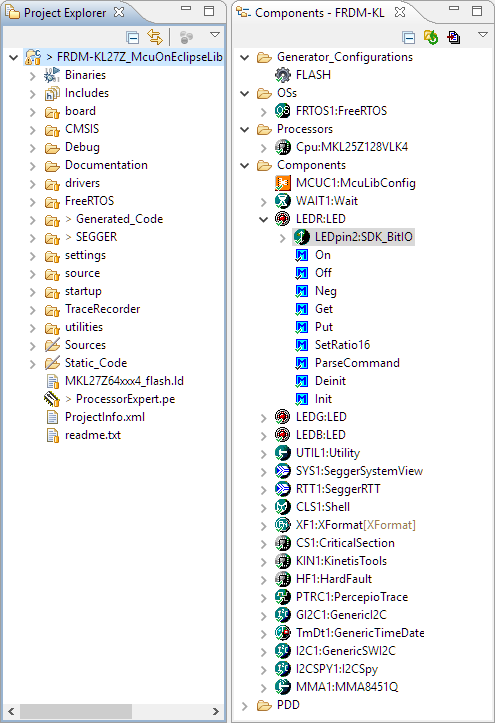
SDKv2 Project with Processor Expert

SDKv2 Project with Processor Expert which is supposed not to work together

Continue reading
