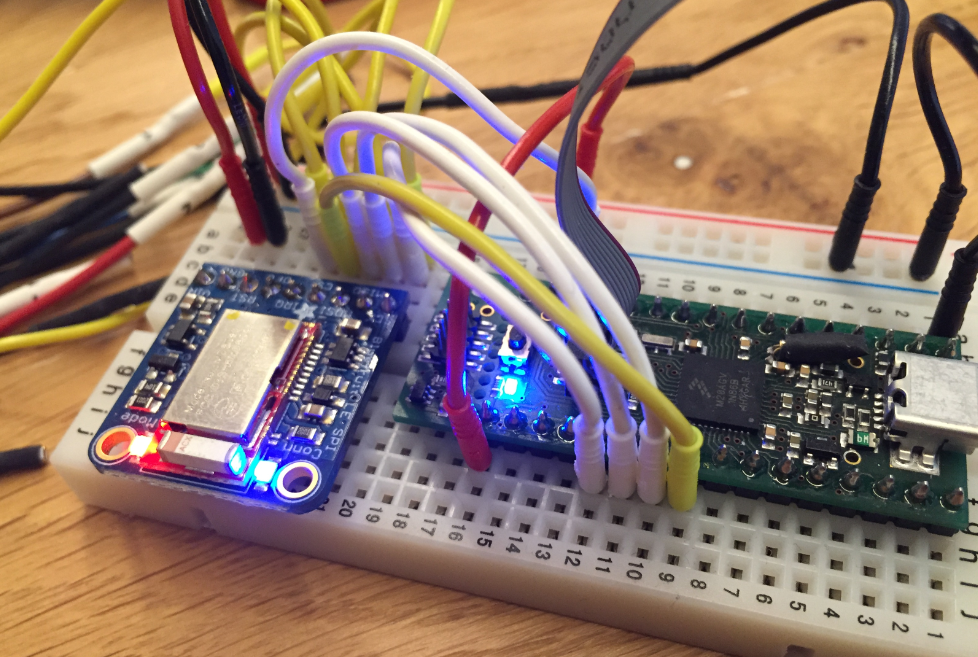
In many of my embedded projects I’m using successfully the Nordic Semiconductor nRF24L01+ (see “Tutorial: Nordic Semiconductor nRF24L01+ with the Freescale FRDM-K64F Board“) and the HC-06 Bluetooth transceivers (see “Getting Bluetooth Working with JY-MCU BT_BOARD V1.06“) for wireless communication. However, the nRF24L01+ is using a proprietary protocol, and the HC-06 does not work with Apple products (it does very well with Android devices). To close that gap I decided to add Bluetooth Low Energy (BLE, or Bluetooth 4.x). So this post is about how to add Bluetooth Low Energy (BLE) to NXP (formerly Freescale) Kinetis devices:
Category Archives: Embedded Components
USB CDC with the Raspberry Pi
For my home automation project with openHAB I want to attach Freescale (now NXP) FRDM (Freedom) boards so they can take care about the realtime aspects and to act as gateways to my other systems. One way is to use USB CDC (Serial over USB) as communication channel. USB has the advantage that it powers the board, plus I can attach multiple devices: up to four on the Raspberry Pi 2 and even more with using a USB hub. In a standard configuration with a USB WiFi and a USB HID (mouse plus keyboard) dongle I still can attach two Freescale (ahem, NXP) Freedom boards to the Raspberry Pi:
McuOnEclipse Components: 22-Nov-2015 Release
A lot of good things happened in the last three weeks, so here is a new updated McuOnEclipse component release, with the following main improvements:
- Updated Segger RTT component
- New Segger SystemView component
- FreeRTOS ‘tasklist’ shell command
- FreeRTOS with support for Segger SystemView
Segger SystemView: Realtime Analysis and Visualization for FreeRTOS
One of the most important aspects for developing complex realtime applications is get insights into what is going on the target. Segger just has released a free tool which gives an incredible useful insight view and visualization:
McuOnEclipse Components: 08-Nov-2015 Release
Time is flying fast, time for another McuOnEclipse components release on SourceForge with the following main changes and features:
- New component for Segger RTT makes adding a console communication interface super easy (and fast!)
- RTT support for the command line Shell component
- RTT component used for Percepio FreeRTOS Tracing
- Updated USB component, support for USB CDC blocking/waiting and endpoint configuration
- Updated FreeRTOS to V8.2.3, memory heap selection improved and setting for time slicing
- RingBuffer implements a Delete() method
- Extended Kinetis SDK support in components, added by default
Tutorial: lwip with FreeRTOS and the Freescale FRDM-K64F Board
This tutorial is about how to create a lwIP project with FreeRTOS using the Kinetis SDK V1.3.0 with Kinetis Design Studio on the Freescale FRDM-K64F board.
Overview: Processor Expert
In “Overview: From Snippets to Code Generation” I discussed several tools used in my development process. On tool which helps me a lot to get things done is Processor Expert. In this post I’ll give an overview about this tool and reasoning for the pros and cons of using it.
McuOnEclipse Components: 17-Oct-2015 Release
On SourceForge I have published an update of the McuOnEclipse software components, with following major changes:
- FreeRTOS updated to version V8.2.2 which comes with TLS (Thread Local Storage) support and GDB debug helpers.
- Percepio Trace updated to V3.0.2 with the release of Segger Real Time Terminal (RTT) for continuous trace streaming.
- FSL_USB_Stack with alternate USB initialization to deal with an issue in combination with the Kinetis SDK v1.3.0
- GenericI2C and GenericSWI2C have added support for custom I2C bus handling.
FreeRTOS ARM Thread Debugging with Eclipse and GDB
FreeRTOS is probably the most popular RTOS used and I love it: it is efficient, has a lot of features, simple and easy to use. But despite its popularity, debugging it with open source tools as with Eclipse and GDB is really not that user-friendly: debugging threads/tasks is a pain compared to commercial solutions. For my university classes this semester I was looking for something easy to use by my students. Finally I managed to use a GDB helper which makes things easier now: I can switch task threads in Eclipse with GDB now 🙂
Removing Hidden COM & LPT Ports and Devices on Windows
These days machines do not have physical serial (COM) ports any more. I do not understand why the USB group had missed to define a clean serial communication standard :-(. And the same mistake gets repeated for BLE again 😦 :-(. So every vendor and provider has its own USB CDC driver and interface. And it is really a big pain of the virtual COM/USB CDC ports installed. I have seen countless cases where “the USB UART or CDC port does not work”. So if you have such a problem, I might have a tip for you: Show hidden devices in the Windows Device manager. But in a special way I had not thought about it!


