Eclipse Debugging with Pointers and Arrays

In the C programming language it is good practice to pass values by reference (using a pointer), especially for large set of data. For example the following function takes a message string and pointer to integer data which then is printed to the console:

static void printData(const char *msg, const int *intBuf, size_t bufSize) {
  puts(msg); /* print message */
  for(int i=0; i<bufSize;i++) {
    printf("buf[%i] = %i\n", i, intBuf[i]);
  }
}

Continue reading

McuOnEclipse Components: 1-July-2018 Release

I’m pleased to announce that a new release of the McuOnEclipse components is available on SourceForge. This release includes several smaller bug fixes and initial component support for the NXP S32 Design Studio and SDK.

SourceForge

SourceForge

Continue reading

McuOnEclipse Components: 1-Apr-2018 Release

It’s April Fool’s Day, but be assured this is not a joke ;-): I’m pleased to announce that a new release of the McuOnEclipse components is available in SourceForge. This release includes several smaller bug fixes and components have been upgraded for FreeRTOS V10.0.1.

SourceForge

SourceForge

Continue reading

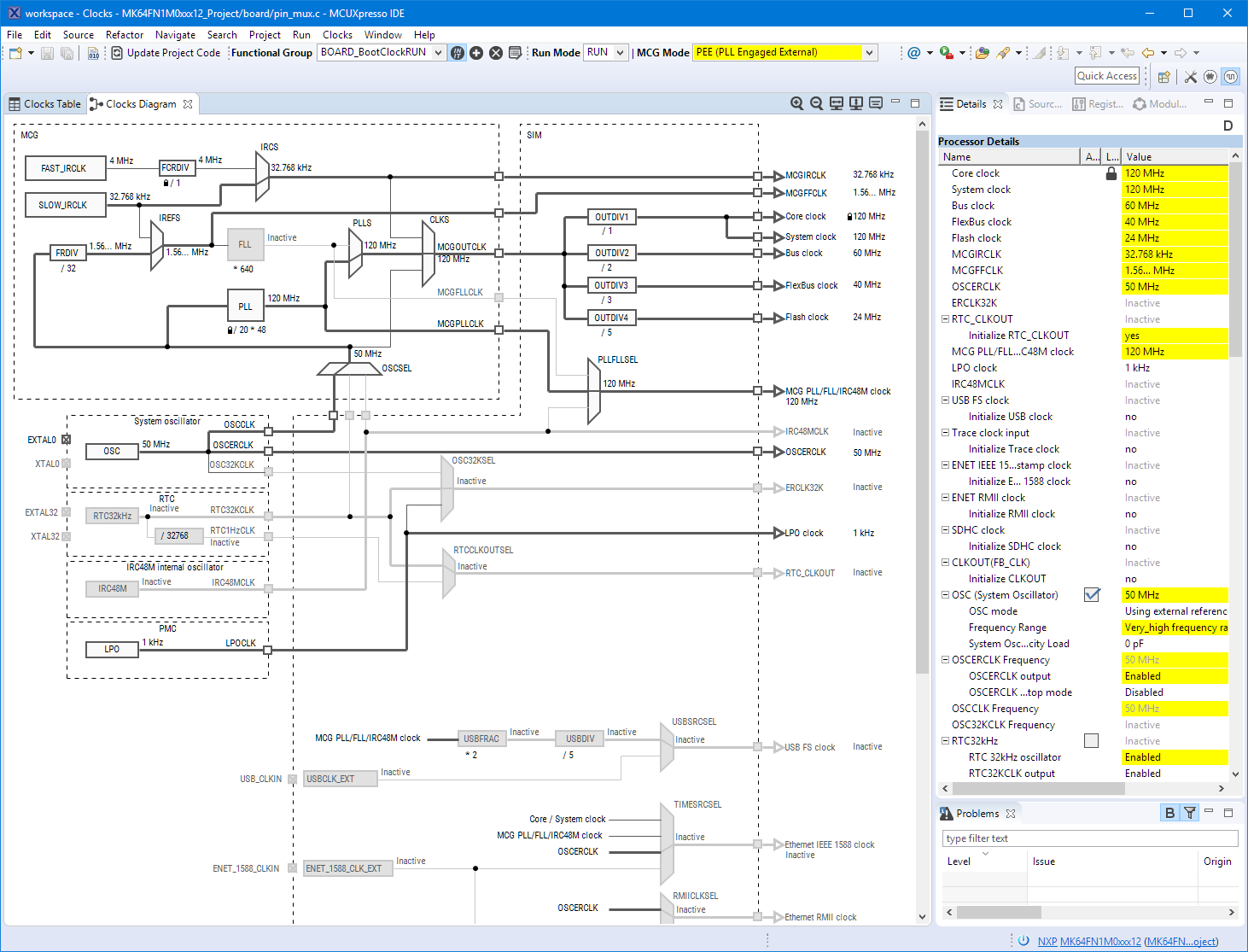
Eclipse MCUXpresso IDE 10.1 with integrated MCUXpresso Configuration Tools

Back in March 2017, NXP had rolled the MCUXpresso IDE starting with Version 10.0.0. With the intent to unify the SDK, LPCXpresso, CodeWarrior, Kinetis Design Studio and Processor Expert into one unified and integrated set of tools. V10.0.0 was a good start. The MCUXpresso IDE V10.0.2 in July was more of a smaller update, and the Pin and Clock configuration tools were not integrated, no added tool for peripheral configuration.

A week ago the MCUXpresso V10.1.0 has been released which shows where the journey is going: an free-of-charge and code size unlimited Eclipse based integrated set of tools to configure, build and debug Cortex-M (Kinetis, LPC and i.MX RT) microcontroller/processor based applications.

Clock Tool inside MCUXpresso IDE

Clock Tool inside MCUXpresso IDE

I have used it for a week, and although many things are still new, I thought I’m able to give an overview about what is new.

Continue reading

Troubleshooting Tips for FreeRTOS Thread Aware Debugging in Eclipse

FreeRTOS seems to get more and more popular, and I think as well because more and more debugger and Eclipse IDE vendors add dedicated debugging support for it.

FreeRTOS Threads in Eclipse

FreeRTOS Threads in Eclipse

Continue reading

McuOnEclipse Components: 06-May-2017 Release

I’m pleased to announce that a new release of the McuOnEclipse components is available in SourceForge, with the following changes and updates:

  • SEGGER SystemView updated to V2.42
  • More components to work with MCUXpresso SDK: GenericSWSPI, FXO8500 and SimpleEvents
  • SSD1351 display driver supports 128×128 pixel resolution and Adafruit 1.5″ breakout module
  • Extended FreeRTOS debug helper settings
  • GenericI2C: added ReadWordAddress8() and ReadWordAddress8() functions
  • RingBuffer with new Getn() and Update() functions
  • Utility with map(), constrain(), random() and randomSetSeed()
  • XFormat: new xsnprintf(), contributed by Engin Lee
  • OneWire protocol component with Maxim DS18B20 temperature sensor
  • Many smaller bug fixes and enhancements
SourceForge

SourceForge

Continue reading

McuOnEclipse Components: 12-Mar-2017 Release

I’m pleased to announce that a new release of the McuOnEclipse components is available in SourceForge, with the following main features and changes:

  • Wait: Busy-Waiting using ARM DWT cycle counter
  • Percepio FreeRTOS+Trace: Updated to version 3.1.1, simplified usage of streaming and snapshot mode
  • GenericSWI2C: MCUXpresso SDK can be used with the bit-banging I2C driver support
  • FreeRTOS: includes updates of the 9.0.1 release, ‘optimized task selection, enabled MPU support (experimental)
  • Graphical GUI drivers for screens, windows, icons, headers, text widgets and more
  • SSD1351: display driver for Solomon Systech SSD1351 display
  • More components are now supported by the McuLibConfig settings
  • Many other smaller bug fixes and enhancements

Continue reading

Tips for Making Copy of Eclipse CDT Projects Easier

Instead creating a new project from scratch, often it is simpler to copy an existing Eclipse CDT project, then change it and go on.  To copy-past the a project in Eclipse:

  1. Select the project in the Project Explorer View (CTRL-C on Windows)

    Copy of a project

    Copy of a project

  2. Then paste it in the Project Explorer View (CTRL-V on Windows), and I can specify the new name:

    Paste of Project

    Paste of Project

However, to make that process simpler, a few things have to be done right in the ‘source’ project first.

Continue reading

McuOnEclipse Components: 28-Jan-2017 Release

I’m pleased to announce that a new release of the McuOnEclipse components is available in SourceForge, with the following main features and changes:

  • New Sharp Memory Display Driver supporting 96×96 and 128×128 pixel ultra low power display
  • PID_Int can be used without hardware
  • GenericTimeData has added functions to convert date/time into strings
  • HardFault can now disable write buffers on ARM Cortex to simplify debugging faults
  • Folder support for SEGGER SystemView and Percepio FreeRTOS+Trace
  • Component usage without Processor Expert
  • NXP MCUXpresso SDK support for FreeRTOS using tickless idle mode and low power timer
  • Many other smaller bug fixes and enhancements
SourceForge

SourceForge

Continue reading