This article is part of a ‘mini series’ about hidden gems, tips and tricks around Eclipse.
The topic of this one is how use Code Completion in the editor.

Library Code Completion

This article is part of a ‘mini series’ about hidden gems, tips and tricks around Eclipse.
The topic of this one is how use Code Completion in the editor.
Library Code Completion
I’m making progress with the new ‘Billion Light‘ modules (aka V2): the new design is more modular and easier to build and assemble and still looks awesome with the moving lights and clock hands:

Different Enclosure and Arrangement
This article is part of a ‘mini series’ about hidden gems, tips and tricks around Eclipse.
The topic of this one is how to accelerate the start of the debugger.

Nothing to be done
Creating a new project with Eclipse for a microcontroller these days is fairly easy, and I have the choice if I want to start the project with C or C++:

Choice of C and C++ for a new project
Still the embedded microcontroller world is dominated by C and not C++. So while it is easy to start with a C++ project, most vendor provided example or tutorial project are C projects. So how can I transform such project to C++?
When using a logging framework it is useful to use the current file name or line number. The ANSI C/C++ standard defines the __LINE__ and __FILE_ preprocessor macros for this.
But what about the project name, if it is a release or debug build, the microcontroller used or other things like the operating system which was used to build the binary?

Target Chip Name
This (and even more) can be easily provided by Eclipse to the C/C++ application being built with CDT.
Using the debugger to inspect the application data is a very convenient thing. But if the data grows and if the data set is large, it makes more sense to dump the data to the host and process it offline. GDB is the de-facto debugger engine and includes a powerful command line and scripting engine which can be used in Eclipse too.

GDB Debugger Console in Eclipse
Especially in a lab or classroom environment it is convenient to start with a template project, and then explore different ways to shape the project for different needs. As for any IDE of this world, this requires an understanding of the inner workings to get it right. So in this article I show how to copy, clone or rename properly an Eclipse ‘template’ project in the MCUXpresso IDE.
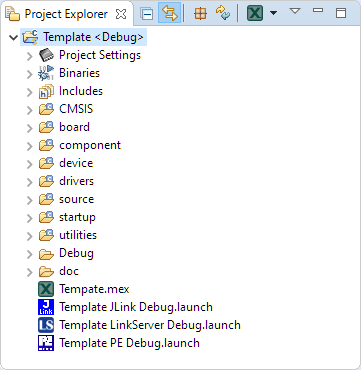
Template Project
Eclipse with its CDT managed Make system makes it easy to build projects, because it can handle a lot of the background tasks and settings between the project and the build setting. It can get a bit difficult if I want to include a library or other sub-source project for which I have to add extra compiler #define or add extra includes path settings.
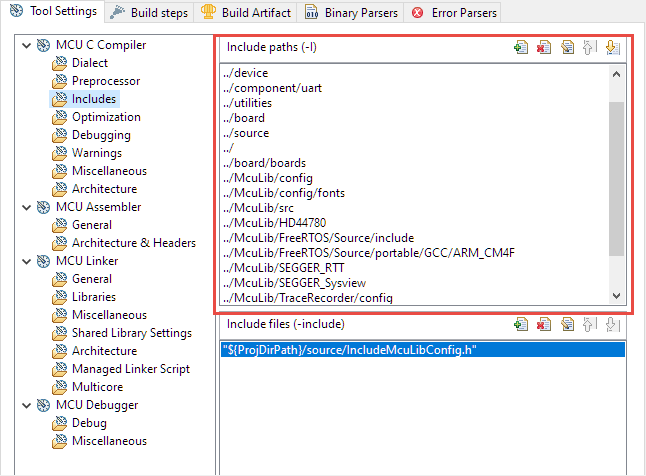
Eclipse project settings for include paths
This article show the different ways I have found to make such imports (and exports) easier.
The GNU size utility which is part of the GNU build tools shows code and data size for archive or object files. It is usually used as a post-build step in Eclipse CDT to show text, data and bss at the end of the build:

Detailed size information for each file
Right before Christmas 2019, NXP has released a new version of the MCUXpresso IDE, the version 11.1.0. This gave me time to explore it over the Christmas/New-Year break and evaluate it for the next university semester. There are several new features which will make my labs using it easier, so I plan to get the course material updated for it.

MCUXpresso IDE V11.1.0 Welcome Screen
After the break you will find the highlights …
 MCU on Eclipse