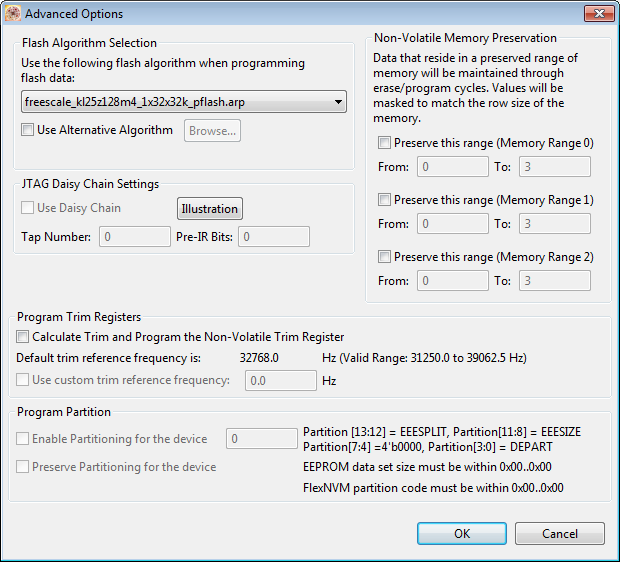
P&E has upgraded their GDB implementation and interface used in combination with the GNU ARM Eclipse plugins: they support now advanced flash programming options plus the ability to attach/connect to a running target :-). This update is available as Eclipse update.
Tag Archives: P&E
Command Line Programming and Debugging with GDB
Eclipse with GDB is great: it comes with a graphical front end for debugging. But sometimes it is all about to download a program. Is it really necessary to launch an IDE like Eclipse to program or quickly debug a board? With the GNU Debugger (GDB), the answer is ‘no’: GDB comes with a command line debugger which is designed exactly for this: providing a command line interface for programming/downloading and debugging, bypassing any GUI (Graphical User Interface).
Tutorial: How to Erase the FLASH with the GNU GDB debugger
I have several applications where I store application specific information in the microcontroller FLASH memory (see “Configuration Data: Using the Internal FLASH instead of an external EEPROM“). I have run into issues recently with the Segger J-Link GDB server as by default it does *not* erase all the FLASH memory. So the question is: How can I erase all (or part) of the FLASH memory with GDB (e.g. in Kinetis Design Studio or in Eclipse)?
Tutorial: FreeRTOS with the Kinetis SDK and Processor Expert
Freescale had announced at FTF back in April this year that they will use Kinetis Design Studio and the Kinetis SDK for all new Kinetis devices. The switch from CodeWarrior to Kinetis Design Studio (see “Comparing CodeWarrior with Kinetis Design Studio“) was not much of big deal for my projects (although CodeWarrior still has better features), and projects are rather easily portable. However, the move to the Kinetis SDK has been massively disruptive: Before it was easy to move projects from one device to another with Processor Expert, even from S08 to ColdFire to Kinetis. Now with the Kinetis SDK everything is very different. At least Freescale now officially supports FreeRTOS, and for myself as a big fan of that open source RTOS, that was some good news.
So in this tutorial I’m showing how FreeRTOS can be used with the Kinetis Design Studio. That makes at least using the Kinetis SDK bit more familiar to me :-).
RAM Target with Kinetis Design Studio and FRDM-K64F
Newer microcontroller have increase RAM areas, making it suitable to run the application from RAM instead of FLASH. For the FRDM-K64F board and the Kinetis Design Studio (V1.1.1), I have explored how to run the application out of RAM instead of FLASH memory, both for P&E and Segger connections.
Illustrated Step-by-Step Instructions: Updating the Freescale Freedom Board Firmware
I have received a bunch of Freescale FRDM boards to be used in an Embedded Systems programming crash course. There are multiple issues with the boards coming from the factory:
- They come with an old bootloader which is not compatible with Windows 8.x
- They have an old and outdated firmware on the board only supports a MSD bootloader
This post is a step-by-step instruction how to update Freescale FRDM boards (e.g. FRDM-KL25Z) to the latest firmware.
Unlocking and Erasing FLASH with Segger J-Link
When using a bootloader (see “Serial Bootloader for the Freedom Board with Processor Expert“), then I usually protect the bootloader FLASH areas, so it does not get accidentally erased by the application ;-). When programming my boards with the P&E Multilink, then the P&E firmware will automatically unlock and erase the chip. That’s not the same if working with the Segger J-Link, as it but requires extra steps.
Emulating Eclipse ‘Run’ with ‘Debug’ Configuration
Student: “Professor, my application does not work!”
Professor: “What is the problem?”
Student: “I don’t know, but the LED on my board is not blinking.”
Professor: “Can you step through the port initialization sequence and check if the clocks are initialized correctly?”
Student: “I have pressed the ‘Run’ button, I’m not debugging”.
Professor: “Why are you not debugging?”
Student: “I always do a ‘Run’, and I do ‘Debug’ only if needed.”
Professor: “Ahhhhhhrrrrgggg!”
Clearly, I’m not immune to the ‘déformation professionelle‘. I very rarely use ‘Run’, because it simply does not offer much value compared to ‘Debug’ during development. If using ‘Run’ and then there is a problem, I have to ‘Debug’ anyway, why not ‘Debug’ from the beginning? It is simply not an efficient way to work for me. Or I’m missing something?
Semihosting with GNU ARM Embedded (LaunchPad) and GNU ARM Eclipse Debug Plugins
In “Semihosting with Kinetis Design Studio” I used printf() to exchange text and data between the target board and the host using the debug connection. Kinetis Design Studio (KDS) has that semihosting baked into its libraries. What about if using the GNU ARM Embedded (launchpad) tools and libraries (see “Switching ARM GNU Tool Chain and Libraries in Kinetis Design Studio“)? Actually it requires two more steps, but is very easy too.
P&E Eclipse Update Site for GNU ARM Eclipse Plugins
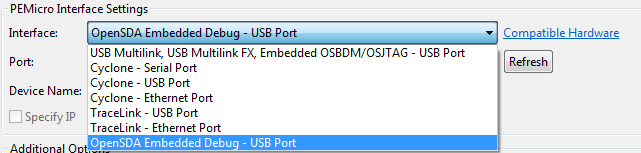
P&E has just released a new version of their Eclipse plugins for the set of GNU ARM Eclipse debug plugins. The GNU ARM Eclipse plugins from Liviu support OpenOCD and Segger J-link, so with this update or extension it adds P&E support to it. With this, I can use the P&E debug devices (P&E Multilink, Tracelink) or as well the Freescale OpenSDA with it.