The new semester is approaching fast! And I’m under pressure to get everything lined up and ready. This time, I want the students of the INTRO (Infotronic) course at the Lucerne University of Applied Sciences and Arts to have some fun with building and programming Mini-Sumo Robots 🙂
Tag Archives: KL25Z Freedom Board
Mini Sumo Robot Competition running with FRDM-KL25Z
Every three years, there is the “Eidgenössisches Schwing- und Älplerfest” in Switzerland. A really big thing for us here. If you are not familiar with what this is, then have a read about the long tradition of  Schwingen in Switzerland.
Wondering what “Schwingen” or wrestling has to do with a technology blog? It is about having fun with robots!
The Freescale OpenSDA Trap: “No Device Available”, or something like that….
Self-Motivation: I write this post in the hope to cut the number of ‘please help me’ emails in my inbox ;-):
If you want to debug one of the Freescale boards with OpenSDA (FRDM-KL25Z, FRDM-K20, FRDM-KL05Z, FRDM-KL46Z48M, FRDM-KL02Z, TWR-KL47Z48M, …), and if you get this dialog …
… then read on.
Fail! The Zumo Shield Blade Problem
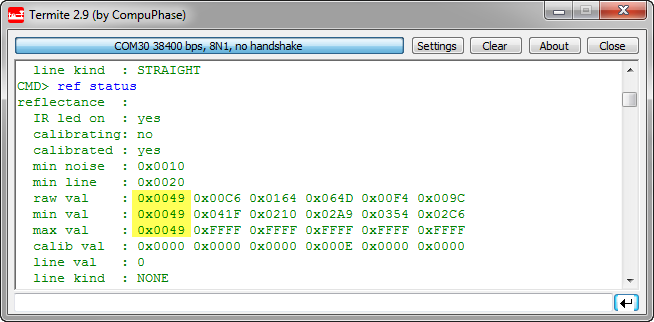
Ahhhhrg! I admit: I’m not immune to all the silly problems an engineer can face in his life. And sometimes it is about the most basic things. This morning was again such a day: One of the infrared sensors of my Zumo Robot reported wrong values:
USB for the Freescale ARM Kinetis KL46Z and K21D50M
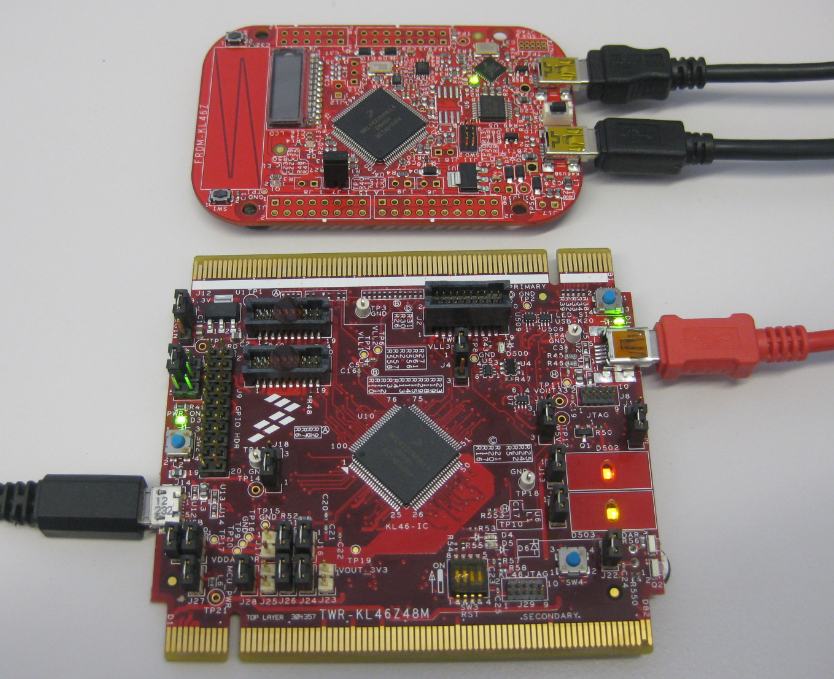
As I was so pleased with the FRDM-KL46Z board, that I have ordered the Tower version of it, the TWR-KL46Z48M:
What I missed so far was USB support for the KL46Z. So time to have a quick look at board(s) and to add USB support for it.
Tutorial: FreeMASTER Visualization and Run-Time Debugging
“A picture says more than 1000 words.”
I don’t know the source of that quote, but for sure it is true for every developer and engineer too. Engineers need to work a lot with numbers. But numbers can be transformed into pictures and graphs which can make complex things and relationships easier to understand. Verifying proper functionality of a PID closed loop controller or watching sensor values with a nice plot is definitely something very useful. Would it not be great to watch sensor data changing over time in a chart like the one below?
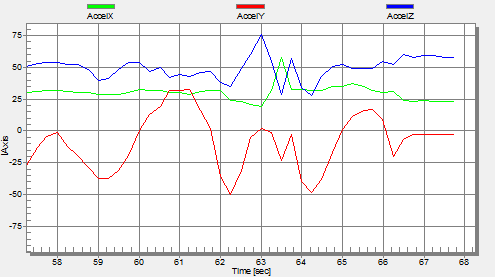
One way is to export data and then show it e.g. in Excel (which has been great chart functions). But even better, if this could be done directly with data provided from the target board? If you think this is hard to do, then I can show you how this can be done in a few steps with the help of a very nice tool: FreeMASTER 🙂
Driver for Microchip 24xx Serial EEPROM
For many projects I need to store configuration or sensor data. For this I’m using either an SD card or program the internal flash memory of the microcontroller. Using the internal flash is a good thing as it does not need an external component. However, the typical number of programming cycles is limited to 10k-50k which is a limiting factor if data has to be recorded over a long time or very often. That’s why I’m using the very popular external 24xx external EEPROM devices from Microchip.
DIY Free Toolchain for Kinetis: Part 6 – Linux Host with OpenOCD and CMSIS-DAP
For everyone who wants to build a Do-It-Yourself toolchain for Kinetis on Linux, I recommend to read the following excellent post by Karibe:
Setting up Linux opensource build and debug tools for freescale freedom board FRDM-KL25Z
He describes how to get OpenOCD with CMSIS-DAP working with Eclipse on Ubuntu to debug the FRDM-KL25Z board.
List of Tutorials
- Part 1: Setting up ARM GNU tool chain
- Part 2: Setting up Eclipse IDE
- Part 3: Setting up the debugger (P&E and Segger)
- Part 4: Setting up Processor Expert
- Part 5: Setting up FreeRTOS Kernel Awareness
- Part 6: Linux Host Support with OpenOCD and CMSIS-DAP
- Part 7: GNU ARM Eclipse Plugins
- Part 8: Processor Expert with GNU ARM Eclipse Plugins
- Part 9: DIY Free Toolchain for Kinetis: Part 9 – Express Setup in 8 Steps
- Part 10 – Project Creation with GNU ARM Eclipse 2.1.1
Happy Linuxing 🙂
DIY Free Toolchain for Kinetis: Part 5 – FreeRTOS Eclipse Kernel Awareness with GDB
So far I have covered in this tutorial series how to install ARM GNU gcc, adding Eclipse, followed by adding GNU GDB debugger, and then adding Processor Expert. I’m using FreeRTOS a lot in my projects, and luckily there is a Kernel Awareness Plugin available for FreeRTOS for GDB in Eclipse. This tutorial is about how to install and use it.
Using the FRDM-KL25Z as a USB Mouse Device
I finally completed my project turning the FRDM-KL25Z board into a USB mouse device :-). The form factor and the capabilities of the Freedom board makes it a great board for implementing it as a ‘custom mouse’. All what I need is the USB stack running on it and have it acting as USB HID Mouse device.