DIY Free Toolchain for Kinetis: Part 10 – Project Creation with GNU ARM Eclipse 2.1.1

As mentioned in Part 9: There is a new GNU ARM Eclipse plugin 2.1.1, and this one makes project creation for Freescale devices easier than ever 🙂

  • Native Kinetis-L project templates for FRDM-KL25Z and FRDM-KL46Z boards
  • Easier than ever project creation for Processor Expert projects
GNU ARM Eclipse 2.1.1

GNU ARM Eclipse 2.1.1

Continue reading

DIY Free Toolchain for Kinetis: Part 9 – Express Setup in 8 Steps

On Monday the new semester starts, and yet again: we will do a Sumo thing :-). They can choose which tool chain they would like to use to develop their application for the ARM Cortex-M0+ used from Freescale. One option is to create a ‘Do-It-Yourself’ toolchain. Since the start of the series, things have evolved: there is a new GNU ARM tool chain available, Segger has updated their drivers, and most important the GNU ARM Eclipse plugin has been greatly extended to support Freescale parts and Processor Expert. So instead to read through all the previous tutorials, this one is about putting together a free tool chain less than 10 minutes (not counting the time to download around 500 MByte).

DIY Eclipse Toolchain

DIY Eclipse Toolchain

Continue reading

IoT: FreeRTOS Down to the Micro Amps

University research projects can be a lot fun, and are very challenging the same time. The good thing is that there is always someting new to learn :-).

This week-end I was working on my Internet of Things (IoT) project, based on a Freescale KL15Z and a nRF24L01+ transceiver. In essence it is a wireless data logger. For this, I only can afford a few micro amps consumed by the whole board over an extended period of time. I mean 21 micro amps for running a whole board with sensor, EEPROM, wireless transceiver, operating system and an ARM Cortex-M0+ ready to crunch numbers at 20 MHz 🙂

21 micro amps for wireless sensor node

21 micro amps for wireless sensor node (when not sending)

Continue reading

CriticalSection Component

I have created and published on GitHub a new component ‘CriticalSection’:

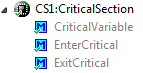
Critical Section Component Methods

Critical Section Component Methods

This component is a wrapper between my components and the problematic current implementation in Processor Expert (see EnterCritical() and ExitCritical(): Why Things are Failing Badly). It uses a flexible approach and uses macros to either use my modified version of EnterCritical() and ExitCritical(), or simply defaults to the original implementation.

Continue reading

FRDM with Arduino Ethernet Shield R3, Part 3: Embedded Web Server

This is Part 3 of an ongoing tutorial to use the Arduino Ethernet Shield R3 with a Freescale FRDM-KL25Z board (or any other board you like).

In Part 1 I worked on the SD card, in Part 2 I have added basic network connection. Now time to run a web server with my FRDM-KL25Z :-). With this, I can get access to my board through the network, and the board will host a web page where I can do pretty much everything: showing status, or adding functions to turn on things like an LED 🙂

Web Server with W5100 on FRDM-KL25Z

Web Server with W5100 on FRDM-KL25Z

Continue reading

DIY Free Toolchain for Kinetis: Part 8 – Processor Expert, Eclipse and GNU ARM Eclipse Plugins

There has been many new releases these days: Freescale released Processor Expert Driver Suite 10.3, and Liviu Ionescu released new GNU ARM Eclipse Plugins with new and updated documentation. So time for me to show how this all comes together 🙂

Processor Expert Driver Suite 10.3 Project with GNU ARM Eclipse Build Tools

Processor Expert Driver Suite 10.3 Project with GNU ARM Eclipse Build Tools

It is now easier than ever before to use the GNU ARM Eclipse plugins and Processor Expert. There are still some manual steps, and this post is about all the details to get it working as smooth as possible.

Continue reading

DIY: Changing Processor Expert Components

I’m maintaining and hosting now more than 100 different Processor Expert components on GitHub. Instead to deal with CDE (Component Development Environment, that’s the SDK to create your own components), most users simply download and install the PEupd files. If you deal with normal source files, and if spot something you want (or need to change), then you can easily do this. But what if you want or need to change something in that code which comes with the PEupd file(s)?

Components in the Components Library

Components in the Components Library

Continue reading

Debugging the same Project Multiple Times in Parallel with Eclipse

I have I project which I want to debug on multiple boards the same time. So how can I download and debug the same application to multiple boards/processors, and debug them all the same time from within the same workspace and Eclipse IDE?

This is a typical scenario I have with my RNet stack: the same application runs on multiple boards, and I want to debug all the boards with the same project with the same Eclipse. For example to wireless sensor nodes with the RNet nRF24L01+ stack as in the picture below:

Two FRDM-KL25Z with nRF24L01+ Transceivers

Two FRDM-KL25Z with nRF24L01+ Transceivers

Continue reading

DIY Free Toolchain for Kinetis: Part 7 – GNU ARM Eclipse Plugins

Tired by the tool chains provided by your silicon vendor? Do you want to use a free and open tool chain? Then you probably followed by “DIY Free Toolchain” series already. In “DIY Free Toolchain for Kinetis: Part 2 – Eclipse IDE” I used the standard GNU Eclipse plugins. As mentioned in above post, there is an even better and more powerful plugin available: the GNU ARM Eclipse plug-ins. There is a dedicated blog site which provides excellent documentation and direct access to new and frequent releases. And these days there is a true a Christmas gift for every Eclipse lover: the version 1.1.7 with the addition of J-Link debugger plugin :-).

GNU ARM Eclipse (http://gnuarmeclipse.livius.net)

GNU ARM Eclipse

Continue reading