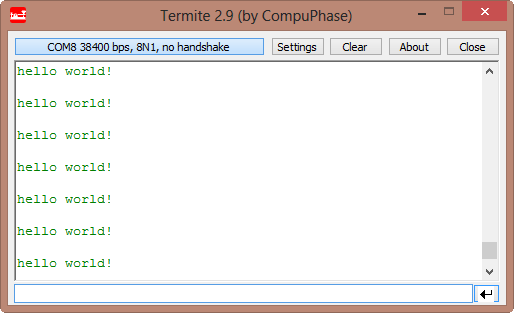
In this post I tapped into how to print messages to a console using the Kinetis/Freedom board. I’m not a fan of printf() for multiple reasons: It is simply a bad thing for embedded systems programming. But as many have asked for it, here is how to say “hello” from the Freedom Board using printf():
Tag Archives: arm gcc
Switching ARM GNU gcc Toolchain in Eclipse
CodeWarrior for MCU10.3 comes with the ARM GNU 4.6.2 installed:
What about switching to a different (newer) gcc?
Reducing the build time with gcc for ARM and CodeWarrior
Eclipse based CodeWarrior for MCU10.3 comes with gcc build tools for Kinetis/ARM cores. While it features the parallel build make, I noticed that especially for larger projects build times are not as fast as it should be. The good news is: I was able to cut down my build time to less than half with a simple change :-).
When I looked at the output folder where all the object and make files are stored by Eclipse, I noticed that it has as well the listing files generated:
A new Freedom Board: FRDM-KL05Z
Christmas and New Year time is great: Gifts and time to work on my home projects. But this post is not about one gift I have organized for myself: a Raspberry Pi ;-)). No, this post is about a gift I have received from Freescale: a *new* Freedom board, the FRDM-KL05Z :-).
A Processor Expert Component to Help with Hard Faults
Ahrg! Again my ARM application crashed somewhere and I ended up in a HardFault exception :-(. In my earlier post I used a handler to get information from the processor what happened. But it is painful to add this handler again and again. So I decided to make things easier for me: with a special HardFault Processor Expert component :-).
After adding this HardFault component to my project, it automatically adds an entry to the vector table. So no manual steps are needed: having the component in the project and enabled will do the needed steps.
Migrating Kinetis-L Projects from Beta to Final MCU 10.3
I have successfully used CodeWarrior for MCU10.3 beta version for many projects. With the advent of the final CodeWarrior for MCU10.3, I want to migrate my existing projects to the new and final version. First: my existing projects work as well in the final version, which is good news. But there are two things to change to take advantage of the final 10.3:
- Linker file memory split
- ARM Micro Trace Buffer (MTB) support
Reducing Code Size with gcc and EWL
If you have not noticed: the final CodeWarrior for MCU10.3 has been released on the Freescale web :-).
It comes with a few changes compared to the 10.3beta release, and one is about the library configuration. I noticed that new projects created with the wizard are around 4 KByte larger than I expect them to be. For example my rather simple application below uses 8 KByte of code, where my expectation would be in the range of around 4 KByte:
text data bss dec hex filename 8644 24 1108 9776 2630 Freedom_2x16_HTA.elf
ARM Cortex-M0+ Interrupts and FreeRTOS
“Anything that can go wrong, will go wrong”.
strikes again. Well, the modified version of it:
“Anything that can go wrong, will go wrong, but it will wait until it really, really goes wrong”.
It is always amazing to see that systems having a fundamental flaw, they can work for a long period. Only that on day X my application crashes. And when found the problem, I’m wondering how in the world it was *ever* working with that bug in it :-(.
Debugging Hard Faults on ARM Cortex-M
It is as bad as this: my application stopped in an unhandled interrupt service routine:

That does not tell much. I’m using Processor Expert generated code, and with this all my ‘unhandled’ vectors are pointing the same handler:
Continue readingThumbs up with Assembly on ARM Cortex
Sometimes it is necessary to write an interrupt service routine in assembly language. This is the case as well for the ARM Cortex-M0+ which is found in the KL25Z on my Freedom board. But there is something important about the ARM Cortex architecture: Thumb Mode.
Thumb mode the ‘ARM way’ to reduce the code size with a reduced (16bit wide) instruction set. The ARM architecture can implement a ‘mixed’ mode, on a function level. To distinguish between ‘normal’ ARM functions and ‘thumb’ functions, the processor is checking if the LSB (Least Significant Bit) of a function pointer (or function call destination) is set. So a jump address of 0x410 is for a ‘normal’ function, while a function jump to the address 0x411 (even if the function is located at the address 0x410) denotes a ‘thumb’ function.


