Sharing Standalone NXP SDK Projects in VS Code

The NXP SDK is git based which is great. If I create a project with VS code, it references the SDK cloned locally.

Standard NXP SDK Project in VS Code

A standalone project structure is needed if you want to easily share a project with your team. It’s also necessary for sharing inside a classroom environment. This article shows how to use an NXP SDK project in standalone mode.

Continue reading

Workaround for FreeRTOS Runtime Counter Issues in VS Code

FreeRTOS has a great performance measurement feature built-in: Performance counters. At each context switch, the RTOS can do a bookkeeping of time spent in tasks. With this, it can estimate the runtime distribution between the tasks. A very useful feature to get a feeling what the tasks are doing.

But I noticed that with recent FreeRTOS versions, VS Code extension have issues showing the correct runtime counter values:

Unknown Runtime Counters in VS Code Extension (mcu-debug.rtos-views)
Continue reading

Remote Debugging with DevContainer and VS Code

This is the second part describing how to use DevContainer for embedded applications with VS Code.

In Optimizing Embedded Development with VS Code and DevContainer I use VS Code with a docker ‘development’ container. The container is created with a recipe to install the development tools and SDK. With VS Code and DevContainer I have the same developer experience as I would develop locally on the host.

One thing not addressed in that earlier article is debugging. Using USB debug probes like a SEGGER J-Link or NXP MCU-Link is a challenge inside a container. This applies to any other debug probe as well.

The solution is to transform an USB based debug probe into one with a network connection:

VS Code DevContainer with Hardware Debugging

In this article, I show how to do this.

Continue reading

Optimizing Embedded Development with VS Code and DevContainer

Embedded System have a lifetime of 10 or 15 years. During that time the software and tools has to be maintained. This can be very challenging. Who knows if that compiler or tool used is still available in 10 years from now? Additionally installing and configuring the tool chain and environment for a new team member is difficult. Even worse: using a different host operating system for the cross development can produce different results or introduce issues.

VS Code running with DevContainer

One solution for all these problems is to use Docker images and containers. I can pack all the necessary tools and software into a virtual environment and container. But developing inside a container comes with many challenges. In this article I’ll show how Visual Studio Code or VS Code makes working with containers very easy. In this article I show how easy it is to use modern development tools and methodologies for embedded development.

Continue reading

Start New VS Code Instances with Unique Environments

If working with different tool chains, SDKs, and vendors, then one must use different environments.

With VS Code, this can end up in counter-intuitive situation. When I start a new Visual Studio Code instance, it will open a new window. But if there is already an instance running, it actually will re-using that environment. This can cause lots of subtle problems, including failed builds.

VS Code re-using instance environment

So how to start a new Visual Studio Code Window, with a new instance?

Continue reading

GitLab Automated CI/CD Embedded Multi-Project Building using Docker

In CI/CD for Embedded with VS Code, Docker and GitHub Actions, I used GitHub to build a pipeline. This setup supports continuous integration within a CI/CD environment.

This time, let’s do a similar thing. But instead of GitHub, I use GitLab with VS Code. And I use it for a project where three different MCUs are used: the Raspberry Pi Pico-W, an Espressif ESP32 plus the NXP K22FX512 on the Sumo robot:

Raspberry Pi Pico-W, Espressif ESP32 and Robot with NXP K22FX512
Continue reading

On-Target Testing with LinkServer Runner and VS Code

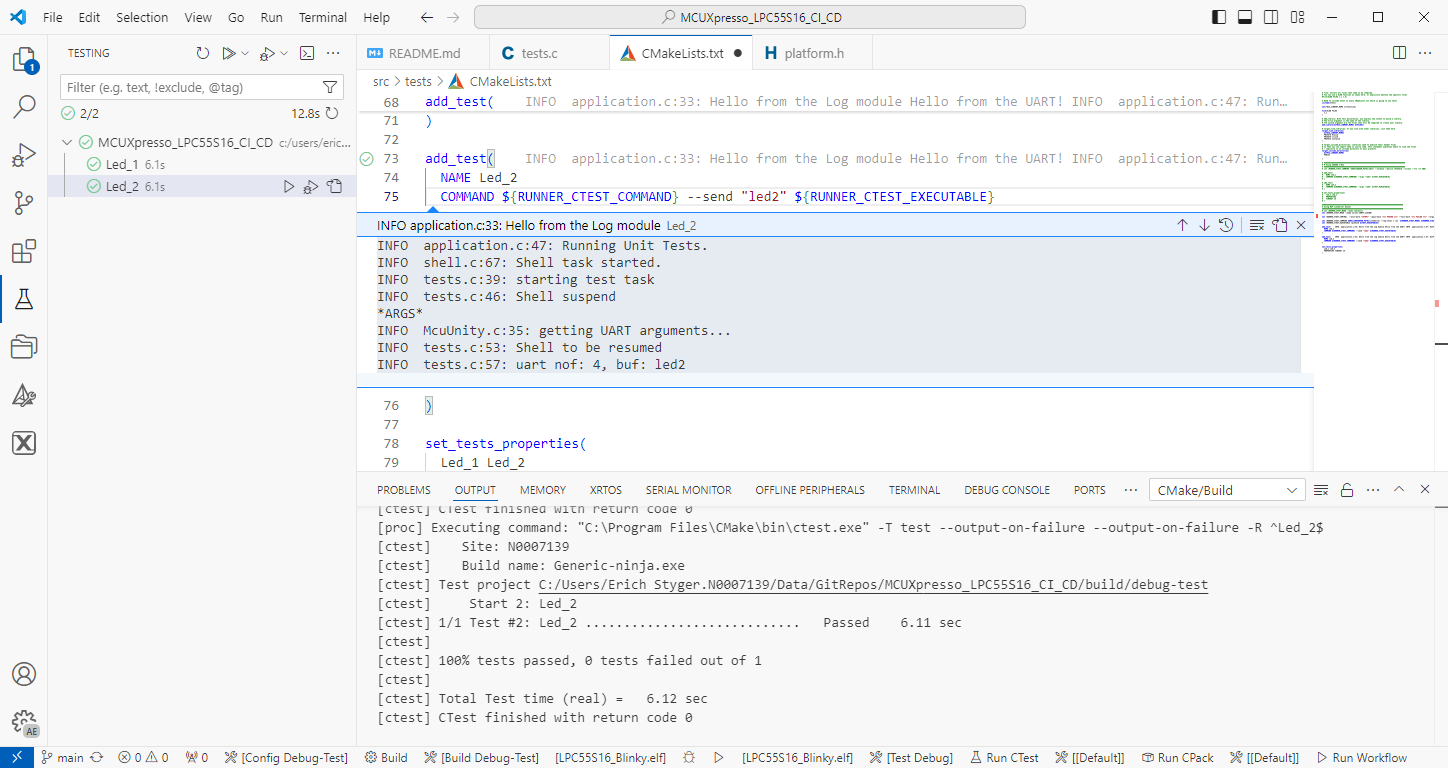
The release 24.9.75 of LinkServer software and tools includes interesting feature: the ability to use the debug probe for automated on-target testing. It includes a ‘runner’ which can program, launch and run the application on the target through a debug probe. While the target is running, it uses semihosting or UART for communication. This makes it a perfect tool for automated testing, especially in a CI/CD environment. One such environment is running automated tests with CMake and CTest in VS Code.

Automated on-target testing with VS Code and LinkServer
Continue reading

Customizable DIY RFID Business Card and Badge Holder with Victorinox Swiss Army Knife Tools

In case you are looking for an unusual business card, company badge or event badge holder, then this article is for you: A DIY RFID badge and business card with bling-bling addressable RGB LEDs to impress your customer, clients, friends at work or at a conference, packed with electronics. Plus it includes 10 original tools from Victorinox, the manufacturer of the Swiss Army Knife.

Complete Badge and Business Card Solution
Continue reading

NXP MCU-Link for Rust with probe-rs

The Rust programming language is making its way into the embedded world, and getting more and more popular and not only at the Lucerne University. With Rust, the probe-rs is one of the popular debug choices, as it nicely comes with cargo. On the hardware side, the NXP MCU-Link is $15 debug probe hardware I use for many targets. Why not using the MCU-Link with probe-rs and Rust?

MCU-Link Board Top Side
Continue reading

‘Experience Energy’ at the Verkehrshaus: The ‘House of Energy’ Construction Kit

The ‘Verkehrshaus der Schweiz‘, the ‘Swiss Museum of Transport’ is Switzerland’s most popular museum.

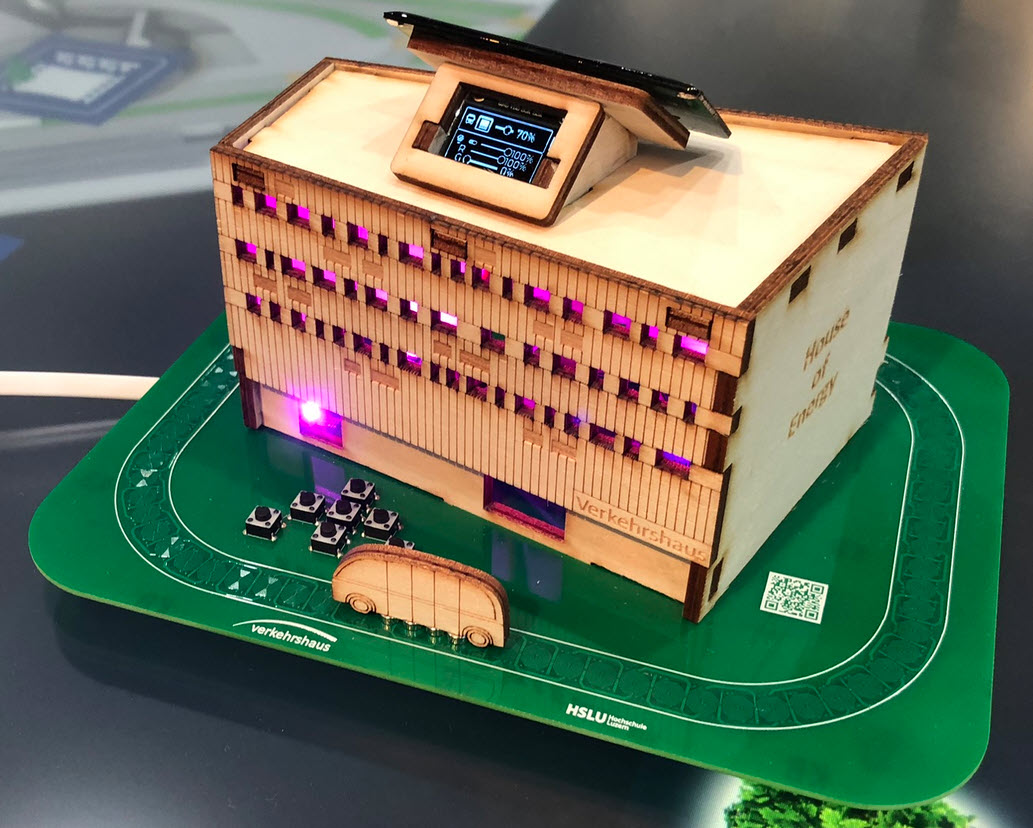
In April 2023, it opened up a new building and the ‘Experience Energy!’ exhibition. For the opening event we created a unique construction kit to explore energy: from harvesting to storing and up to distributing and using energy.

“House of Energy” at the Swiss Museum of Transport in Lucerne
Continue reading