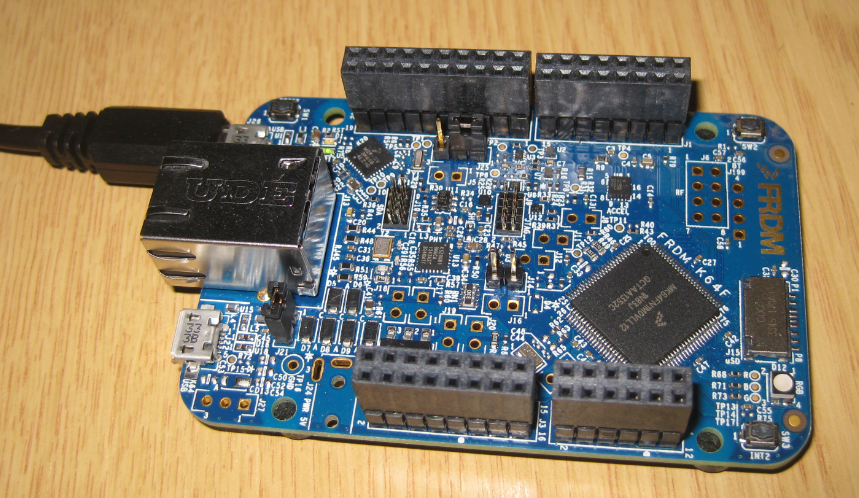
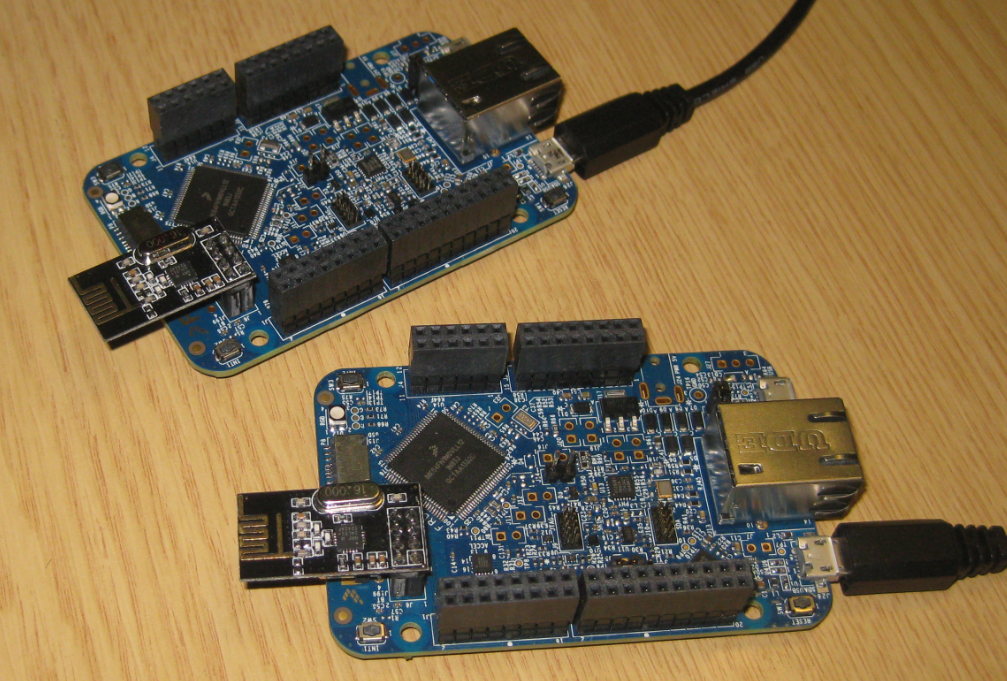
For some time I’m using the Nordic Semiconductor nRF24L01+ transceiver successfully in many projects (see “Tutorial: Ultra Low Cost 2.4 GHz Wireless Transceiver with the FRDM Board“). Since that tutorial things evolved a lot with the introduced RNet Stack. To honor the popularity of the Nordic Semiconductor nRF24L01+, Freescale has put a socket on the FRDM-K64F board. So time to make a new step-by-step tutorial how to use the nRF24L01+ with the FRDM-K64F.
Category Archives: FRDM-K64F120M
Tutorial: DIY Kinetis SDK Project with Eclipse – Board Configuration
In “Tutorial: DIY Kinetis SDK Project with Eclipse – Startup” I showed how to create a Kinetis SDK project from scratch. In this post it is about adding the board initialization files. With the board initialization the peripheral clocks and pin muxing is configured.
Tutorial: DIY Kinetis SDK Project with Eclipse – Startup
This is the start of a multi-post tutorial about the Freescale Kinetis SDK, released back in April as beta version. The SDK a set of peripheral drivers, and will become the standard software foundation and drivers provided by Freescale for their ARM Cortex based devices. Similar what other vendors already do. While this is a good step, it is the same time very disruptive for my university projects with new Freescale Cortex-M devices. And with everything new (and beta), it needs time to learn. So this post is about creating a Do-It-Yourself Kinetis SDK project from scratch for Eclipse. This part is about the startup code: about everything to get the application started.
FRDM-K64F at Maximum Speed of 120 MHz
The ARM Cortex-M4F on the Freescale FRDM-K64F board can run up to 120 MHz. Here is how to get it running with maximum speed:
Tutorial: Data Logger with the FRDM-K64F Board
The Freescale FRDM-K64F is a great board for data logger applications: it has a powerful ARM Cortex M4F with 120 MHz, 1 MB Flash and 256 KByte RAM. Best of all: it already has a micro SD card socket on the board :-).
Segger J-Link Firmware for OpenSDAv2
Segger just has released their OpenSDAv2 firmware. The OpenSDAv2 firmware is different from the OpenSDAv1 as it is using a different memory map and bootloader. The OpenSDAv2 e.g. is present on the new FRDM-K64F board. The availability of the Segger firmware is definitely good news for any owner of the FRDM-K64F board: so far only the CMSIS-DAP firmware was available (on top of the mbed bootloader). With this, it was not possible to use the board with CodeWarrior, except with using an external P&E Multilink or Segger J-Link. With that new Segger J-Link OpenSDAv2 firmware, I can now use the FRDM-K64F with any IDE which supports the Segger J-Link :-).
Binary (and S19) Files for the mbed Bootloader with Eclipse and GNU ARM Eclipse Plugins
The existing OpenSDAv1 (see “OpenSDA on the Freedom KL25Z Board“) bootloader is using the industry standard Motorola S-Record (S19) Files. However, new FRDM-K64F board (see “FTF: FRDM-K64F, Kinetis Design Studio and Kinetis SDK“) has OpenSDAv2 on it, which is an mbed bootloader. So how to create files with an IDE other than mbed for that bootloader which is present on the FRDM-K64F board by default? Well, creating binary files is one thing, but to have it working with the mbed bootloader is another challenge :-(.
Using the FRDM-K64F with CodeWarrior
The new flagship of FRDM boards is the FRDM-K64F board. After FTF I have explored different ways debugging the board, and received many comments and questions about it (thanks!). Freescale announced the supports with the new Eclipse based Kinetis Design Studio (KDS). But until KDS is out, how can I use the FRDM-K64F board with CodeWarrior?
FTF: FRDM-K64F, Kinetis Design Studio and Kinetis SDK
I’m attending the Freescale Technology Forum (FTF) in Dallas this year: As they say here: “everything is bigger in Texas”, that’s the motto of this conference ;-). The conference is packed, and I have a hard time to keep up with all the things going on. My focus is obviously everything around Eclipse and ARM microcontroller. The conference started yesterday afternoon with hands-on labs, and I was in the one were Freescale presented the new ‘Kinetis Design Studio’: a free of charge/unlimited Eclipse tool chain based on Eclipse Kepler, GCC and GDB. Freescale presented their new software library ‘Kinetis SDK’. And: There is a new Freedom board which gets handed out to the attendees: the FRDM-K64F :-).