Debugging FRDM-KL05Z with USBDM

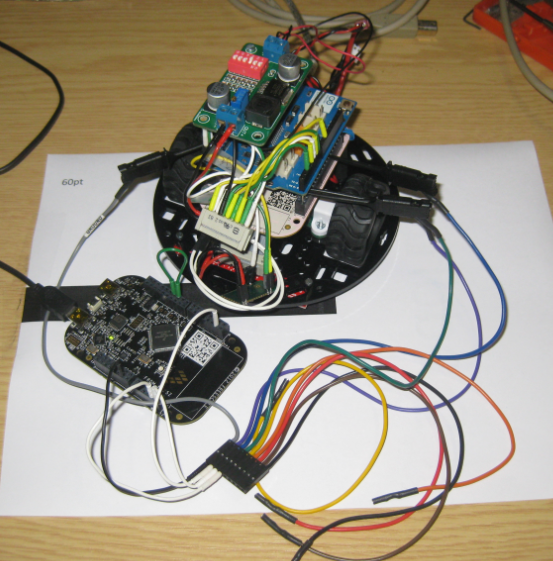
I mentioned in “Debug External Processors with USBDM and Freedom Board” post that I had a problem to debug the FRDM-KL05Z with USBDM. Well, after a long night with some sleep, with more thinking and searching, finally I have it resolved: I can debug my FRDM-KL05Z with USBDM 🙂

FRDM-KL05Z Debugging with USBDM

FRDM-KL05Z Debugging with USBDM

Continue reading

Debug External Processors with USBDM and Freedom Board

Teaching at a university means to work in a very special environment. What students love is ‘Open Source’: because it allows them to ‘see’ things and learn from the technology. The other thing is: students have a low budgets, so they appreciate if they can use inexpensive or low-cost hardware and software. The FRDM-KL25Z Freedom board for sure meets that low price, and no extra programming device needed.

Now they are building their own boards, and they wish to program and debug it. They can borrow the Segger J-Links and P&E Multilinks we have available at the university. But why not use the Freedom board as ‘hobby’ debug and programming solution? As explored in “Using the Freedom Board as SWD Programmer“, they can use the default factory installed OpenSDA to program another microcontroller of same type. But not to debug it.

While writing the “Using the Freedom Board as SWD Programmer” article, I was looking into USBDM. USBDM has added in January 2013 support for OpenSDA. But at that time, it was somehow not working for me, and I had not enough time to find out what the problem was. Time to get that fixed. Good news: With help and tips from the USBDM community, I have it finally working 🙂

USBDM Debugging another FRDM-KL25Z

USBDM Debugging another FRDM-KL25Z

Continue reading

printf() with the FRDM-KL25Z Board and without Processor Expert

In this tutorial I explored how to use printf(), and this tutorial is so generic that it works for any processor/microcontroller. That flexibility is because I’m using Processor Expert. In case Processor Expert shall not be used, then some tweaks are needed. Here I show what is needed to have printf() working with the FRDM-KL25Z board. I use the UART0 connected to OpenSDA USB CDC for this.

Continue reading

A new Freedom Board: FRDM-K20D50M with ARM Cortex M4

Freescale/Farnell/Element14 announced last week a new Freedom Board: the FRDM-K20D50M :-). As you can expect, I was not able to resist, and ordered one from my local Farnell store right away. So I did my first steps with it on this sunny and wonderful weekend (yes! we skipped Spring Time and entered Summer Time right away!).

I do not need to compare the board with the previous Freedom boards, as I have found an article here. I a nutshell: I get pretty much the same as with the FRDM-KL25Z, but instead of an ARM Cortex-M0+, it has an ARM Cortex-M4!

The new FRDM-K20D50M Board

The new FRDM-K20D50M Board

Continue reading

Extended Driver for the MMA8451Q Accelerometer

In “Tutorial: Accelerating the KL25Z Freedom Board” I used the MMA8451Q accelerometer on the FRDM-KL25Z board in a very primitive way: I’m reading directly some low-level registers from the device through an I2C low-level component. No calibrating, no special device feature setting, only raw values. Since then, things have been evolved: In “Tutorial: Creating a Processor Expert Component for an Accelerometer” I started to create a driver for this accelerometer, and since then a lot more functionality has been added.

Tracing Accelerometer Values to the Shell

Traced Accelerometer Values to the Shell

Continue reading

Tutorial: Creating a Processor Expert Component for an Accelerometer

If you are a frequent reader of this blog, then you know: I’m a big fan of Processor Expert components. While there are many Processor Expert components delivered with CodeWarrior, it lacks many components and device drivers beside of the normal on-chip peripherals. But value gets added to an embedded project with all the external devices, sensors and actuators. That’s why I have created many more components which are available on my GitHub site. Readers of this blog have asked several times to create a tutorial on how to create a Processor Expert component. So why not working on that on a long Easter weekend full of cold rain and snow?

So here we go: a tutorial how to create a Processor Expert component for the MMA8451Q accelerometer found on the FRDM-KL25Z board:

MMA8451Q Accelerometer on the FRDM-KL25Z Board

MMA8451Q Accelerometer on the FRDM-KL25Z Board

Continue reading

RFduino: Wireless Cortex Arduino to the Size of a Finger Tip

How cool is this: combine ‘Arduino’, ‘Bluetooth’ and ‘Low Power’ with ‘small size’: an ARM Cortex-M0 board with low power Bluetooth 4.0, shrunk to size of a finger tip! 🙂

This Kickstarter project asked for $5k funding, and it has received over $245k! The video shows the prototype interacting with an iPhone:

It combines Arduino compatibility with the power of an ARM Cortex M0. Given the low-cost and versatility of that board, that would make that board an ideal base for many projects.

Adding an internet gateway, and I will have the ‘Internet of Things’ (IoT) 🙂

Happy RFing 🙂

Freedom Logic Analyzer with DMA

The FRDM-KL25Z Open Source Logic Analyzer based on SUMP presented here was already very useful with the added trigger support. But it was not capable to do a sampling rate above a few hundred kHz. That’s ok for slower probing, but not for anything with a higher speed. Using DMA (Direct Memory Access) instead of timer based sampling can remove that limitation :-).

FRDM-KL25Z used as Logic Analyzer on another FRDM-KL25Z board

FRDM-KL25Z used as Logic Analyzer on another FRDM-KL25Z board

Continue reading

mbed for the Freedom Board

I knew about mbed already for some time: watching students using it for an NXP enabled board. Pretty cool stuff: mbed is an online IDE and compiler with tons of software libraries for the supported platform. So I was dreaming to have something like this for my own boards like the Freedom board. But because mbed only supported two dedicated NXP boards, that was a road block.

But then mbed announced recently that the mbed SDK is open source. Wow, that is interesting! And finally the announcement last week: mbed supports the KL25Z Freedom Board. Now they have my attention :-).

Continue reading