RNet Stack as Component, nRF24L01+ with Software SPI

The great thing with Processor Expert is: it writes the code for me :-). I’m using now the RNet wireless stack in more than 10 different projects, and keeping the projects up-to-date with the RNet stack sources in a traditional way gets harder and harder: I  need to make sure the paths are pointing to the right place, and if I pass the project to somebody else, I have to make sure all the sources are packaged with that project. Processor Expert makes things simpler: it can generate the source files into my project, and I can easily configure it.

So instead to copy and support files by hand, I decided to package the RNet stack files into a Processor Expert component: all still normal C files, but easier to configure and distribute.
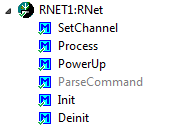
RNet Component

RNet Component

Continue reading

Tutorial: Thermal Printer, Part 1: Hardware Setup with FRDM Board

One of my embedded projects is to measure the running time in a sports event (see “Sports Timing System in a Lunch Box“). The recorded time is stored in an EEPROM plus sent over USB or wireless connection to the host. It would be great if I could print out the time and ranking directly, so if there is no PC, the system can be small and tiny. So here is my next project and tutorial: Printing with the Freedom board!

Hello World on the Printer with FRDM-KL25Z

Hello World on the Printer with FRDM-KL25Z

Continue reading

Generating Static FreeRTOS Source Code

Using Processor Expert is an awesome tool: it generates source code for me, and I can can ‘dynamically’ tune my projects to my needs. Still, sometimes it is better or desirable to have a ‘normal’ or ‘static’ project. This is very well possible with Processor Expert (see “Sneaking from Processor Expert” or “Disable my Code Generation“): I can generate the code one time, and then use it without Processor Expert.

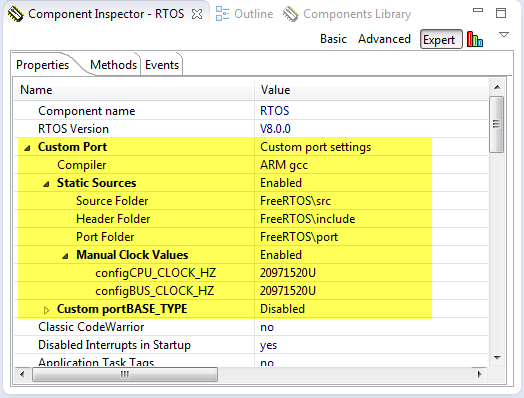
To make this even easier, I have added an option to the FreeRTOS Processor Expert component to generate ‘static’ code I can copy-paste to projects and tool chains which are either not supported by Processor Expert, or just for ‘static’ projects.

FreeRTOS Custom Port Settings

FreeRTOS Custom Port Settings

Continue reading

Processing the Pololu Motor Shaft Encoders

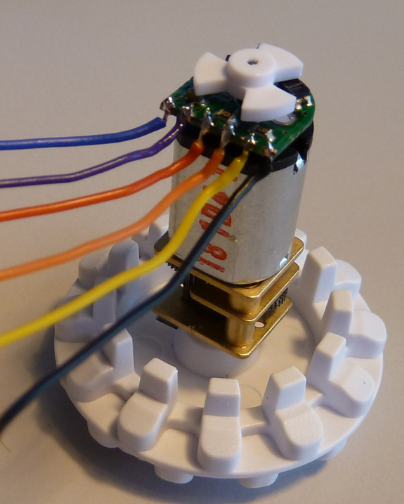
For the first generation of the INTRO Zumo robots, I have Pololu optical wheel encoders (see “Adding Quadrature Encoder to the Zumo Chassis“) which were available last year. It seems that Pololu heard my feedback, and are offering new encoders. Time to move things to the next level, using an optical encoder attached to the motor shaft:

Optical Motor Shaft Encoder

Optical Motor Shaft Encoder

Continue reading

DIY Free Toolchain for Kinetis: Part 10 – Project Creation with GNU ARM Eclipse 2.1.1

As mentioned in Part 9: There is a new GNU ARM Eclipse plugin 2.1.1, and this one makes project creation for Freescale devices easier than ever 🙂

  • Native Kinetis-L project templates for FRDM-KL25Z and FRDM-KL46Z boards
  • Easier than ever project creation for Processor Expert projects
GNU ARM Eclipse 2.1.1

GNU ARM Eclipse 2.1.1

Continue reading

DIY Free Toolchain for Kinetis: Part 9 – Express Setup in 8 Steps

On Monday the new semester starts, and yet again: we will do a Sumo thing :-). They can choose which tool chain they would like to use to develop their application for the ARM Cortex-M0+ used from Freescale. One option is to create a ‘Do-It-Yourself’ toolchain. Since the start of the series, things have evolved: there is a new GNU ARM tool chain available, Segger has updated their drivers, and most important the GNU ARM Eclipse plugin has been greatly extended to support Freescale parts and Processor Expert. So instead to read through all the previous tutorials, this one is about putting together a free tool chain less than 10 minutes (not counting the time to download around 500 MByte).

DIY Eclipse Toolchain

DIY Eclipse Toolchain

Continue reading

CriticalSection Component

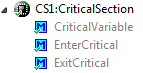
I have created and published on GitHub a new component ‘CriticalSection’:

Critical Section Component Methods

Critical Section Component Methods

This component is a wrapper between my components and the problematic current implementation in Processor Expert (see EnterCritical() and ExitCritical(): Why Things are Failing Badly). It uses a flexible approach and uses macros to either use my modified version of EnterCritical() and ExitCritical(), or simply defaults to the original implementation.

Continue reading

FRDM with Arduino Ethernet Shield R3, Part 3: Embedded Web Server

This is Part 3 of an ongoing tutorial to use the Arduino Ethernet Shield R3 with a Freescale FRDM-KL25Z board (or any other board you like).

In Part 1 I worked on the SD card, in Part 2 I have added basic network connection. Now time to run a web server with my FRDM-KL25Z :-). With this, I can get access to my board through the network, and the board will host a web page where I can do pretty much everything: showing status, or adding functions to turn on things like an LED 🙂

Web Server with W5100 on FRDM-KL25Z

Web Server with W5100 on FRDM-KL25Z

Continue reading

DIY Free Toolchain for Kinetis: Part 8 – Processor Expert, Eclipse and GNU ARM Eclipse Plugins

There has been many new releases these days: Freescale released Processor Expert Driver Suite 10.3, and Liviu Ionescu released new GNU ARM Eclipse Plugins with new and updated documentation. So time for me to show how this all comes together 🙂

Processor Expert Driver Suite 10.3 Project with GNU ARM Eclipse Build Tools

Processor Expert Driver Suite 10.3 Project with GNU ARM Eclipse Build Tools

It is now easier than ever before to use the GNU ARM Eclipse plugins and Processor Expert. There are still some manual steps, and this post is about all the details to get it working as smooth as possible.

Continue reading

DIY: Changing Processor Expert Components

I’m maintaining and hosting now more than 100 different Processor Expert components on GitHub. Instead to deal with CDE (Component Development Environment, that’s the SDK to create your own components), most users simply download and install the PEupd files. If you deal with normal source files, and if spot something you want (or need to change), then you can easily do this. But what if you want or need to change something in that code which comes with the PEupd file(s)?

Components in the Components Library

Components in the Components Library

Continue reading