GNU ARM Eclipse & Segger J-Link Device Name Settings

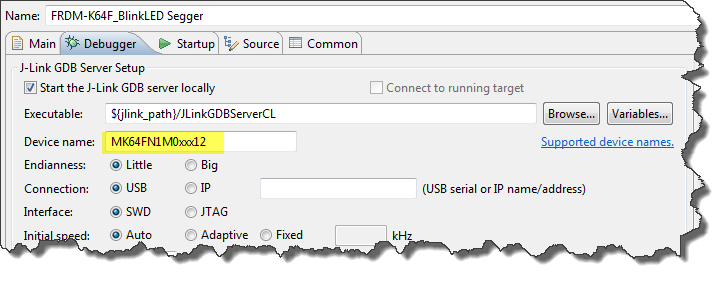
Thanks to the GNU ARM Eclipse plugins from Liviu it is easy to build and debug projects for all the different ARM cores. But I need to specify the device name in the debug configuration:

Device Name for Segger GDB Configuration

Device Name for Segger GDB Configuration

There must be an easier way for this? Yes, indeed, there is πŸ™‚

Continue reading

Segger J-Link Firmware for OpenSDAv2

Segger just has released their OpenSDAv2 firmware. The OpenSDAv2 firmware is different from the OpenSDAv1 as it is using a different memory map and bootloader. The OpenSDAv2 e.g. is present on the new FRDM-K64F board. The availability of the Segger firmware is definitely good news for any owner of the FRDM-K64F board: so far only the CMSIS-DAP firmware was available (on top of the mbed bootloader). With this, it was not possible to use the board with CodeWarrior, except with using an external P&E Multilink or Segger J-Link. With that new Segger J-Link OpenSDAv2 firmware, I can now use the FRDM-K64F with any IDE which supports the Segger J-Link :-).

FRDM-K64F with Segger OpenSDAv2 Firmware

FRDM-K64F with Segger OpenSDAv2 Firmware

Continue reading

Binary (and S19) Files for the mbed Bootloader with Eclipse and GNU ARM Eclipse Plugins

The existing OpenSDAv1 (see “OpenSDA on the Freedom KL25Z Board“) bootloader is using the industry standard Motorola S-Record (S19) Files. However, new FRDM-K64F board (see “FTF: FRDM-K64F, Kinetis Design Studio and Kinetis SDK“) has OpenSDAv2 on it, which is an mbed bootloader. So how to create files with an IDE other than mbed for that bootloader which is present on the FRDM-K64F board by default? Well, creating binary files is one thing, but to have it working with the mbed bootloader is another challenge :-(.

FRDM-K64F with mbed MSD bootloader

FRDM-K64F with mbed MSD bootloader

Continue reading

Recovering FRDM-K64F mbed Board

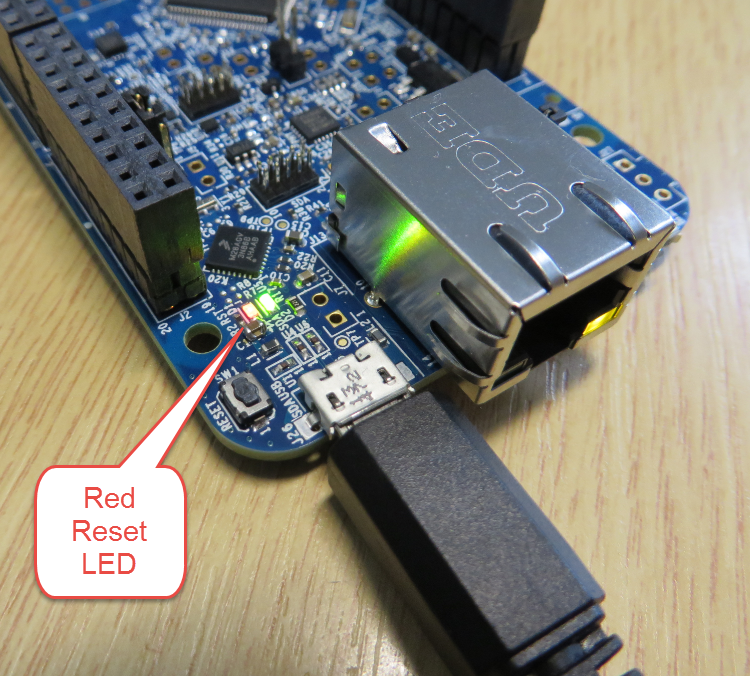
The mbed for FRDM-K64F firmware (http://mbed.org/handbook/Firmware-FRDM-K64F) has great potential. Unfortunately it seems that edges are still very rough: It happens veryΒ  often that my FRDM-K64F board gets locked up :-(. I can see that the target CPU is constantly resetting: the red reset LED is always on:

FRDM-K64F Red Reset LED always on

FRDM-K64F Red Reset LED always on

Continue reading

Sharing Debug Configuration with Eclipse

Maybe you had this problem too: you shared a project with somebody, only to realize that your carefully crafted debug configuration was not shared?

Eclipse has the concept to store settings in the ‘framework’. The ‘framework’ is the Eclipse internal data, basically what is inside the .metadata folder of the workspace.

metadata folder in workspace

metadata folder in workspace

Continue reading

DIY Free Toolchain for Kinetis: Part 10 – Project Creation with GNU ARM Eclipse 2.1.1

As mentioned in Part 9: There is a new GNU ARM Eclipse plugin 2.1.1, and this one makes project creation for Freescale devices easier than ever πŸ™‚

  • Native Kinetis-L project templates for FRDM-KL25Z and FRDM-KL46Z boards
  • Easier than ever project creation for Processor Expert projects
GNU ARM Eclipse 2.1.1

GNU ARM Eclipse 2.1.1

Continue reading

S-Record Manipulation with GNU objcopy and Burner Utility

In my earlier post “S-Record Generation with gcc for ARM/Kinetis” I documented how to have the ARM GNU gcc toolchain to produce aΒ S19 (Motorola (or now Freescale) S-Record) file. Here are a few more tips on that subject:

  1. Changing length of S-Records
  2. Only using 32bit addresses
  3. Combining S19 files

Continue reading

Using the FRDM-KL25Z with CMSIS-DAP to program non-Freescale ARM Microcontrollers

Freescale might not have thought about this: how to use Freescale boards and silicon to develop for non-Freescale silicon? πŸ˜‰

I tinkered around using the FRDM (e.g. FRDM-KL25Z) board as a general purpose programming or debugging device. See the links to the posts at the end of this article. I have used it to program and debug other Freescale ARM processors. It requires board changes and the usage of a different OpenSDA firmware which has its own limitations (no USB CDC serial bridge). But for about $15-20 I have a device to program my own external boards :-).

If you are using Keil tools, then the good news is: With CMSIS-DAP you can debug any other (even non-Freescale) ARM device as long it is supported by the IDE :mgreen:

FRDM-KL25Z debugging the nRF51422-DK (Source: Keith Wakeham)

FRDM-KL25Z debugging the nRF51422-DK (Source: Keith Wakeham)

Continue reading

FRDM Board Bootloader fails with Windows 8.1 Preview

Microsoft has released the Windows 8.1 Preview. So you can try out the next update of Windows 8. In short: Do NOT use Windows 8.1 Preview if you are using a Freescale FRDM board! Otherwise you will not be able to change the OpenSDA firmware (MSD or debug application).

❗ Update: P&E has released a new firmware v114 which combines USB CDC, MSD bootloader and debug application, and this firmware fixes the issue described in this post.

Well, I have not used it personally: I never use ‘test’ or ‘preview’ versions on my ‘production’ machine. It is ok to try things out on separate ‘scratch’ machines, but not on something I need to have stable for my work. Well, some of the students in my INTRO class were not able to resist and downloaded and installed Windows 8.1 Preview on their machines. With the result that the OpenSDA Bootloader does not work with Windows 8.1 Preview:

❗ It seems that the problem exists as well with the Windows 8.1 ‘final’ release.

Continue reading

FRDM Board not responding? Check your Virus Scanner!

In case you have this problem with the FRDM boards: You are using the FRDM bootloader mode (it shows up as BOOTLOADER) or the MSD mode (e.g. it shows up as FRDM-KL25Z) (see OpenSDA on the Freedom KL25Z Board) and it does not respond any more, or does not work as expected, then read on…

Continue reading