Tutorial: FreeRTOS with the Kinetis SDK and Processor Expert

Freescale had announced at FTF back in April this year that they will use Kinetis Design Studio  and the Kinetis SDK for all new Kinetis devices. The switch from CodeWarrior to Kinetis Design Studio (see “Comparing CodeWarrior with Kinetis Design Studio“) was not much of big deal for my projects (although CodeWarrior still has better features), and projects are rather easily portable. However, the move to the Kinetis SDK has been massively disruptive: Before it was easy to move projects from one device to another with Processor Expert, even from S08 to ColdFire to Kinetis. Now with the Kinetis SDK everything is very different. At least Freescale now officially supports FreeRTOS, and for myself as a big fan of that open source RTOS, that was some good news.

Blinking Red LED with FreeRTOS Task using Kinetis SDK, FreeRTOS and Processor Expert

Blinking Red LED with FreeRTOS Task using Kinetis SDK, FreeRTOS and Processor Expert

So in this tutorial I’m showing how FreeRTOS can be used with the Kinetis Design Studio. That makes at least using the Kinetis SDK bit more familiar to me :-).

Continue reading

Export and Import Processor Expert Component Settings

When I create a new Processor Expert project for a board I already have the components configured, then an easy way to transfer components from one project to another is to copy-paste the components. In the ‘source’ project I select the components I want to use, choose Copy (or CTRL+C shortcut on Windows):

Copy of Processor Expert Components

Copy of Processor Expert Components

Continue reading

C++ with Kinetis Design Studio

Unlike CodeWarrior, the Kinetis Design Studio (at least in V1.1.1) does not offer a choice between C and C++ projects. That makes sense with the GNU ARM Eclipse plugins, other than the CodeWarrior gcc integration, there is no need for setting up a special tool chain for C++ (see “Compiling C Files with GNU ARM G++“). While this is great, things are not perfect yet, so I’m providing in this post the information needed to properly setup a C++ project with Kinetis Design Studio V1.1.1.

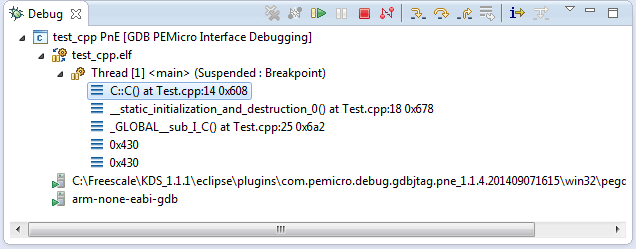
Debug View of Startup Code Calling C++ Constructors

Debug View of Startup Code Calling C++ Constructors

Continue reading

USB CDC with the FRDM-K64F, finally!

Sometimes I think that a problem should be solvable in a few minutes, and then it turns out that it lingers around for months. Very, very frustrating! Such a thing is getting the USB 4.1.1 stack running on the FRDM-K64F board. I have that board since April 2014, and it took me 7 months to get the FSL USB stack running on it :-(.

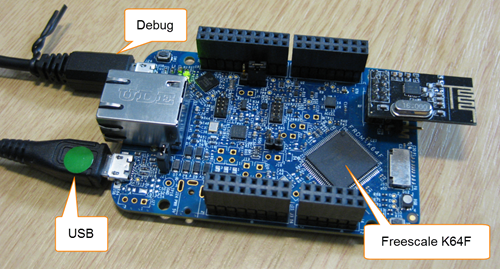
FRDM-K64F Board

FRDM-K64F Board

Continue reading

McuOnEclipse Releases on SourceForge

When I started the McuOnEclipse project back in 2012, I did not expect that it would create that much of attention :-). So far I’m sharing the project files on GitHub (see “McuOnEclipse goes Git“). GitHub is excellent for sharing sources, but not a good way to share release (binary) files. It is somewhat ok for small/few files, and initially that worked well for the few Processor Expert files (see “Processor Expert Component *.PEupd Files on GitHub“). However, with the amount of components and binary releases, the GitHub repository gets bloated. So I’m performing some maintenance work, and so I’m moving binary releases to a new McuOnEclipse SourceForge site.

McuOnEclipse On SourceForge

McuOnEclipse On SourceForge

Continue reading

Enabling/Disabling FXOS8700CQ Device Needs a Delay

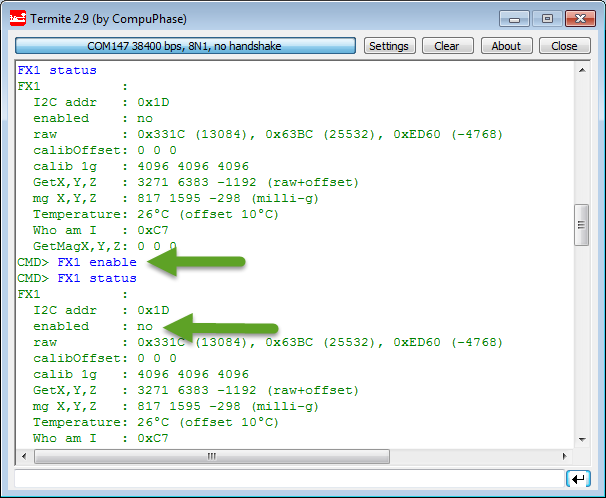
Found an interesting behaviour with the Freescale FXOS8700CQ on the new Sumo Robots (see “Sensor and Communication Shield for Sumo Robot“): when enabling the accelerometer/magnetometer, it actually did not work:

Failed to Enable FXOS8700 Accelerometer

Failed to Enable FXOS8700 Accelerometer

Continue reading

User Interrupt on NMI Pin with Kinetis and ExtInt Component

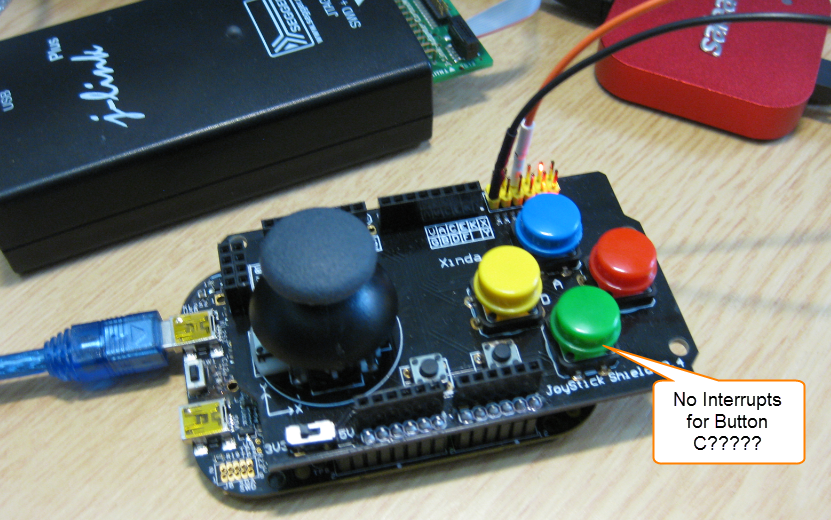
While my beef brisket (see “My First DIY Smoked Beef Brisket: Day 1“) is smoking on ;-), I have time to investigate a problem I was running on in my lecture on Friday: For the Joystick shield (see “JoyStick Shield with the FRDM Board“) on the FRDM-KL25Z board, I wanted to use an interrupt if I press the green button:

No Interrupts for Button C

No Interrupts for Button C

However, that did not work :-(.

Continue reading

RingBuffer Component with Put/Get/Clear Events

Sometimes I have a good idea how to extend one of my Processor Expert components with an extra feature, but then I step back because why implementing more than I need at the moment? Until another user of the component simply asks for the same thing, and here we go: if one or more can take advantage of a feature, that’s definitely a strong argument to add it :-). This happened with the RingBuffer Processor Expert component I’m using in many projects. And a reader of this blog asked to add some extra event methods: when an item is added or removed to the buffer.

RingBuffer used in USB Component with Extra Events

RingBuffer used in USB Component with Extra Events

Continue reading

XFormat, a Lightweight printf() and sprintf() Alternative

Frequent readers of this blog know that I do not like printf (see “Why I don’t like printf()“), because the standard printf() adds a lot of overhead and only causes troubles. But like small kids, engineers somehow get attracted by troubles ;-). Yes, printf() and especially sprintf() are handy for quick and dirty coding. The good news is that I have added a lightweight printf() and sprintf() implementation to my set of components: the XFormat component. And best of all: it supports floating point formatting :-).

XFormat Component

XFormat Component

Continue reading