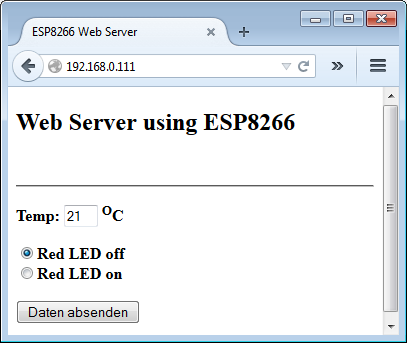
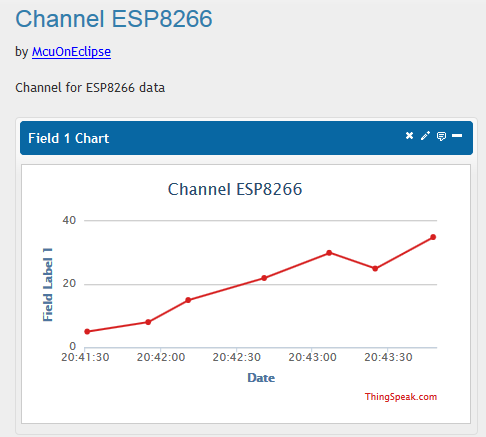
In my earlier post “Tutorial: Web Server with the ESP8266 WiFi Module” I used the ESP8266 WiFi module to run a local web server. This is a cool way to control devices inside my network. But to use that web page from the internet, I would need to open up my router which I don’t want to do for obvious reasons. Why not going the other way: host the web page in the internet, and have my board communicating with that internet page? This is exactly what this hype around IoT (Internet of Things) is all about :-).
Tag Archives: Eclipse
McuOnEclipse Components: 07-Dec-2014 Release
Over the last weeks, several contributions, extensions and fixes have been added to the McuOnEclipse components, so a new release is available on SourceForge.
- Bug fix for RingBuffer.
- Better FreeRTOS task debugging with gdb.
- Better watchdog support with Shell component.
- Additional properties for PercepipTrace.
- New Utility function ScanDoubleQuotedString() to scan a double quoted string.
- LCDHTA with additional cursor functions.
- New devices supported in FSL_USB_Stack: K22FN1M (FRDM-K22F), KL24Z48M, USB host support for K22F120/K22FX512).
- RNet with nRF24L01+ to deal better with overflow situations.
- A new component FreeRTOS_Tasks to create FreeRTOS tasks.
Tutorial: Web Server with the ESP8266 WiFi Module
It has been a while since my first post about the ESP8266 (see “Cheap and Simple WiFi with ESP8266 for the FRDM Board“). The ESP8266 is a new inexpensive ($4.50) WiFi module which makes it easy to connect to the network or internet. Finally this week-end I have found the time to write up a tutorial:
how to implement a WiFi web server for the ESP8266 WiFi module and the Freescale FRDM-KL25Z board:
Continue reading
Adding ‘Show in Windows Explorer’ to Eclipse
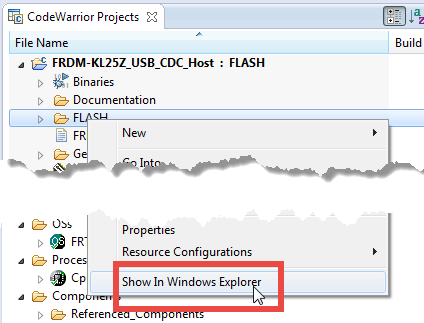
In CodeWarrior there was a very useful feature in the CodeWarrior Projects view: with a context menu I can open that folder/file in Windows Explorer:
However, this feature is missing in Eclipse, so how to add this functionality?
Tutorial: Playing MP3 Files with VS1053B and FRDM Board
I want to make some noise with this post!!! This tutorial is about adding music and sound capabilities to the Freescale Freedom board, and to have a lot of fun with it :-). I need this ability for a larger project working on for a while. But I thought I share that sub-part how to play sound files. So with this tutorial I can turn my Freescale Freedom board into a music or sound player :-). And adding sounds is a cool way for any project, and as the music is stored on an SD card it fits easily hours of music or sounds.
Updated McuOnEclipse Components: USB for KL24Z, FatFs v0.10c, Shell Backspace and FreeRTOS Trace Hook Configuration
I have received several requests to post a quick note when there is a new release (16-Nov-2014) of the McuOnEclipse components on SourceForge (see “McuOnEclipse Releases on SourceForge“). I have published today a new release, and with following major improvements:
- USB support for Kinetis KL24Z
- FatFs now features the latest Elm-Chan v0.10c release
- Backspace support in Shell
- Configuration item in FreeRTOS for Percepio Trace Hooks
Tutorial: How to Erase the FLASH with the GNU GDB debugger
I have several applications where I store application specific information in the microcontroller FLASH memory (see “Configuration Data: Using the Internal FLASH instead of an external EEPROM“). I have run into issues recently with the Segger J-Link GDB server as by default it does *not* erase all the FLASH memory. So the question is: How can I erase all (or part) of the FLASH memory with GDB (e.g. in Kinetis Design Studio or in Eclipse)?
Adding Processor Expert to Atollic TrueSTUDIO
For me as an Eclipse and Processor Expert lover, a press release that Atollic supports Processor Expert catched my eye :-). So there is yet another way to use Processor Expert: with a commercial Eclipse IDE provided by Atollic (atollic.com/).
Time to check it out…
Recovering the FRDM-K64F Bootloader, or: Cloning the Program of a Microcontroller
The Freescale FRDM-K64F and FRDM-K22F have a different OpenSDA (v2) firmware on it: unlike the earlier (v1), that firmware is open and not protected which is a great thing. However, it has the disadvantage if you use the wrong SWD/JTAG header on your board, the bootloader on the K20 OpenSDA microcontroller is gone 😦
Using Keil μVision 5 with Processor Expert
I happily used the Keil v4.71.2.0 μVision tools for a few small projects (see “Using Keil µVision (ARM-MDK) with Processor Expert Driver Suite“) with the ‘lite’ edition (32kByte code size limitation). This weekend I wanted to move to the new v5.12.05 version.
And there were indeed several things which are different. So this is post is about getting this version getting up and running as the v4.7 one.