
Over the last weeks, several contributions, extensions and fixes have been added to the McuOnEclipse components, so a new release is available on SourceForge.
- Bug fix for RingBuffer.
- Better FreeRTOS task debugging with gdb.
- Better watchdog support with Shell component.
- Additional properties for PercepipTrace.
- New Utility function ScanDoubleQuotedString() to scan a double quoted string.
- LCDHTA with additional cursor functions.
- New devices supported in FSL_USB_Stack: K22FN1M (FRDM-K22F), KL24Z48M, USB host support for K22F120/K22FX512).
- RNet with nRF24L01+ to deal better with overflow situations.
- A new component FreeRTOS_Tasks to create FreeRTOS tasks.

FreeRTOS Tasks Component
Ring Buffer Bug Fix
With a RingBuffer buffer size of 256 it was possible that the internal index variable overflows. This has now been fixed and it works properly with a buffer size of 256 bytes.

RingBuffer with 256 Elements
FreeRTOS Task Stack Frame with GDB
With FreeRTOS v8.0.0 on, there is an issue with gcc+gdb that it does not properly show the stack frame:

Incomplete Stack Frame
This is caused by the addition of an error handler in case the task returns. There is now a setting in the FreeRTOS properties where you can disable the error handler:

Task Exit Error Handler setting for FreeRTOS
With this, the stack task frames are shown properly with GDB too:

FreeRTOS Task Stack Frame properly shown
Shell with Command Parsing Hooks
If using a watchdog and if command line Shell commands take long for printing text, this can be an issue to properly refresh a watchdog. To deal with this situation, two optional hooks have been added to the shell:

Shell Iteration Hooks
If enabled, the hooks are called before and after parsing a command:
uint8_t CLS1_IterateTable(const uint8_t *cmd, bool *handled, CLS1_ConstStdIOType *io, CLS1_ConstParseCommandCallback *parserTable) { uint8_t res = ERR_OK; if (parserTable==NULL) { /* no table??? */ return ERR_FAILED; } /* iterate through all parser functions in table */ while(*parserTable!=NULL) { CLS1_OnBeforeIterateCmd(cmd); if ((*parserTable)(cmd, handled, io)!=ERR_OK) { res = ERR_FAILED; } CLS1_OnAfterIterateCmd(cmd); parserTable++; } return res; }That way I can measure and offset the time needed to handle a command and use this in my application to keep my watchdog counters up-to-date:
static TickType_t ticksBeforeCmd; void SHELL_OnBeforeIterateCmd(const uint8_t *cmd) { (void)cmd; /* not used */ ticksBeforeCmd = FRTOS1_xTaskGetTickCount(); } void SHELL_OnAfterIterateCmd(const uint8_t *cmd) { (void)cmd; /* not used */ WDT_IncTaskCntr(WDT_TASK_ID_SHELL, (FRTOS1_xTaskGetTickCount()-ticksBeforeCmd)/portTICK_RATE_MS); /* count for output to console */ }FreeRTOS PercepioTrace
Additional properties in Percepio FreeRTOS trace gives now more control what to trace:
- Ability to limit only to trace scheduling events
- Setting if ready events shall be traced
- Configuration if 16bit or 32bit handles shall be used
- Started to build up settings to enable/disable events to better use the trace buffer. For now vTaskDelay() and vTaskDelayUntil() can be turned on or off individually.
- Setting to tell trace that the heap is always below 16 MByte to reduce the trace size

New Perceipio FreeRTOS Trace Settings
Utility String Scanning
A new function has been added to the Utility to scan a string in double quotes. This is useful for example to read strings like
"hello", "my world"

ScanDoubleQuotedString
Character LCD Cursor Functions
The LCDHTA character LCD component has now a public interface to WriteLCDCommand() so the application can directly write LCD commands. And there are two new functions to shift the cursor either left or right:
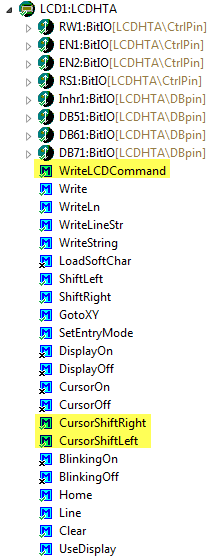
LCDHTA Cursor Functions
New Device Support for FSL_USB_Stack
The following devices have been added to the USB stack component:
- KL24Z48M
- K22FN1M (FRDM-K22F)
- USB host support for K22FX devices

New Device Support in USB Stack
RNet and nRF24L01+
The RNet component has been extended with a shell interface for the RMSG part, so it can report the size and status of the message queues. Additionally error handling for queue full cases in the nRF24L01+ transceiver has been improved.
Component to Create FreeRTOS Tasks
This component is a contribution of Omar Isaí Pinales Ayala from Mexico (thanks!). Omar already contributed a OneWire component which is experimental for the moment.
FreeRTOS Tasks Component
With the FreeRTOS_Tasks component new tasks can be created with a graphical user interface:

Tasks Created
It then creates the source to create the tasks:
void TSK1_CreateTasks(void) { if (FRTOS1_xTaskCreate( BlinkTask, /* pointer to the task */ "Blink", /* task name for kernel awareness debugging */ configMINIMAL_STACK_SIZE + 0, /* task stack size */ (void*)NULL, /* optional task startup argument */ tskIDLE_PRIORITY + 0, /* initial priority */ (xTaskHandle*)NULL /* optional task handle to create */ ) != pdPASS) { /*lint -e527 */ for(;;){}; /* error! probably out of memory */ /*lint +e527 */ } if (FRTOS1_xTaskCreate( CalcTask, /* pointer to the task */ "Calc", /* task name for kernel awareness debugging */ configMINIMAL_STACK_SIZE + 100, /* task stack size */ (void*)NULL, /* optional task startup argument */ tskIDLE_PRIORITY + 2, /* initial priority */ (xTaskHandle*)NULL /* optional task handle to create */ ) != pdPASS) { /*lint -e527 */ for(;;){}; /* error! probably out of memory */ /*lint +e527 */ } }Summary
I’m happy to publish multiple extensions, improvements and as well bug fixes. I hope the release is useful. The full release notes are available on SourceForge here.
Happy Upgrading 🙂


Sounds great! I’m especially interested in the string processing functions. Where can I download these component libraries and how do I import these into Code Warrior? I tried to find it on mcuoneclipse, without succeeding, though. A short hint would be appreciated.
Thanks and cheers
Adrian
LikeLike
Hi Adrian,
see https://mcuoneclipse.com/2014/10/21/mcuoneclipse-releases-on-sourceforge/
Erich
LikeLike
Hi,
how to create simple multi task without the use of operating system?
ARM Kinets.
ex:
main_task(){}
serial_task(){}
thanks
Carlos.
LikeLike
Hi Carlos,
This is the natural domain of operating systems :-). But you could use the Trigger component of my McuOnEclipse processor expert component set. With this, you have ‘mini-tasks’ which probably would do what you need?
LikeLike
Hi Erich,
my case 2 task
example:
main_task1 = monitor ( CDC ) PC ARM
load_code for RAM ( task2)
——————————————————
task2_RAM_Execute( code in RAM ) exe
——————————————————-
task1 load code(exe) PC,
task2 running code in ram.
thanks,
Carlos.
LikeLike
That looks like you should use a light-weight kernel like FreeRTOS….
LikeLike
Hi Erich,
with h08 was very easy to create multi tasks.
I will see,
thanks,
Carlos.
LikeLike
Hi Carlos,
then why you cannot use the same approach for Kinetis then?
Erich
LikeLike
Hi Erich,
See:
asm51.eng.br/forum/topic.asp?TOPIC_ID=10809
my examples, simple task for HC08,
timer_owerflow = sw task
I am new to ARM, my knowledge is not enough to do the same code.
thanks,
Carlos.
LikeLike
Hi Carlos,
looks like this is simply using a timer interrupt and then depending on the timer count to call functions. You can easily do this for ARM too, but you do not need assembly: simply write that in C code.
LikeLike
Why am I getting “conflicting types for ‘boolean'” when using MQX Lite and USB CDC class device?
LikeLike
Probably because MQXlite is declaring its own version of boolean?
LikeLike
thanks, I have solved it, I move USB to lastet component, and then ok
LikeLike
Hi Erich,
I created a project only with a KL05Z32 CPU in KDS using Processor Expert to test the Wait component. In main I used this:
Bit1_PutVal(TRUE);
WAIT1_Waitms(3);
Bit1_PutVal(FALSE);
WAIT1_Waitus(50);
Bit1_PutVal(TRUE);
WAIT1_Waitns(1);
Bit1_PutVal(FALSE);
WAIT1_Waitns(1000);
Using a scope I saw that the times are little different.
the 3ms is 3,28ms
50us is 58,8us
1ns is 1,84us
1000ns is 4,4us
CPU is configured to FEI mode, 20,97152MHz and the slow internal reference is used.
Did I missconfigured something or the reference’s accuracy is not so good? Is this component useful for KL05Z32 devices?
The 1ns I now that is not possible due to this 20,97152MHz.
Thanks in advance!
LikeLike
Hi Frederico,
these numbers look about correct. Keep in mind that WAIT is using busy waiting: so if you have interrupts interrupting it, the time will greatly vary.
If you need more accurate waiting, then I suggest that you either use an RTOS or a timer.
Erich
LikeLike
Hi Erich,
thanks for answering.
I will keep using the Wait functions, it was just some doubts. Yes, I’m using a interrupt based on Systick timer. It is ok for my applicaition. The wait function is only to wait some time before reading some IO operations.
Thanks!
LikeLike