FILLing unused Memory with the GNU Linker

In many of my applications I use a CRC/checksum to verify that the code/flash on the target is not modified. For this, not only the code/data in flash counts, but as well all the unused gaps in the memory map. Instead to leave it up to the flasher/debugger (which usually erases it to 0xFF), I want to fill it with my pattern. The GNU linker is using the pattern 0x00 for unused bytes inside sections. So this post is about to use the GNU linker to ‘fill’ the uninitalized FLASH memory with a pattern.

FLASH with DeadBeef Pattern

FLASH with DeadBeef Pattern

Continue reading

Tutorial: DIY Kinetis SDK Project with Eclipse – Board Configuration

In “Tutorial: DIY Kinetis SDK Project with Eclipse – Startup” I showed how to create a Kinetis SDK project from scratch. In this post it is about adding the board initialization files. With the board initialization the peripheral clocks and pin muxing is configured.

MK64FN1M0VLL12 on FRDM-K64F

MK64FN1M0VLL12 on FRDM-K64F

Continue reading

Tutorial: DIY Kinetis SDK Project with Eclipse – Startup

This is the start of a multi-post tutorial about the Freescale Kinetis SDK, released back in April as beta version. The SDK a set of peripheral drivers, and will become the standard software foundation and drivers provided by Freescale for their ARM Cortex based devices. Similar what other vendors already do. While this is a good step, it is the same time very disruptive for my university projects with new Freescale Cortex-M devices. And with everything new (and beta), it needs time to learn. So this post is about creating a Do-It-Yourself Kinetis SDK project from scratch for Eclipse. This part is about the startup code: about everything to get the application started.

FRDM-K64F with SD, nRF24L01+ and HC-06 Bluetooth

FRDM-K64F with SD, nRF24L01+ and HC-06 Bluetooth

Continue reading

Semihosting with Kinetis Design Studio

Semihosting is a technique to do printf() debugging through an active debug connection. So instead using a physical connection like RS-232 or USB CDC, the connection to the host machine is through the debugger. This post is about enabling and using semihosting with gcc and newlib/newlib-nano in Freescale Eclipse based Kinetis Design Studio (KDS) using the GNU ARM Eclipse plugins.

Semihosting Console View with output

Semihosting Console View with output

Continue reading

Tutorial: Freedom Board with Adafruit Ultimate GPS Data Logger Shield

Many times I start with a project and tutorial, only to get interrupted for emergency tasks and assignments. For a long time I wanted to add GPS (Global Positioning System) functionality to one of my projects. While I started a few months ago on this, it took me until this week-end to finish the at least the first part: a SD card data logger with GPS :-): I calculate global positioning and time information, can use it in Google maps and store it on a SD card:

Adafruit GPS Data Logger Shield on a FRDM-KL25Z Board

Adafruit GPS Data Logger Shield on a FRDM-KL25Z Board

Continue reading

Reducing Compile Time in Eclipse with Parallel Build

Feeling that building a project in Eclipse (including Kinetis Design Studio) takes a long time? Then probably the ‘parallel build’ option is not enabled in your project: Using parallel build option reduces the needed time by factors. To give an example, to build a project with 56 source files takes 32 seconds without parallel build enabled:

no parallel build

no parallel build

With parallel build enabled this gets reduced down to less than 10 seconds:

Parallel Build Enabled

Parallel Build Enabled

🙂

Continue reading

Constructing a Classroom IDE with Eclipse for ARM

For the next semester I will do things differently in my advanced embedded systems programming course (INTRO) at the University of Lucerne: Instead of using the Freescale provided CodeWarrior, we will use a DIY tool chain for ARM with Eclipse Kepler.
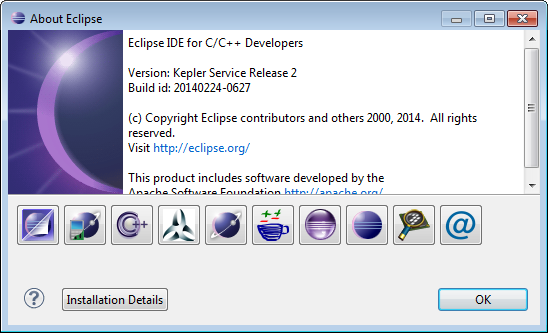
Eclipse Kepler Ready for Classroom Usage

Eclipse Kepler Ready for Classroom Usage

That way we we can offer students an open and convenient tool chain for their lab work, course assignments and own projects both at work and at home. So this post is about spending about 30 minutes to build your own tool chain which then can passed to students and coworkers so they have a complete toolchain installed in a few minutes.
Continue reading

Printing Code Size Information in Eclipse

For the GNU ARM tools it is easy to print out the code and date size information, see

But this is all for ARM cores. What if I use other architectures like S08 or ColdFire in Eclipse?

Code Size Information in Build Console

Code Size Information in Build Console

Continue reading

Binary (and S19) Files for the mbed Bootloader with Eclipse and GNU ARM Eclipse Plugins

The existing OpenSDAv1 (see “OpenSDA on the Freedom KL25Z Board“) bootloader is using the industry standard Motorola S-Record (S19) Files. However, new FRDM-K64F board (see “FTF: FRDM-K64F, Kinetis Design Studio and Kinetis SDK“) has OpenSDAv2 on it, which is an mbed bootloader. So how to create files with an IDE other than mbed for that bootloader which is present on the FRDM-K64F board by default? Well, creating binary files is one thing, but to have it working with the mbed bootloader is another challenge :-(.

FRDM-K64F with mbed MSD bootloader

FRDM-K64F with mbed MSD bootloader

Continue reading