This is Part 2 of a Mini Series. In Part 1, I described how to set up the hardware (see “Tutorial: Adafruit WS2812B NeoPixels with the Freescale FRDM-K64F Board – Part 1: Hardware“). Now it is time to have the software tools ready. In this post I describe to have the IDE (Freescale Kinetis Design Studio) with the Freescale SDK installed, along with the correct firmware on the FRDM-K64F Board. The goal is to drive Adafruit’s NeoPixel (WS2812B) with the Freescale FRDM-K64F board:
Tag Archives: Building
How to use Kinetis Design Studio!!
Getting the hands on an embedded project has always been exciting for me. So, here I am again with my blog trying to provide you with an easy to use guide for the Kinetis Design Studio 3.0.0 (KDS_3.0.0). Well, as you all know I am an intern at Freescale working for the first time on KDS, I will tell you what all we can do to start working on it with a perspective of a novice. But personally I feel KDS is one of the most encouraging IDE you can work on. So how do I start with my code for our NeoMatrix board? I am currently working with one of the demo codes for the NeoMatrix:
https://mcuoneclipse.com/2015/07/10/lets-play-with-freescale-frdm-k64f/
So, my first task is to write the code in KDS for the NeoMatrix_Demo. How do I do that? After opening the KDS 3.0.0, I need to go to File and select New and then Kinetis Project. You can see that the New Kinetis Project wizard appears once you click the File>New> Kinetis Project. Type a name and click next.
Using Segger Real Time Terminal (RTT) with Eclipse
I have used semihosting more and more in my projects. However, there are several disadvantage of using it:
- Without special handlers, it only works with an active debug connection going on. Without a debugger attached, the application blocks otherwise.
- Because it needs debugger interactions, it is rather slow (only several hundreds of bytes per second)
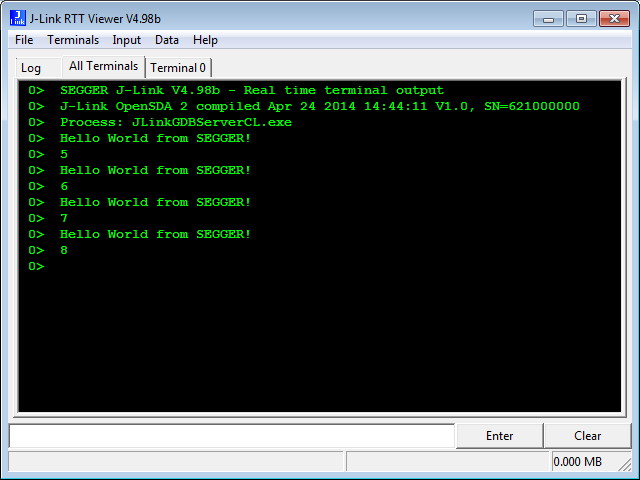
The good news is that Segger supports with their debug probes a faster approach with what they name Real Time Terminal (RTT). And it even runs without a debugger attached to the board: all what I need is a Segger J-Link probe (or Segger J-Link OpenSDA) plus a telnet client.
Open Source Static Code Analysis: Cppcheck with Eclipse
I have a challenge for you: Can you spot the problem in the following source?
TMOUT1_CounterHandle TMOUT1_GetCounter(TMOUT1_CounterType nofTicks){ TMOUT1_CounterHandle handle; CS1_CriticalVariable(); handle = 0; if (nofTicks==0) { nofTicks = 1; /* wait at least for one tick, otherwise will timeout immediately */ } CS1_EnterCritical(); while (!TMOUT1_FreeCounters[handle] && handle<TMOUT1_NOF_COUNTERS) { handle++; } if (handle<TMOUT1_NOF_COUNTERS) { TMOUT1_FreeCounters[handle]=FALSE; TMOUT1_Counters[handle] = nofTicks; } CS1_ExitCritical(); if (handle==TMOUT1_NOF_COUNTERS) { return TMOUT1_OUT_OF_HANDLE; } return handle;}No? Well, I have not spotted the problem the first time neither. However, a reader of this blog did: he used a cool tool named ‘cppcheck’: that tool reported the following:
Tutorial: Using Kinetis Design Studio V3.0.0 with IAR and Keil IDE’s
Freescale Kinetis Design Studio V3.0.0 came out early May this year. One of the new cool features is that it includes the Processor Expert V3.0.0 with an extended New Project Wizard. With this wizard I’m able to create and use Processor Expert projects with IAR Embedded Workbench and Keil MDK :-).
Eclipse Project ‘Refresh Policy’: Broken Incremental Build with External Make?
So here is a problem I have observed for a while, and several users have reported that to me: the problem is that for some reasons and only for some projects, when I do a ‘build’ in Eclipse CDT, it does a ‘full’ build. It does not only build the changed files, it builds all or many files in the project.
I expect that only the changed files will be rebuild. Instead, it compiles many files it should not compile/build, with the result that a build takes a very long time. That’s clearly wrong, and not what I expect. So what is causing this problem?
Code Coverage with gcov, launchpad tools and Eclipse Kinetis Design Studio V3.0.0
What makes Eclipse great: using open source tools there are a lot of tools and techniques available which usually are only provided for desktop development.
A while back I described how to do code coverage with Eclipse Kepler and the GNU ARM Embedded (launchpad) tools (see “Code Coverage for Embedded Target with Eclipse, gcc and gcov“). With Kinetis Design Studio out, time to do the same with that Eclipse distribution, especially as Freescale is now using the stock GNU ARM Embedded tools too.
Problem: undefined reference to ‘__end__’ if using Semihosting
In case you are running into the following GNU linker error about a missing __end__:
'Building target: MyProject.elf' 'Invoking: Cross ARM C++ Linker' ... toolchain/bin/../lib/gcc/arm-none-eabi/4.8.4/../../../../arm-none-eabi/lib/armv6-m/rdimon-crt0.o: In function `_start': (.text+0xdc): undefined reference to `__end__' collect2.exe: error: ld returned 1 exit status make: *** [MyProject.elf] Error 1
The GNU linker complains that rdimon-crt0.o needs the symbol __end__. This symbol marks the end of the user data/RAM section, and is needed by the rdimon library specs which is used with semihosting.
Merging NXP LPCXpresso IDE with Freescale Kinetis Design Studio, Processor Expert and Kinetis SDK
So NXP announced here a $40 Billion Merger with Freescale. Frequent readers of my blog will know that I’m using in my own and university projects many Freescale devices with Eclipse based tools (Eclipse Kepler/Luna, Emprog ThunderBench, Atollic TrueSTUDIO, Freescale CodeWarrior and of Freescale Kinetis Design Studio) in combination with Processor Expert. In a few projects I have used NXP devices with the CodeRed Eclipse base tools too. So I was curious how that merger of the two silicon companies could look like, if you merge the Freescale and NXP Eclipse based tools, and mix it with Processor Expert and the Freescale Kinetis SDK? The result looks like this:
Semihosting for Kinetis Design Studio V3.0.0 and GNU ARM Embedded (launchpad)
Freescale has released the v3.0.0 version of the Kinetis Design Studio: this one comes with a great positive change: instead of a custom toolchain, it is coming with the standard GNU ARM Embedded (launchpad) toolchain from ARM. Beside of better code density and less RAM needed, there is one change which affects semihosting. Previously, semihosting was enabled by default in the V2.0.0 libraries. Now semihosting needs to be turned on. This post is how to do this.