This is the start of a multi-post tutorial about the Freescale Kinetis SDK, released back in April as beta version. The SDK a set of peripheral drivers, and will become the standard software foundation and drivers provided by Freescale for their ARM Cortex based devices. Similar what other vendors already do. While this is a good step, it is the same time very disruptive for my university projects with new Freescale Cortex-M devices. And with everything new (and beta), it needs time to learn. So this post is about creating a Do-It-Yourself Kinetis SDK project from scratch for Eclipse. This part is about the startup code: about everything to get the application started.
Tag Archives: arm gcc
Semihosting with Kinetis Design Studio
Semihosting is a technique to do printf() debugging through an active debug connection. So instead using a physical connection like RS-232 or USB CDC, the connection to the host machine is through the debugger. This post is about enabling and using semihosting with gcc and newlib/newlib-nano in Freescale Eclipse based Kinetis Design Studio (KDS) using the GNU ARM Eclipse plugins.
Tutorial: Data Logger with the FRDM-K64F Board
The Freescale FRDM-K64F is a great board for data logger applications: it has a powerful ARM Cortex M4F with 120 MHz, 1 MB Flash and 256 KByte RAM. Best of all: it already has a micro SD card socket on the board :-).
Reducing Compile Time in Eclipse with Parallel Build
Feeling that building a project in Eclipse (including Kinetis Design Studio) takes a long time? Then probably the ‘parallel build’ option is not enabled in your project: Using parallel build option reduces the needed time by factors. To give an example, to build a project with 56 source files takes 32 seconds without parallel build enabled:
With parallel build enabled this gets reduced down to less than 10 seconds:
🙂
Constructing a Classroom IDE with Eclipse for ARM
For the next semester I will do things differently in my advanced embedded systems programming course (INTRO) at the University of Lucerne: Instead of using the Freescale provided CodeWarrior, we will use a DIY tool chain for ARM with Eclipse Kepler.
That way we we can offer students an open and convenient tool chain for their lab work, course assignments and own projects both at work and at home. So this post is about spending about 30 minutes to build your own tool chain which then can passed to students and coworkers so they have a complete toolchain installed in a few minutes.
Continue reading
GNU ARM Eclipse & Segger J-Link Device Name Settings
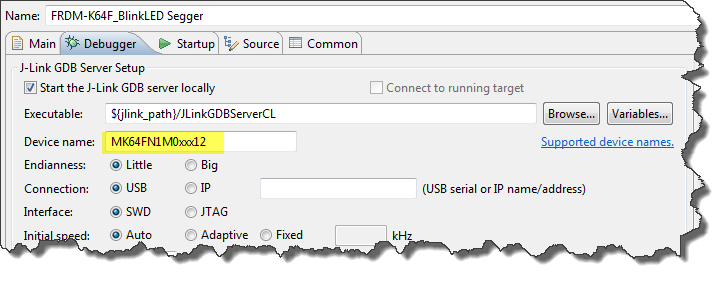
Thanks to the GNU ARM Eclipse plugins from Liviu it is easy to build and debug projects for all the different ARM cores. But I need to specify the device name in the debug configuration:
There must be an easier way for this? Yes, indeed, there is 🙂
Printing Code Size Information in Eclipse
For the GNU ARM tools it is easy to print out the code and date size information, see
- GNU Additional Tools: Create Flash Image, Print Size and Extended Listing Options
- Code Size Information with gcc for ARM/Kinetis
- text, data and bss: Code and Data Size Explained
But this is all for ARM cores. What if I use other architectures like S08 or ColdFire in Eclipse?
Binary (and S19) Files for the mbed Bootloader with Eclipse and GNU ARM Eclipse Plugins
The existing OpenSDAv1 (see “OpenSDA on the Freedom KL25Z Board“) bootloader is using the industry standard Motorola S-Record (S19) Files. However, new FRDM-K64F board (see “FTF: FRDM-K64F, Kinetis Design Studio and Kinetis SDK“) has OpenSDAv2 on it, which is an mbed bootloader. So how to create files with an IDE other than mbed for that bootloader which is present on the FRDM-K64F board by default? Well, creating binary files is one thing, but to have it working with the mbed bootloader is another challenge :-(.
GNU Linker, can you NOT Initialize my Variable?
my students sometimes are afraid to ask questions, although I urge them ask any question. In my opinion there are no ‘dumb’ questions: only questioning things let us think and learn new things. I see that many readers of this blog are *not* afraid to comment or ask questions. The WordPress statistics shows 5’687 questions/comments for this blog (thank you all!), and the spam filter protected me from 202,341 items (ok, these *are* dumb) :-).
The ‘question of the week’ comes from Andy. That question caused me some serious head scratching, but the same time I have learned something important and useful for my next project: how to tell the ARM GNU linker *not* to initialize variables?
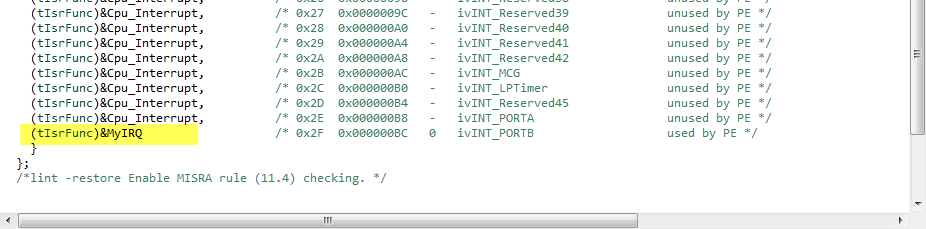
Tutorial: User Interrupts with Processor Expert
I have been asked this question several times:
“How can I define my own interrupt vector with Processor Expert?”
So I think it deserves a short tutorial, if more than one person is asking this ;-).