Many applications need to store persistent (non-volatile) data at runtime: configuration data, error logs, sensor data, calibration values, etc. The question is: where to store that data? If it is only a few kBytes, an SD card or similar is an overkill. Adding an external EEPROM? Sure, that works, but adds an extra part to the design. Some microcontroller have internal EEPROM. But what if not? Why not using the microprocessor internal flash memory?
Category Archives: Tips & Tricks
Tutorial: Freedom Board with Adafruit Ultimate GPS Data Logger Shield
Many times I start with a project and tutorial, only to get interrupted for emergency tasks and assignments. For a long time I wanted to add GPS (Global Positioning System) functionality to one of my projects. While I started a few months ago on this, it took me until this week-end to finish the at least the first part: a SD card data logger with GPS :-): I calculate global positioning and time information, can use it in Google maps and store it on a SD card:
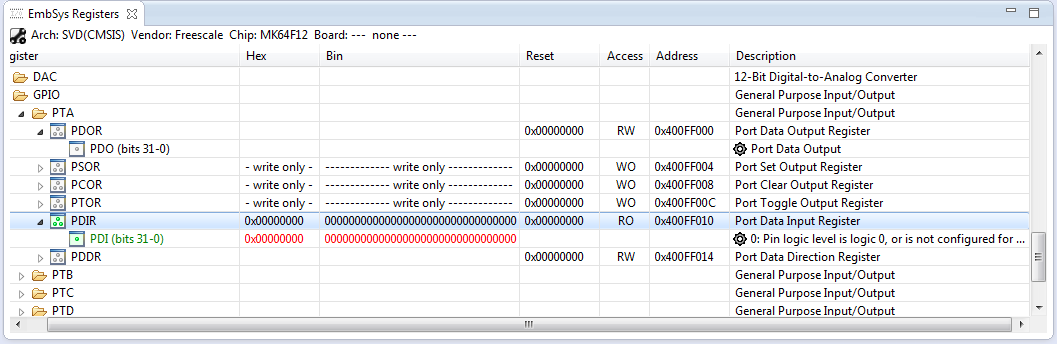
How to Add Register Details View in Eclipse
The standard Eclipse registers view only shows the core registers:
I think it would be great to have a view to see all the device peripheral registers too?
If you want the same, then this article is for you. It works both for stock Eclipse and Freescale Kinetis Design Studion (KDS) 🙂
Reducing Compile Time in Eclipse with Parallel Build
Feeling that building a project in Eclipse (including Kinetis Design Studio) takes a long time? Then probably the ‘parallel build’ option is not enabled in your project: Using parallel build option reduces the needed time by factors. To give an example, to build a project with 56 source files takes 32 seconds without parallel build enabled:
With parallel build enabled this gets reduced down to less than 10 seconds:
🙂
C/C++ Watchpoints with Eclipse Kepler
In “Watchpoints: Data Breakpoints” I used the Eclipse based CodeWarrior to set breakpoints so the debugger stops when my application is writing or reading a certain memory location. That CodeWarrior is based on an earlier Eclipse version, and things are different in Eclipse Kepler and not so easy to find. So here is how I can use watchpoints in Eclipse Kepler:
Joystick Shield with nRF24L01 driving a Zumo Robot
With the Joystick shield I have a convenient way to drive and control a Zumo Robot without a wired connection:
While things started promising, there was a power supply problem at the end to be solved…
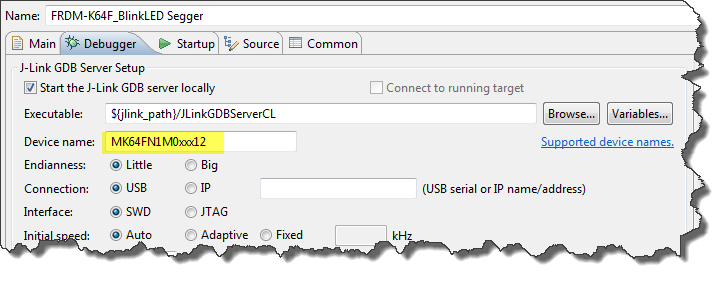
GNU ARM Eclipse & Segger J-Link Device Name Settings
Thanks to the GNU ARM Eclipse plugins from Liviu it is easy to build and debug projects for all the different ARM cores. But I need to specify the device name in the debug configuration:
There must be an easier way for this? Yes, indeed, there is 🙂
Printing Code Size Information in Eclipse
For the GNU ARM tools it is easy to print out the code and date size information, see
- GNU Additional Tools: Create Flash Image, Print Size and Extended Listing Options
- Code Size Information with gcc for ARM/Kinetis
- text, data and bss: Code and Data Size Explained
But this is all for ARM cores. What if I use other architectures like S08 or ColdFire in Eclipse?
Binary (and S19) Files for the mbed Bootloader with Eclipse and GNU ARM Eclipse Plugins
The existing OpenSDAv1 (see “OpenSDA on the Freedom KL25Z Board“) bootloader is using the industry standard Motorola S-Record (S19) Files. However, new FRDM-K64F board (see “FTF: FRDM-K64F, Kinetis Design Studio and Kinetis SDK“) has OpenSDAv2 on it, which is an mbed bootloader. So how to create files with an IDE other than mbed for that bootloader which is present on the FRDM-K64F board by default? Well, creating binary files is one thing, but to have it working with the mbed bootloader is another challenge :-(.
Using the FRDM-K64F with CodeWarrior
The new flagship of FRDM boards is the FRDM-K64F board. After FTF I have explored different ways debugging the board, and received many comments and questions about it (thanks!). Freescale announced the supports with the new Eclipse based Kinetis Design Studio (KDS). But until KDS is out, how can I use the FRDM-K64F board with CodeWarrior?