Listing Code and Data Size for each Source File with GNU and Eclipse

I have used the ‘classic’ CodeWarrior IDE for years, before I moved over to Eclipse some years ago. And as with any IDE or tool switch, things are different in the ‘new world’. In summary, I don’t want to go back anyway, and Eclipse is my development tool of choice now. But from time to time I get challenged about something like “hey, this was possible in the previous tool, so how can I do the same in Eclipse?”. As a fan of Eclipse, this then gets my attention as I feel that Eclipse can do it, and it can do it better. 😉

So what about this one: In CodeWarrior the project view lists code and data size for each source file:

Code And Data Size in CodeWarrior
Code And Data Size in CodeWarrior

Continue reading

Step-by-Step: Updating OSBDM/OSJTAG Debug Firmware

While new Freescale boards come with the OpenSDA debug firmware, I still students using boards with the OSBDM/OSJTAG. And with new CodeWarrior tools, it might be that there is a new OSBDM/OSJTAG firmware, and when I download to a board with an older firmware, the tool will prompt me to update the firmware. To me, after doing this several times, not a big deal. But for someone who sees this the first time, it might not be that easy. So to avoid any further questions, here we go with a step-by-step tutorial how to update the OSBDM/OSJTAG firmware.

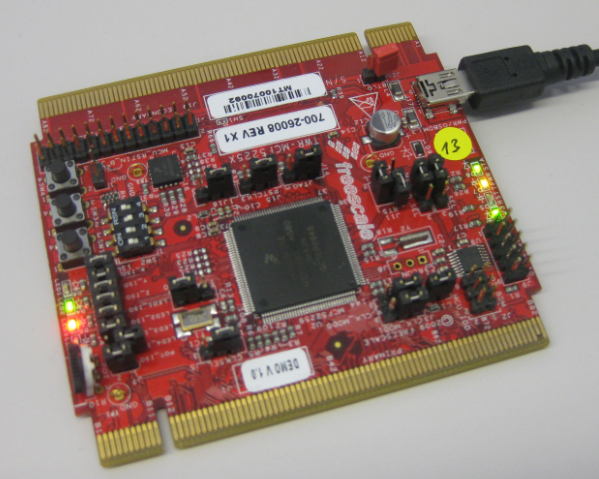
MCF52259 Tower Board with OSBDM Firmware

MCF52259 Tower Board with OSBDM Firmware

Continue reading

Replicating an Eclipse Update Site for Offline Usage

In my post “Constructing a Classroom IDE with Eclipse for ARM” I outlined how to build a DIY Eclipse distribution. That way I can build an archive/zip and distribute to my students: it saves them a lot of time, and they do not need to download things from the internet themselves, as I can give them the thing on a memory stick. But what if I want them to give them the update site files for offline usage too? For example CodeWarrior has an online update site:

Online Update Site

Online Update Site

How can I make a local copy of it to use in my classroom?

Continue reading

Finding Settings in Processor Expert Components

Processor Expert components are making things very easy to configure: go a component, use the component inspector and change a setting. However, with the devices getting more and more complex, the list of settings or properties get longer and longer. To the point that it is hard to find a setting.

For example, where are the settings for the PLL in the CPU component?

Component with Settings

Component with Settings

Continue reading

Printing Code Size Information in Eclipse

For the GNU ARM tools it is easy to print out the code and date size information, see

But this is all for ARM cores. What if I use other architectures like S08 or ColdFire in Eclipse?

Code Size Information in Build Console

Code Size Information in Build Console

Continue reading

Using the FRDM-K64F with CodeWarrior

The new flagship of FRDM boards is the FRDM-K64F board. After FTF I have explored different ways debugging the board, and received many comments and questions about it (thanks!). Freescale announced the supports with the new Eclipse based Kinetis Design Studio (KDS). But until KDS is out, how can I use the FRDM-K64F board with CodeWarrior?

Debugging FRDM-K64F Board with CodeWarrior for MCU v10.6

Debugging FRDM-K64F Board with CodeWarrior for MCU v10.6

Continue reading

Processor Expert (Driver Suite/Plugins/KDS) V10.4 with new Component Inspector

There has been a lot of new Freescale releases recently around FTF, and I’m trying to catch up. For me as a Processor Expert Lover, it is good news that there is now the new version 10.4 available. And it comes in different ways:

Microcontrollers Driver Suite v10.4

Microcontrollers Driver Suite v10.4

Continue reading

GNU Additional Tools: Create Flash Image, Print Size and Extended Listing Options

One question I have been asked several times here at FTF:

“How can I create an S19/Motorola S-Record with Eclipse?”

The answer depends on which Eclipse you are using. Actually it depends on which (ARM) build  tools plugin you are using, as with Eclipse you have the freedom of choice.

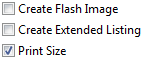
And this is not only about S19/Binary (Flash Image), but covers ‘Extended Listing’ and ‘Print Size’:

Additional Tool Options

Additional Tool Options

Continue reading

Tutorial: Thermal Printer, Part 1: Hardware Setup with FRDM Board

One of my embedded projects is to measure the running time in a sports event (see “Sports Timing System in a Lunch Box“). The recorded time is stored in an EEPROM plus sent over USB or wireless connection to the host. It would be great if I could print out the time and ranking directly, so if there is no PC, the system can be small and tiny. So here is my next project and tutorial: Printing with the Freedom board!

Hello World on the Printer with FRDM-KL25Z

Hello World on the Printer with FRDM-KL25Z

Continue reading

Generating Static FreeRTOS Source Code

Using Processor Expert is an awesome tool: it generates source code for me, and I can can ‘dynamically’ tune my projects to my needs. Still, sometimes it is better or desirable to have a ‘normal’ or ‘static’ project. This is very well possible with Processor Expert (see “Sneaking from Processor Expert” or “Disable my Code Generation“): I can generate the code one time, and then use it without Processor Expert.

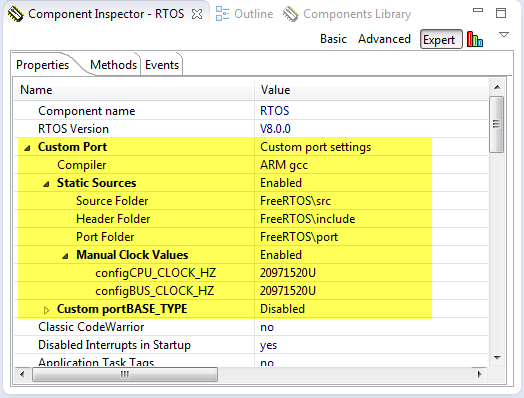
To make this even easier, I have added an option to the FreeRTOS Processor Expert component to generate ‘static’ code I can copy-paste to projects and tool chains which are either not supported by Processor Expert, or just for ‘static’ projects.

FreeRTOS Custom Port Settings

FreeRTOS Custom Port Settings

Continue reading