This article is part of a ‘mini series’ about hidden gems, tips and tricks around Eclipse.
The topic of this one is how to organize projects in the workspace with ‘Working Sets’.

Working Set Selection
This article is part of a ‘mini series’ about hidden gems, tips and tricks around Eclipse.
The topic of this one is how to organize projects in the workspace with ‘Working Sets’.
Working Set Selection
This article is part of a ‘mini series’ about hidden gems, tips and tricks around Eclipse.
The topic of this one is how to comment and un-comment a block of source code.

Block Comment
This article is part of a ‘mini series’ about hidden gems, tips and tricks around Eclipse.
The topic of this one is how to quickly mark and show where a variable is used and defined in the code.
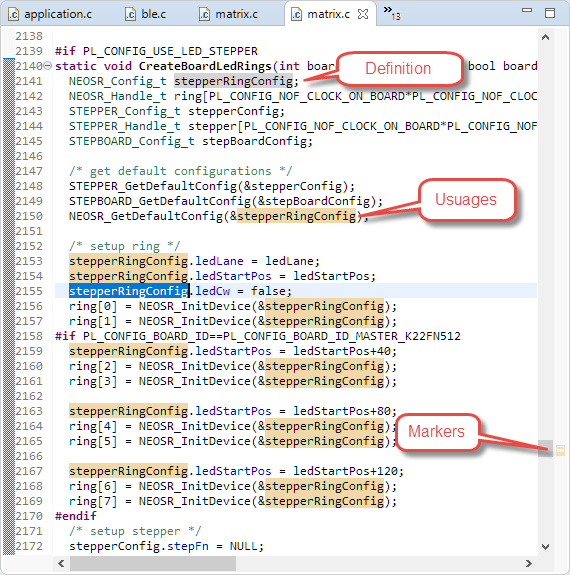
Highlighted Usages
This article is part of a ‘mini series’ about hidden gems, tips and tricks around Eclipse.
The topic of this one is how use Code Completion in the editor.

Library Code Completion
This article is part of a ‘mini series’ about hidden gems, tips and tricks around Eclipse.
The topic of this one is how to show where a variable, function, … is declared or defined.

Navigate Open Declaration
I’m making progress with the new ‘Billion Light‘ modules (aka V2): the new design is more modular and easier to build and assemble and still looks awesome with the moving lights and clock hands:

Different Enclosure and Arrangement
This article is part of a ‘mini series’ about hidden gems, tips and tricks around Eclipse.
The topic of this one is how to show where a project is located on the host system.

Show in System Explorer
This article is part of a ‘mini series’ about hidden gems, tips and tricks around Eclipse.
The topic of this one is how to accelerate the start of the debugger.

Nothing to be done
Creating a new project with Eclipse for a microcontroller these days is fairly easy, and I have the choice if I want to start the project with C or C++:

Choice of C and C++ for a new project
Still the embedded microcontroller world is dominated by C and not C++. So while it is easy to start with a C++ project, most vendor provided example or tutorial project are C projects. So how can I transform such project to C++?
When using a logging framework it is useful to use the current file name or line number. The ANSI C/C++ standard defines the __LINE__ and __FILE_ preprocessor macros for this.
But what about the project name, if it is a release or debug build, the microcontroller used or other things like the operating system which was used to build the binary?

Target Chip Name
This (and even more) can be easily provided by Eclipse to the C/C++ application being built with CDT.

