The Freescale FRDM-K64F is a great board for data logger applications: it has a powerful ARM Cortex M4F with 120 MHz, 1 MB Flash and 256 KByte RAM. Best of all: it already has a micro SD card socket on the board :-).

Data Logger with FRDM-K64F

The Freescale FRDM-K64F is a great board for data logger applications: it has a powerful ARM Cortex M4F with 120 MHz, 1 MB Flash and 256 KByte RAM. Best of all: it already has a micro SD card socket on the board :-).
Data Logger with FRDM-K64F
Feeling that building a project in Eclipse (including Kinetis Design Studio) takes a long time? Then probably the ‘parallel build’ option is not enabled in your project: Using parallel build option reduces the needed time by factors. To give an example, to build a project with 56 source files takes 32 seconds without parallel build enabled:

no parallel build
With parallel build enabled this gets reduced down to less than 10 seconds:

Parallel Build Enabled
🙂
For the next semester I will do things differently in my advanced embedded systems programming course (INTRO) at the University of Lucerne: Instead of using the Freescale provided CodeWarrior, we will use a DIY tool chain for ARM with Eclipse Kepler.

Eclipse Kepler Ready for Classroom Usage
That way we we can offer students an open and convenient tool chain for their lab work, course assignments and own projects both at work and at home. So this post is about spending about 30 minutes to build your own tool chain which then can passed to students and coworkers so they have a complete toolchain installed in a few minutes.
For the GNU ARM tools it is easy to print out the code and date size information, see
But this is all for ARM cores. What if I use other architectures like S08 or ColdFire in Eclipse?

Code Size Information in Build Console
The existing OpenSDAv1 (see “OpenSDA on the Freedom KL25Z Board“) bootloader is using the industry standard Motorola S-Record (S19) Files. However, new FRDM-K64F board (see “FTF: FRDM-K64F, Kinetis Design Studio and Kinetis SDK“) has OpenSDAv2 on it, which is an mbed bootloader. So how to create files with an IDE other than mbed for that bootloader which is present on the FRDM-K64F board by default? Well, creating binary files is one thing, but to have it working with the mbed bootloader is another challenge :-(.

FRDM-K64F with mbed MSD bootloader
my students sometimes are afraid to ask questions, although I urge them ask any question. In my opinion there are no ‘dumb’ questions: only questioning things let us think and learn new things. I see that many readers of this blog are *not* afraid to comment or ask questions. The WordPress statistics shows 5’687 questions/comments for this blog (thank you all!), and the spam filter protected me from 202,341 items (ok, these *are* dumb) :-).
The ‘question of the week’ comes from Andy. That question caused me some serious head scratching, but the same time I have learned something important and useful for my next project: how to tell the ARM GNU linker *not* to initialize variables?

GNU ARM Embedded Linker Options
I have been asked this question several times:
“How can I define my own interrupt vector with Processor Expert?”
So I think it deserves a short tutorial, if more than one person is asking this ;-).
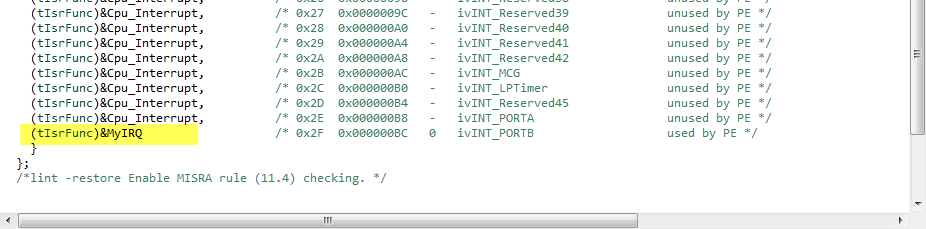
My user interrupt in the vector table
FreeRTOS has many memory allocation options (see Memory Management) with four ‘schemes’. One of it is the a simple wrapper over the library malloc() and free() routines. I admit, I have not used them, as usually I avoid to include such kind of libraries, as they have their own problems. Anyway, a discussion in the FreeRTOS forum raised my interest: obviously some malloc() implementation (as in the EWL library of CodeWarrior) are making a safety check against the current stack pointer.
Using Processor Expert is an awesome tool: it generates source code for me, and I can can ‘dynamically’ tune my projects to my needs. Still, sometimes it is better or desirable to have a ‘normal’ or ‘static’ project. This is very well possible with Processor Expert (see “Sneaking from Processor Expert” or “Disable my Code Generation“): I can generate the code one time, and then use it without Processor Expert.
To make this even easier, I have added an option to the FreeRTOS Processor Expert component to generate ‘static’ code I can copy-paste to projects and tool chains which are either not supported by Processor Expert, or just for ‘static’ projects.
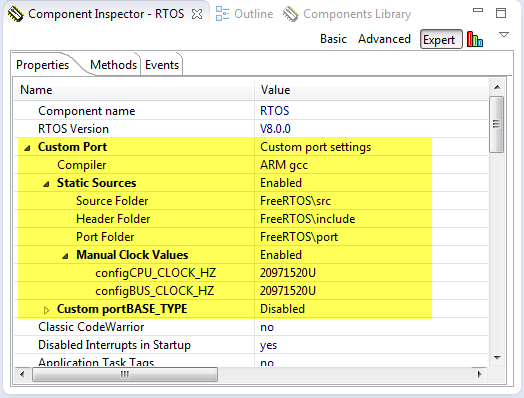
FreeRTOS Custom Port Settings
Naturally, I have several project ideas lingering around. No time to make them all (for now). One of it is interfacing the Raspberry Pi camera with a microcontroller. To store the images, I need plenty of RAM on the device, and so far the Kinetis microcontroller did not have that. Finally, Freescale announced the K64F120 a few months back, and my ordered TWR-K64F120M board arrived on my desk, waiting to be used: Finally I get an ARM Cortex-M4F with 1 MByte of FLASH and 256 KByte of RAM :-).

TWR-K64F120M Box
 MCU on Eclipse