This post starts a small (or larger?) series of tutorials using the Arduino Motor/Stepper/Servo Shield with the FRDM-KL25Z board. That motor shield is probably one of the most versatile on the market, and features 2 servo and 4 motor connectors for DC or stepper motors. That makes it a great shield for any robotic project :-).
Tag Archives: software project
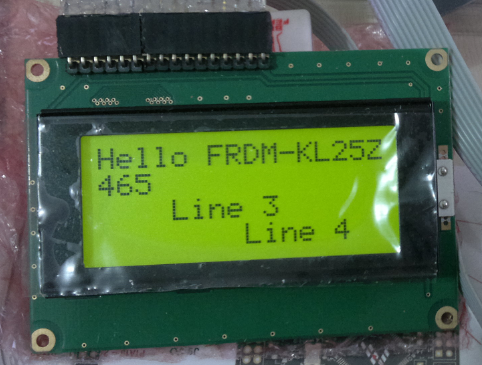
Character LCD with 4 Lines
Character LCD’s (like 2 lines with 16 characters each) as in this post are easy to use. Much easier to use compared to full graphical LCDs.
The ones I’m using have either 1 or 2 lines, but I saw that there are 4 line displays too. So far my LCD component only supports one or two lines.
Tracked Robot Update: Ultrasonic, Line Sensor and Shell with SMAC 802.15.4
The FRDM-KL25Z tracked robot from my earlier post has gone trough several upgrades:
How to use MCUonEclipse GitHub without Git
Not everyone is familiar with Git, and not everyone wants to use it. Although I think using Git or SVN is something every software engineer today needs to master 😉 To make it easier for the ‘non-Gitter’ to use the Processor Expert components, they are available now as *.PEupd files as described here. However, the *.PEupd files are just a snapshot, and not the latest and greatest. So how to use the latest component sources and example projects without Git?
Freedom Track Robot with IEEE802.15.4/SMAC
My other robots based on the FRDM-KL25Z use Bluetooth as connectivity. This one is using a Freescale IEEE802.15.4/ZigBee/SMAC module:
USBDM 4.10.5 supports now MCU10.4
Processor Expert Component *.PEupd Files on GitHub
The MCUonEclipse GitHub repository is great for everyone which is familiar with Git or GitHub. Previously I was hosting my Processor Expert components on steinerberg.com. Exporting and maintaining the Processor Expert Update Files (*.PEupd) one by one is a lot of effort. GitHub makes things a lot easier, but again: you need to be familiar with it. And not everyone is ‘gitting’ yet. To help the rest of the world (the non-Gitter), I have now published Processor Expert update files for all the components in the repository, so it is easier to install them.
IMPORTANT NOTE: After October 17th 2014, the releases of the McuOnEclipse Processor Expert has been moved to SourceForge, see McuOnEclipse Releases on SourceForge
Adding/Removing Floating Point Format for S08 Projects
Usually I do *not* use floating point numbers in my projects. For this, I select ‘None’ during the project creation in CodeWarrior for MCU:
But what if I need to change my mind later? How to change such a ‘no-floating-point-needed’ project to one with floating point format support?
Added Write Protection Pin to FatFsMemSDHC
What was missing in the FatFsMemSDHC component presented here is support for a ‘write protection’ pin. Well, that write protection is not present on micro-SD cards, and on normal SD cards it is a simple plastic thing with no real hardware meaning: it is all up to the software to respect it. While my other SD card components have support for such a write protection detection, it was lacking for the FatFsMemSDHC (for Kinetis) component. Time to fix this!
Serial Bootloader for the Freedom Board with Processor Expert
Bootloaders are a very useful thing: it allows programming an application file without a debugger. This makes it ideal for upgrading a system in the field.
Usually, there are application notes and examples from silicon vendors available. But typically they are for a certain microcontroller, and hard to change it to another system without a lot knowledge about its implementation. What I need for a project based on the FRDM-KL25Z is a bootloader which shall be small and portable. As I’m using Processor Expert to keep my applications portable across different microcontroller families: why not create a bootloader with Processor Expert components? With the Processor Expert drivers available, things can get a lot simpler compared to the ‘traditional’ approach. With less than 10 KByte footprint?