Using the FRDM-K64F with CodeWarrior

The new flagship of FRDM boards is the FRDM-K64F board. After FTF I have explored different ways debugging the board, and received many comments and questions about it (thanks!). Freescale announced the supports with the new Eclipse based Kinetis Design Studio (KDS). But until KDS is out, how can I use the FRDM-K64F board with CodeWarrior?

Debugging FRDM-K64F Board with CodeWarrior for MCU v10.6

Debugging FRDM-K64F Board with CodeWarrior for MCU v10.6

Continue reading

Processor Expert (Driver Suite/Plugins/KDS) V10.4 with new Component Inspector

There has been a lot of new Freescale releases recently around FTF, and I’m trying to catch up. For me as a Processor Expert Lover, it is good news that there is now the new version 10.4 available. And it comes in different ways:

Microcontrollers Driver Suite v10.4

Microcontrollers Driver Suite v10.4

Continue reading

GNU Additional Tools: Create Flash Image, Print Size and Extended Listing Options

One question I have been asked several times here at FTF:

“How can I create an S19/Motorola S-Record with Eclipse?”

The answer depends on which Eclipse you are using. Actually it depends on which (ARM) build  tools plugin you are using, as with Eclipse you have the freedom of choice.

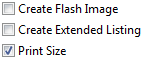
And this is not only about S19/Binary (Flash Image), but covers ‘Extended Listing’ and ‘Print Size’:

Additional Tool Options

Additional Tool Options

Continue reading

FreeRTOS, malloc() and SP check with GNU Tools

FreeRTOS has many memory allocation options (see Memory Management) with four ‘schemes’. One of it is the a simple wrapper over the library malloc() and free() routines. I admit, I have not used them, as usually I avoid to include such kind of libraries, as they have their own problems. Anyway, a discussion in the FreeRTOS forum raised my interest: obviously some malloc() implementation (as in the EWL library of CodeWarrior) are making a safety check against the current stack pointer.

Continue reading

Tutorial: Thermal Printer, Part 1: Hardware Setup with FRDM Board

One of my embedded projects is to measure the running time in a sports event (see “Sports Timing System in a Lunch Box“). The recorded time is stored in an EEPROM plus sent over USB or wireless connection to the host. It would be great if I could print out the time and ranking directly, so if there is no PC, the system can be small and tiny. So here is my next project and tutorial: Printing with the Freedom board!

Hello World on the Printer with FRDM-KL25Z

Hello World on the Printer with FRDM-KL25Z

Continue reading

First Steps with the Freescale TWR-K64F120M

Naturally, I have several project ideas lingering around. No time to make them all (for now). One of it is interfacing the Raspberry Pi camera with a microcontroller. To store the images, I need plenty of RAM on the device, and so far the Kinetis microcontroller did not have that. Finally, Freescale announced the K64F120 a few months back, and my ordered TWR-K64F120M board arrived on my desk, waiting to be used: Finally I get an ARM Cortex-M4F with 1 MByte of FLASH and 256 KByte of RAM :-).

TWR-K64F120M Box

TWR-K64F120M Box

Continue reading

CriticalSection Component

I have created and published on GitHub a new component ‘CriticalSection’:

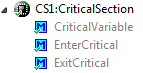
Critical Section Component Methods

Critical Section Component Methods

This component is a wrapper between my components and the problematic current implementation in Processor Expert (see EnterCritical() and ExitCritical(): Why Things are Failing Badly). It uses a flexible approach and uses macros to either use my modified version of EnterCritical() and ExitCritical(), or simply defaults to the original implementation.

Continue reading

Debugging the same Project Multiple Times in Parallel with Eclipse

I have I project which I want to debug on multiple boards the same time. So how can I download and debug the same application to multiple boards/processors, and debug them all the same time from within the same workspace and Eclipse IDE?

This is a typical scenario I have with my RNet stack: the same application runs on multiple boards, and I want to debug all the boards with the same project with the same Eclipse. For example to wireless sensor nodes with the RNet nRF24L01+ stack as in the picture below:

Two FRDM-KL25Z with nRF24L01+ Transceivers

Two FRDM-KL25Z with nRF24L01+ Transceivers

Continue reading

Eclipse Build Variables

This post is not about variables in my application code (which I debug). It is about using Variables in Eclipse for building projects. Eclipse variables allow me to make my projects ‘position independent’ whenever I cannot use a path relative to my projects or workspace.

Eclipse Variables

Which variables are used where in Eclipse might be sometimes not very clear. Depending in which context variables are used, not everything might be available. This link for example gives a list of variables which can be used to invoke an external tool.

Build Variables

Eclipse comes with many built-in variables, especially for the build system. If I want to see what variables are already defined, I can show them in the project properties, under C/C++ Build > Build Variables with enabled option ‘Show system variables’:
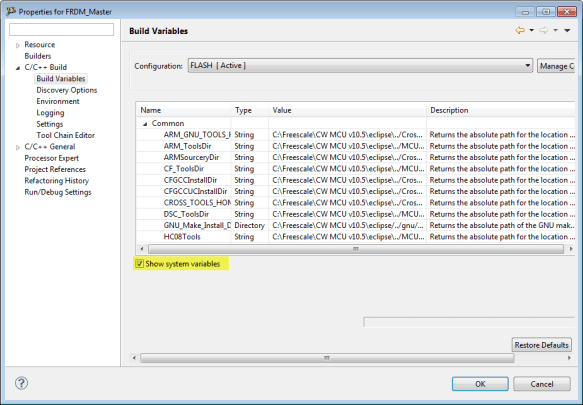
System Build Variables

System Build Variables

Continue reading

Processor Expert CDE: Debug Verbose Mode

I have one rule I try to follow every day: my code shall be warning free. Writing software for multiple compilers gets challenging with this rule, but it avoids the ‘not seeing the forest because of the trees’ problem. This rule extends to writing Processor Expert components with CDE (Component Development Environment). What I have missed (and not used) is a useful option to enable debug output:

Enable Processor Expert Components Debug Verbose Mode

Enable Processor Expert Components Debug Verbose Mode

Continue reading