Adding Multiple Include Paths to Build Settings in Eclipse

In Eclipse and CDT, I need to tell the compiler where it has to search for the header files. The normal way is to go to the compiler settings (menu Project > Properties > C/C++ Build > Settings) and then add the include paths, one by one, using the ‘+’ icon:

Adding Include Path

Adding Include Path (shown using the GNU ARM Eclipse plugin)

But for many include paths, this is a time-consuming process. But there is another way.
Continue reading

Adding ‘Show in Windows Explorer’ to Eclipse

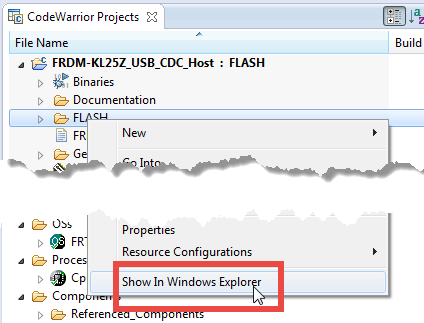
In CodeWarrior there was a very useful feature in the CodeWarrior Projects view: with a context menu I can open that folder/file in Windows Explorer:

Show In Windows Explorer in CodeWarrior Projects View

Show In Windows Explorer in CodeWarrior Projects View

However, this feature is missing in Eclipse, so how to add this functionality?

Continue reading

Tutorial: How to Erase the FLASH with the GNU GDB debugger

I have several applications where I store application specific information in the microcontroller FLASH memory (see “Configuration Data: Using the Internal FLASH instead of an external EEPROM“). I have run into issues recently with the Segger J-Link GDB server as by default it does *not* erase all the FLASH memory. So the question is: How can I erase all (or part) of the FLASH memory with GDB (e.g. in Kinetis Design Studio or in Eclipse)?

Memory Monitor with Erased Flash

Memory Monitor with Erased Flash

Continue reading

Processor Expert Value Proposals

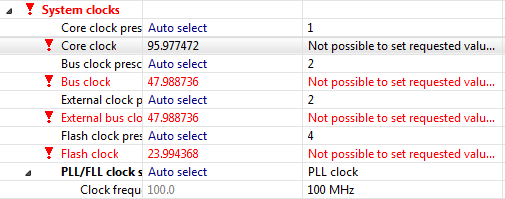
The cool thing with Processor Expert is that it gives me guidance through the settings. And there is a nice (rather hidden feature) which proposes me values I can enter:

💡 First, switch to the non-Tabs (classic) view, as the classic view is using the screen real estate better, and shows you *all* the information needed, and does not hide some.

So if you have some values to correct because other settings have changed:

Values to Enter

Values to Enter

Continue reading

Export and Import Processor Expert Component Settings

When I create a new Processor Expert project for a board I already have the components configured, then an easy way to transfer components from one project to another is to copy-paste the components. In the ‘source’ project I select the components I want to use, choose Copy (or CTRL+C shortcut on Windows):

Copy of Processor Expert Components

Copy of Processor Expert Components

Continue reading

Unlocking and Erasing FLASH with Segger J-Link

When using a bootloader (see “Serial Bootloader for the Freedom Board with Processor Expert“), then I usually protect the bootloader FLASH areas, so it does not get accidentally erased by the application ;-). When programming my boards with the P&E Multilink, then the P&E firmware will automatically unlock and erase the chip. That’s not the same if working with the Segger J-Link, as it but requires extra steps.

Protected FLASH Pages with Processor Expert

Protected FLASH Pages with Processor Expert

Continue reading

Emulating Eclipse ‘Run’ with ‘Debug’ Configuration

Student: “Professor, my application does not work!”
Professor: “What is the problem?”
Student: “I don’t know, but the LED on my board is not blinking.”
Professor: “Can you step through the port initialization sequence and check if the clocks are initialized correctly?”
Student: “I have pressed the ‘Run’ button, I’m not debugging”.
Professor: “Why are you not debugging?”
Student: “I always do a ‘Run’, and I do ‘Debug’ only if needed.”
Professor: “Ahhhhhhrrrrgggg!”

Run and Debug in Eclipse

Run and Debug in Eclipse

Clearly, I’m not immune to the ‘déformation professionelle‘. I very rarely use ‘Run’, because it simply does not offer much value compared to ‘Debug’ during development. If using ‘Run’ and then there is a problem, I have to ‘Debug’ anyway, why not ‘Debug’ from the beginning? It is simply not an efficient way to work for me. Or I’m missing something?

Continue reading

Comparing CodeWarrior with Kinetis Design Studio

At FTF 2014, Freescale made the announcement that CodeWarrior won’t support all the new ARM Kinetis devices coming out in the future: they will be supported with the free-of-charge Kinetis Design Studio (KDS) instead. As for myself, this is a big shift from a well established CodeWarrior toolchain to something new. A question which came up recently several times in the forums and in other posts is: how do CodeWarrior and KDS compare with each other?

CW vs KDS

CW vs KDS

Continue reading

Eclipse Performance Improvement Tip: Close Unused Projects

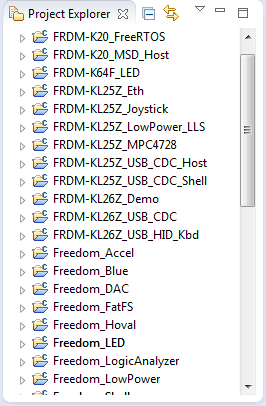
Eclipse is not the fastest and snappiest IDE of the world, but in my view the most versatile and open one. And as with any tool: using it the wrong way does not make it better. Sometimes I have students in my classes which complain that Eclipse is slow, even on a decent machine. Looking at their notebook screens and Eclipse workspace usually tells me right away what they are doing ‘wrong’: there are many, many projects open in the workspace, the most I have seen was more than 50 projects (yikes!!!)!

Many many projects open

Many many projects open

Continue reading

Link to Files and Folders in Eclipse

Eclipse projects have the nice features that they can link to files and folders: so instead of having the physical file, it is just a pointer to a file. This is very cool as that way I can point to shared files, or keep files in a common place referenced from projects, and so on.

Linked Folder and File in Eclipse

Linked Folder and File in Eclipse

As with most things in Eclipse, there is not a single way how to do things. So I’m showing in this post several ways how to link to files and folders.

Continue reading