Adding/Removing Floating Point Format for S08 Projects

Usually I do *not* use floating point numbers in my projects. For this, I select ‘None’ during the project creation in CodeWarrior for MCU:

No Floating Point Selected

No Floating Point Selected

But what if I need to change my mind later? How to change such a ‘no-floating-point-needed’ project to one with floating point format support?

Continue reading

Serial Bootloader for the Freedom Board with Processor Expert

Bootloaders are a very useful thing: it allows programming an application file without a debugger. This makes it ideal for upgrading a system in the field.

Usually, there are application notes and examples from silicon vendors available. But typically they are for a certain microcontroller, and hard to change it to another system without a lot knowledge about its implementation. What I need for a project based on the FRDM-KL25Z is a bootloader which shall be small and portable. As I’m using Processor Expert to keep my applications portable across different microcontroller families: why not create a bootloader with Processor Expert components?  With the Processor Expert drivers available, things can get a lot simpler compared to the ‘traditional’ approach. With less than 10 KByte footprint?

Serial Bootloader made with Processor Expert

Serial Bootloader made with Processor Expert

Continue reading

USB CDC with the FRDM-K20D50M

Good news for everyone owning the FRDM-K20D50M board: I have extended the FSL_USB_Stack with USB CDC device class support for the K20D50M :-).

USB CDC Test Application with the FRDM-K20D50M

USB CDC Test Application with the FRDM-K20D50M

Continue reading

printf() with the FRDM-KL25Z Board and without Processor Expert

In this tutorial I explored how to use printf(), and this tutorial is so generic that it works for any processor/microcontroller. That flexibility is because I’m using Processor Expert. In case Processor Expert shall not be used, then some tweaks are needed. Here I show what is needed to have printf() working with the FRDM-KL25Z board. I use the UART0 connected to OpenSDA USB CDC for this.

Continue reading

A new Freedom Board: FRDM-K20D50M with ARM Cortex M4

Freescale/Farnell/Element14 announced last week a new Freedom Board: the FRDM-K20D50M :-). As you can expect, I was not able to resist, and ordered one from my local Farnell store right away. So I did my first steps with it on this sunny and wonderful weekend (yes! we skipped Spring Time and entered Summer Time right away!).

I do not need to compare the board with the previous Freedom boards, as I have found an article here. I a nutshell: I get pretty much the same as with the FRDM-KL25Z, but instead of an ARM Cortex-M0+, it has an ARM Cortex-M4!

The new FRDM-K20D50M Board

The new FRDM-K20D50M Board

Continue reading

Extended Driver for the MMA8451Q Accelerometer

In “Tutorial: Accelerating the KL25Z Freedom Board” I used the MMA8451Q accelerometer on the FRDM-KL25Z board in a very primitive way: I’m reading directly some low-level registers from the device through an I2C low-level component. No calibrating, no special device feature setting, only raw values. Since then, things have been evolved: In “Tutorial: Creating a Processor Expert Component for an Accelerometer” I started to create a driver for this accelerometer, and since then a lot more functionality has been added.

Tracing Accelerometer Values to the Shell

Traced Accelerometer Values to the Shell

Continue reading

Copy of Processor Expert Components

Many times I have Processor Expert components carefully configured in one project, and then I want to have the same thing in another project. There is actually an easy way to carry out this: to copy components from one project to another.

Continue reading

Maze solving FRDM-KL25Z Robot goes backward for Dead-Ends

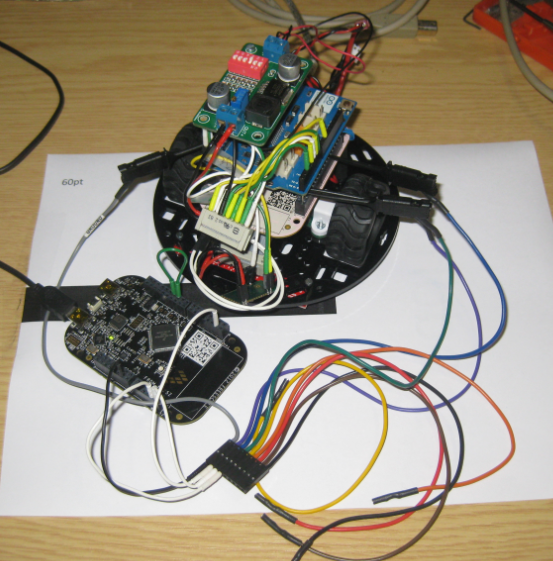
The maze solving robot based on the Freedom FRDM-KL25Z and Pololu Zumo shield has new features:

  1. For dead-end paths, instead turning around, the robot is driving backward
  2. Higher speed for going forward/backward/turns
  3. In the finish area, the robot turns around
  4. It reverts the solution path, so the robot can directly run from the finish area to the start
FRDM-KL25Z Robot on Practice Area

FRDM-KL25Z Robot on Practice Area

Continue reading

Freedom Logic Analyzer with DMA

The FRDM-KL25Z Open Source Logic Analyzer based on SUMP presented here was already very useful with the added trigger support. But it was not capable to do a sampling rate above a few hundred kHz. That’s ok for slower probing, but not for anything with a higher speed. Using DMA (Direct Memory Access) instead of timer based sampling can remove that limitation :-).

FRDM-KL25Z used as Logic Analyzer on another FRDM-KL25Z board

FRDM-KL25Z used as Logic Analyzer on another FRDM-KL25Z board

Continue reading

Compiling C Files with GNU ARM G++

If I want a C++ project for my KL25Z Freedom board, I select C++ during the project creation:

C++ Project Creation for GCC

C++ Project Creation for GCC

This creates a gcc C++ project with all the needed settings.

This worked fine until I added a *.c file to my project which had code in it which was not accepted by the C++ compiler. Wait! Should the *.c not be compiled in C mode, as I was used to with other compilers? It turned out that things are different with gcc (or g++) :-(: the *.c files in my project are compiled in C++ mode. So the question is: how to compile in C mode with the ARM g++ compiler?

Continue reading