The new flagship of FRDM boards is the FRDM-K64F board. After FTF I have explored different ways debugging the board, and received many comments and questions about it (thanks!). Freescale announced the supports with the new Eclipse based Kinetis Design Studio (KDS). But until KDS is out, how can I use the FRDM-K64F board with CodeWarrior?
Tag Archives: Building
GNU Linker, can you NOT Initialize my Variable?
my students sometimes are afraid to ask questions, although I urge them ask any question. In my opinion there are no ‘dumb’ questions: only questioning things let us think and learn new things. I see that many readers of this blog are *not* afraid to comment or ask questions. The WordPress statistics shows 5’687 questions/comments for this blog (thank you all!), and the spam filter protected me from 202,341 items (ok, these *are* dumb) :-).
The ‘question of the week’ comes from Andy. That question caused me some serious head scratching, but the same time I have learned something important and useful for my next project: how to tell the ARM GNU linker *not* to initialize variables?
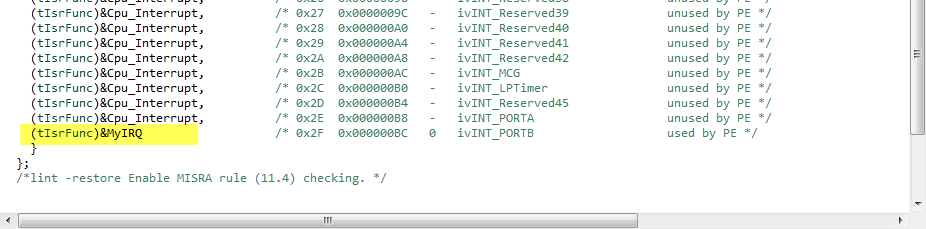
Tutorial: User Interrupts with Processor Expert
I have been asked this question several times:
“How can I define my own interrupt vector with Processor Expert?”
So I think it deserves a short tutorial, if more than one person is asking this ;-).
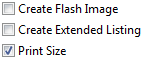
GNU Additional Tools: Create Flash Image, Print Size and Extended Listing Options
One question I have been asked several times here at FTF:
“How can I create an S19/Motorola S-Record with Eclipse?”
The answer depends on which Eclipse you are using. Actually it depends on which (ARM) build tools plugin you are using, as with Eclipse you have the freedom of choice.
And this is not only about S19/Binary (Flash Image), but covers ‘Extended Listing’ and ‘Print Size’:
FreeRTOS, malloc() and SP check with GNU Tools
FreeRTOS has many memory allocation options (see Memory Management) with four ‘schemes’. One of it is the a simple wrapper over the library malloc() and free() routines. I admit, I have not used them, as usually I avoid to include such kind of libraries, as they have their own problems. Anyway, a discussion in the FreeRTOS forum raised my interest: obviously some malloc() implementation (as in the EWL library of CodeWarrior) are making a safety check against the current stack pointer.
Generating Static FreeRTOS Source Code
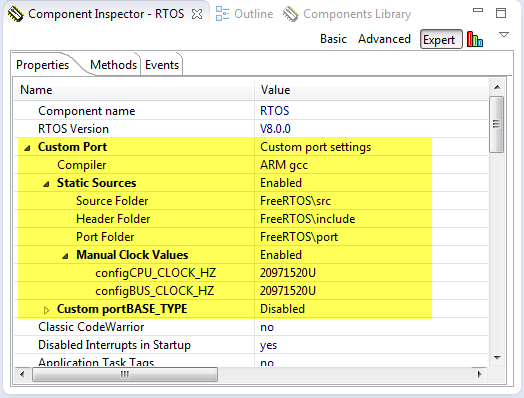
Using Processor Expert is an awesome tool: it generates source code for me, and I can can ‘dynamically’ tune my projects to my needs. Still, sometimes it is better or desirable to have a ‘normal’ or ‘static’ project. This is very well possible with Processor Expert (see “Sneaking from Processor Expert” or “Disable my Code Generation“): I can generate the code one time, and then use it without Processor Expert.
To make this even easier, I have added an option to the FreeRTOS Processor Expert component to generate ‘static’ code I can copy-paste to projects and tool chains which are either not supported by Processor Expert, or just for ‘static’ projects.
DIY Free Toolchain for Kinetis: Part 10 – Project Creation with GNU ARM Eclipse 2.1.1
As mentioned in Part 9: There is a new GNU ARM Eclipse plugin 2.1.1, and this one makes project creation for Freescale devices easier than ever 🙂
- Native Kinetis-L project templates for FRDM-KL25Z and FRDM-KL46Z boards
- Easier than ever project creation for Processor Expert projects
DIY Free Toolchain for Kinetis: Part 9 – Express Setup in 8 Steps
On Monday the new semester starts, and yet again: we will do a Sumo thing :-). They can choose which tool chain they would like to use to develop their application for the ARM Cortex-M0+ used from Freescale. One option is to create a ‘Do-It-Yourself’ toolchain. Since the start of the series, things have evolved: there is a new GNU ARM tool chain available, Segger has updated their drivers, and most important the GNU ARM Eclipse plugin has been greatly extended to support Freescale parts and Processor Expert. So instead to read through all the previous tutorials, this one is about putting together a free tool chain less than 10 minutes (not counting the time to download around 500 MByte).
DIY Free Toolchain for Kinetis: Part 8 – Processor Expert, Eclipse and GNU ARM Eclipse Plugins
There has been many new releases these days: Freescale released Processor Expert Driver Suite 10.3, and Liviu Ionescu released new GNU ARM Eclipse Plugins with new and updated documentation. So time for me to show how this all comes together 🙂
It is now easier than ever before to use the GNU ARM Eclipse plugins and Processor Expert. There are still some manual steps, and this post is about all the details to get it working as smooth as possible.
DIY Free Toolchain for Kinetis: Part 7 – GNU ARM Eclipse Plugins
Tired by the tool chains provided by your silicon vendor? Do you want to use a free and open tool chain? Then you probably followed by “DIY Free Toolchain” series already. In “DIY Free Toolchain for Kinetis: Part 2 – Eclipse IDE” I used the standard GNU Eclipse plugins. As mentioned in above post, there is an even better and more powerful plugin available: the GNU ARM Eclipse plug-ins. There is a dedicated blog site which provides excellent documentation and direct access to new and frequent releases. And these days there is a true a Christmas gift for every Eclipse lover: the version 1.1.7 with the addition of J-Link debugger plugin :-).