DIY Free Toolchain for Kinetis: Part 6 – Linux Host with OpenOCD and CMSIS-DAP

For everyone who wants to build a Do-It-Yourself toolchain for Kinetis on Linux, I recommend to read the following excellent post by Karibe:

Setting up Linux opensource build and debug tools for freescale freedom board FRDM-KL25Z

He describes how to get OpenOCD with CMSIS-DAP working with Eclipse on Ubuntu to debug the FRDM-KL25Z board.

List of Tutorials

Happy Linuxing 🙂

DIY Free Toolchain for Kinetis: Part 5 – FreeRTOS Eclipse Kernel Awareness with GDB

So far I have covered in this tutorial series how to install ARM GNU gcc, adding Eclipse, followed by adding GNU GDB debugger, and then adding Processor Expert. I’m using FreeRTOS a lot in my projects, and luckily there is a Kernel Awareness Plugin available for FreeRTOS for GDB in Eclipse. This tutorial is about how to install and use it.

Queues and Tasks

Queues and Tasks

Continue reading

FreeRTOS V7.5.0 released

A week ago, the updated FreeRTOS V7.5.0 has been released on FreeRTOS.org. So time to have my Processor Expert FreeRTOS component updated as well :-).

FreeRTOS V7.5.0

FreeRTOS V7.5.0

Continue reading

DIY Free Toolchain for Kinetis: Part 2 – Eclipse IDE

This is the second part of a multi-part tutorial about how to set up an open source tool chain with GNU ARM gcc + Eclipse to build and debug an application for Kinetis ARM devices.

List of Tutorials

Eclipse Kepler

Eclipse Kepler

Continue reading

DIY Free Toolchain for Kinetis: Part 1 – GNU ARM Build Tools

This is the first part of a multi-part tutorial on setting up a free and functional GNU gcc + Eclipse + debugger environment for use with the Freescale FRDM-KL25Z board.

List of Tutorials

In this first part, I’m showing how to install the GNU ARM tool chain to build a ‘blinking LED’ application for the FRDM-KL25Z. With 100% free tools 😉

Blinking Red RGB LED made with free tools

Blinking Red RGB LED made with free tools

Continue reading

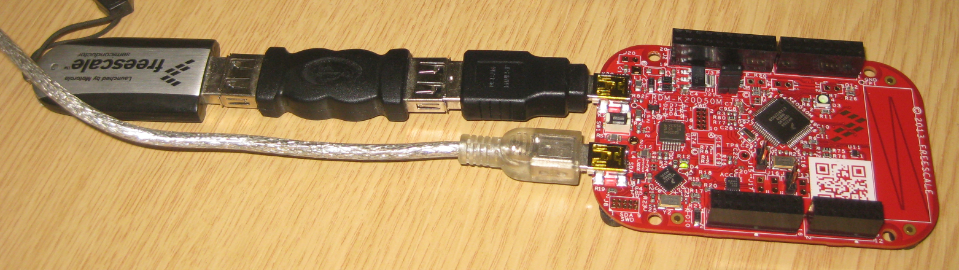
USB MSD Host for the FRDM-K20D50M Board

The Freedom boards FRDM-KL25Z RevE and FRDM-K20D50M make it easier to use it as USB Host device, as they come with a special jumper to provide 5V to the USB device, so my earlier ‘hack’ is not needed any more :-). After I had USB MSD Host working for the FRDM-KL25Z, it was much harder to get the USB stack working for the FRDM-K20D50M board, because somehow the example Freescale provided with their USB stack refused to work properly on my board. After debugging it for several nightly hours, I decided to take my working Processor Expert project for KL25Z and added support for the K20. And the good news is: since tonight this is working :-).

FRDM-K20D50M as USB MSD Host

FRDM-K20D50M as USB MSD Host

Continue reading

FreeRTOS Heap with Segmented Kinetis K SRAM

While working on a project for the FRDM-K20D50M, I faced a problem: I was running out of SRAM for my application. The GNU linker reports: “section `.bss’ will not fit in region `m_data'”: 😦

bss will not fit in region m_data

bss will not fit in region m_data

But my device has 16 KByte of SRAM, and I knew I use much less than 10 KByte. So what is the problem? Continue reading

Using the FRDM-KL25Z as USB Keyboard

I miss my old DELL laptop. Ok, the new one I received from IT services is not bad. It is faster and has a better screen. But I’m not really happy with the new keyboard. With the previous keyboard I was able to do a ‘PrtnScrn’ with a single key press. With the new one I need to press Fn + PrntScrn. And this is impossible to do with one hand:

Impossible to reach Prnt Scrn

Impossible to reach Fn+Prnt Scrn with one hand!

Yes, I have two hands ;-). But many times I need to do ‘print screen’ while having my other hand on the mouse :-(.What else can I do?

Continue reading

Traps and Pitfalls: No Hex/Bin/S19 File Created with GNU?

I stumbled now twice over a problem, and only after a lot of head scratching (you should see my head now 😉 ) I have found the cause (and solution) for it. In the hope that I can save the readers of this blog some time, here is what happened.

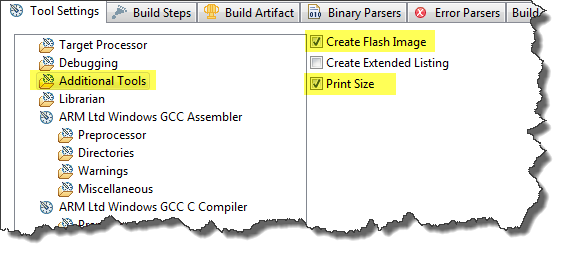
I described in earlier posts how to enable GNU build tools to generate hex/bin/S19 files, or to write the code size to the console view. That works fine for me. But then I received a project were obviously this does not work: even with the project settings configured properly, there is no S19 file, and no code size printed. What’s wrong?

Additional Tools in ARM GNU Eclipse Panel

Additional Tools in ARM GNU Eclipse Panel

Continue reading

Review of CodeWarrior for MCU10.4

Freescale has released this week an updated version of CodeWarrior: version 10.4. I’m usually not switching a tools version in the middle of a university semester. Unless I see a real benefit, and the risk is low. Well, I have used it now for a few days, and I have decided to move my projects from 10.3 to 10.4. Why? Read on…

CW for MCU10.4

CW for MCU10.4

Continue reading