In the area of IoT (Internet of Things), one obvious need is to have a way to send and receive data with an internet protocol. MQTT (or Message Queue Telemetry Transport) is exactly like that: a light-weight Machine-to-Machine communication protocol. With the MQTT protocol a microcontroller (or ‘client’) can send data and/or subscribe to data. For example to the Adafruit.IO:
Tag Archives: arm gcc
MCUXpresso IDE: Installing Processor Expert into Eclipse Neon
In “MCUXpresso IDE: Importing Kinetis Design Studio Projects” I explained how Kinetis Design Studio projects can be imported and used inside the MCUXpresso IDE. Processor Expert projects can be used, but no new components added, modified or new Processor Expert projects created. To fully use Processor Expert, two plugins need to installed, and this is what this article is about.
MCUXpresso IDE: Importing Kinetis Design Studio Projects
Many of my currently active projects are using Kinetis Design Studio (KDS) V3.2.0 from NXP (I have published many of my projects on GitHub). Now with the advent of the MCUXpresso IDE (see “MCUXpresso IDE: Unified Eclipse IDE for NXPs ARM Cortex-M Microcontrollers“), I have migrated several projects from KDS to MCUXpresso. This post is about how to easily get KDS projects ported and running in MCUXpresso IDE.
The Influence of Software and Tools on ARM Cortex-M Microcontroller Vendor Selection
For me, the available software and tools are the primary key decision factor why I select a particular silicon vendor. Without good software and tools, a microcontroller only ‘sand in plastic case’, even if it is the best microcontroller in the world. I do have several probably excellent microcontroller boards, and they are only getting touched by more durst over the months and years.
MCUXpresso IDE: S-Record, Intel Hex and Binary Files
This is another article about the NXP MCUXpresso IDE (see “MCUXPresso IDE: Unified Eclipse IDE for NXPs ARM Cortex-M Microcontrollers“), this time it is about Post-build steps. Post-build steps are custom actions which can be executed after the build (or link phase), and are typically used to generate S-Record, Binary or Intel Hex files (see “S-Record, Intel Hex and Binary Files“).
MCUXpresso IDE: Unified Eclipse IDE for NXPs ARM Cortex-M Microcontrollers
There are many mergers going on in the industry, and one of the largest one was in 2016 the integration of Freescale Semiconductor with NXP Semiconductors, with both providing Eclipse based IDE’s to their customer base. Consequently, the company merger triggered a merger of the IDE’s, and last week NXP has released the result: the MCUXpresso IDE.
Embedded World Nürnberg 2017 Impressions: MCUXpresso, Hexiwear, NTAG, LPC800-DIP and Alan Hawse
This year I managed to attend the Embedded World in Nürnberg/Germany after missing the 2016 show. And 2017 has been a blast! With more than 1000 exhibitors and >30’000 visitors it was huge! There were too many exciting things, so I just pick a few: NXP demonstrated the new MCUXpresso Software and Tools with a new Eclipse Neon based IDE, lots of IoT and Hexiwear, the tiny LPC800-DIP board, and I have met Alan Hawse in person!
Percepio FreeRTOS Tracealyzer Plugin for Eclipse
P&E ARM Cortex-M Debugging with FreeRTOS Thread Awareness and Real Time Expressions for GDB and Eclipse
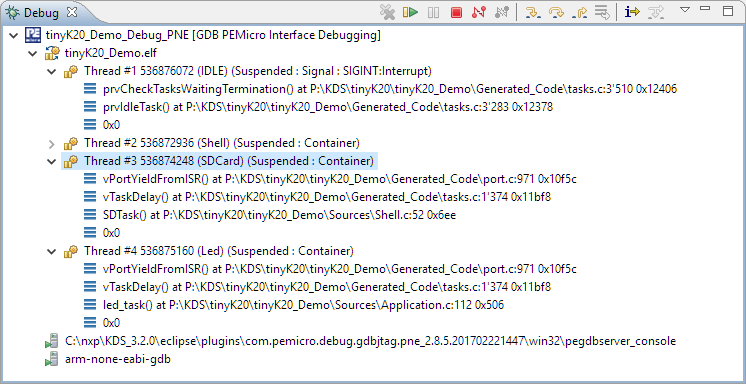
P&E has a new version of their GDB/Eclipse debug plugins available on their Eclipse update site, and it comes with to great features: Real Time Expressions (show variables while target is running) and FreeRTOS thread awareness 🙂
Tips for Making Copy of Eclipse CDT Projects Easier
Instead creating a new project from scratch, often it is simpler to copy an existing Eclipse CDT project, then change it and go on. To copy-past the a project in Eclipse:
- Select the project in the Project Explorer View (CTRL-C on Windows)
- Then paste it in the Project Explorer View (CTRL-V on Windows), and I can specify the new name:
However, to make that process simpler, a few things have to be done right in the ‘source’ project first.