Percepio has recently released the v2.7 version of Tracealyzer. This is a major upgrade from the v2.6 version which I have used so far: time to upgrade my Trace component for FreeRTOS to the latest and greatest v2.7!

FreeRTOS+Trace View (V2.7)

Percepio has recently released the v2.7 version of Tracealyzer. This is a major upgrade from the v2.6 version which I have used so far: time to upgrade my Trace component for FreeRTOS to the latest and greatest v2.7!
FreeRTOS+Trace View (V2.7)
The great thing with open source tools like Eclipse and GNU (gcc, gdb) is that there is a wealth of excellent tools: one thing I had in mind to explore for a while is how to generate code coverage of my embedded application. Yes, GNU and Eclipse comes with code profiling and code coverage tools, all for free! The only downside seems to be that these tools seems to be rarely used for embedded targets. Maybe that knowledge is not widely available? So here is my attempt to change this :-).
Or: How cool is it to see in Eclipse how many times a line in my sources has been executed?
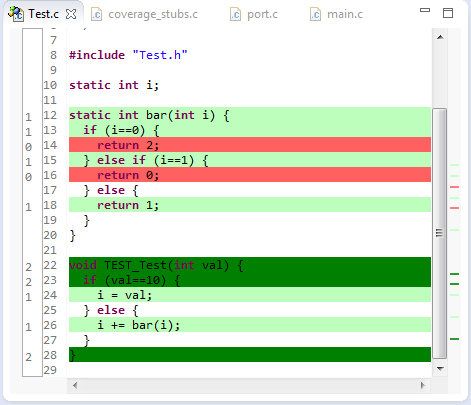
Line Coverage in Eclipse
And best of all, it does not stop here….
As I have received multiple questions about that Darth Vader Santa Claus/Christmas robot in the Mini-Sumo competition last week, here are the details in case you want to build your own :-)…

Darth Vader Sumo Bot
In Eclipse and CDT, I need to tell the compiler where it has to search for the header files. The normal way is to go to the compiler settings (menu Project > Properties > C/C++ Build > Settings) and then add the include paths, one by one, using the ‘+’ icon:

Adding Include Path (shown using the GNU ARM Eclipse plugin)
But for many include paths, this is a time-consuming process. But there is another way.
Travel is a hassle these days: airline on strike in Europe, long security lines at the airport, bumpy flight and long transfer to the hotel which is so tiny that the taxi driver missed it twice! Anyway, at least this time the reservation of the room *did* work. Arrived completely tired and with notebook batteries drained and empty. Unpacked the power adapter, ready to charge it up. Only to realize that the notebook power supply cable does not match the travel adapter plug! :-(:
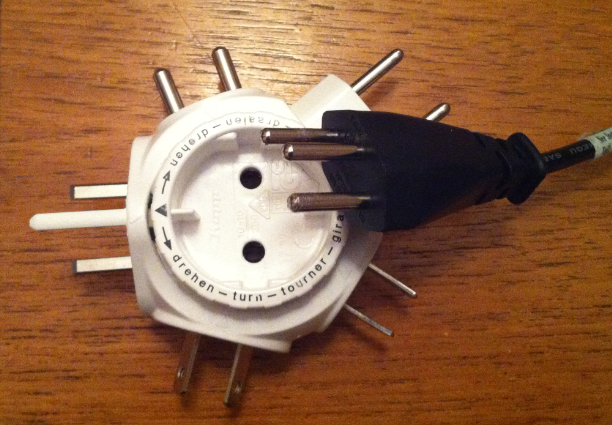
Travel Power Adapter Mismatch
So I have packed the 3-pin notebook power supply instead my usual travel 2-pin one 😦
It has been a while since my first post about the ESP8266 (see “Cheap and Simple WiFi with ESP8266 for the FRDM Board“). The ESP8266 is a new inexpensive ($4.50) WiFi module which makes it easy to connect to the network or internet. Finally this week-end I have found the time to write up a tutorial:
how to implement a WiFi web server for the ESP8266 WiFi module and the Freescale FRDM-KL25Z board:
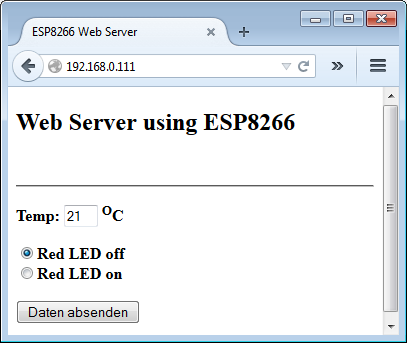
WSP8266 Web Server

FRDM-KL25Z with ESP8266 WiFi Module
In CodeWarrior there was a very useful feature in the CodeWarrior Projects view: with a context menu I can open that folder/file in Windows Explorer:
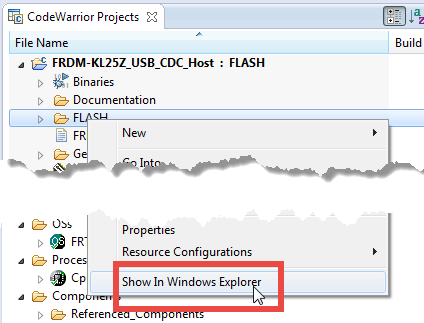
Show In Windows Explorer in CodeWarrior Projects View
However, this feature is missing in Eclipse, so how to add this functionality?
I want to make some noise with this post!!! This tutorial is about adding music and sound capabilities to the Freescale Freedom board, and to have a lot of fun with it :-). I need this ability for a larger project working on for a while. But I thought I share that sub-part how to play sound files. So with this tutorial I can turn my Freescale Freedom board into a music or sound player :-). And adding sounds is a cool way for any project, and as the music is stored on an SD card it fits easily hours of music or sounds.

MP3 Player with FRDM-KL25Z and Adafruit Music Maker MP3 Shield
I have several applications where I store application specific information in the microcontroller FLASH memory (see “Configuration Data: Using the Internal FLASH instead of an external EEPROM“). I have run into issues recently with the Segger J-Link GDB server as by default it does *not* erase all the FLASH memory. So the question is: How can I erase all (or part) of the FLASH memory with GDB (e.g. in Kinetis Design Studio or in Eclipse)?

Memory Monitor with Erased Flash
The Freescale FRDM-K64F and FRDM-K22F have a different OpenSDA (v2) firmware on it: unlike the earlier (v1), that firmware is open and not protected which is a great thing. However, it has the disadvantage if you use the wrong SWD/JTAG header on your board, the bootloader on the K20 OpenSDA microcontroller is gone 😦

Two SWD Headers on FRDM-K64F Board
 MCU on Eclipse