If I open a new workspace in Eclipse, it shows me the default ‘Welcome’ view:

Eclipse Neon Welcome Screen

If I open a new workspace in Eclipse, it shows me the default ‘Welcome’ view:
Eclipse Neon Welcome Screen
During Embedded World 2017 in Nürnberg I was lucky to get a handful LPC800-DIP boards. To get all students who were lucky to get one, here is a tutorial to make that very exciting ‘blinky’ application on that board:
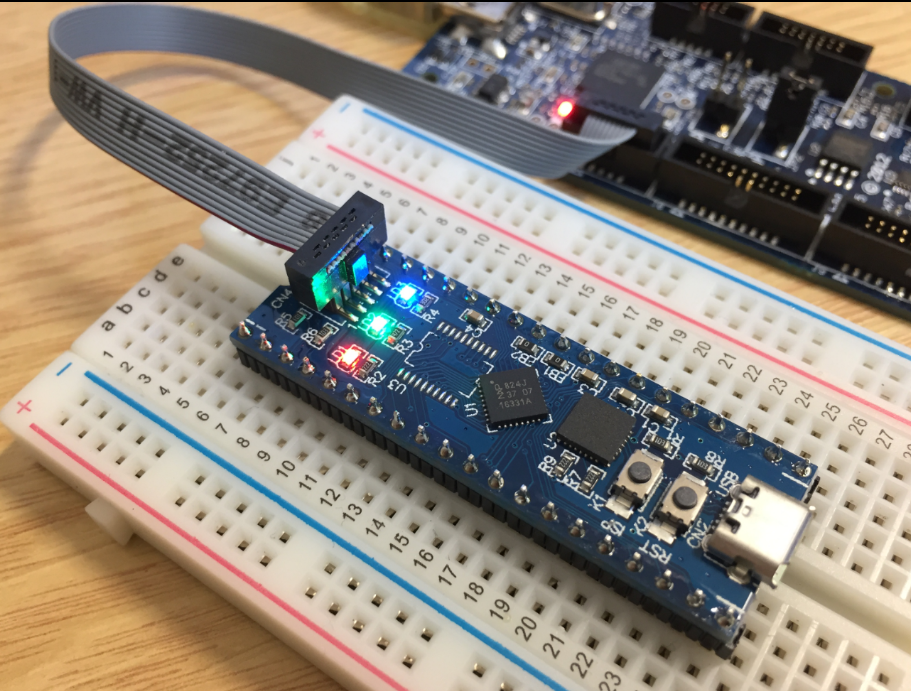
Blinky on the NXP LPC800-DIP
Eclipse for C/C++ (CDT) offers two different ways to get out of a debug session: Terminate and Disconnect:

Terminate and Disconnect
The terminate and disconnect behaviour is not standardized, and varies between Eclipse distributions and debug connection. This article is about how things are handled in MCUXpresso IDE, and how I can influence the behaviour.
I’m using Eclipse based IDE’s to develop and debug my embedded applications. This works great, as Eclipse has all the necessary tools to edit, build and debug it. But when it comes just to download/flash a binary to the board, then things are pretty much specific to the tools used. With the advent of the new MCUXpresso IDE, here is how that Eclipse IDE can be used for this.

LinkServer GUI Flash Programmer
The MCUXpresso IDE (see “MCUXpresso IDE: Unified Eclipse IDE for NXPs ARM Cortex-M Microcontrollers“) has one great feature: it includes debug support for the popular LPC-Link2 debug probes. That way I have yet another powerful debug probe with extra features for ARM based boards. That LPC-Link2 circuit is present on many LPCXpresso boards from NXP. So why not using it to debug it my custom hardware?

Debugging Custom Hardware with LPCXpresso Board
Looking for a small, inexpensive ($25-30) ARM development board (say 120-180 MHz ARM Cortex-M4 with FPU, 512kB-1MB of FLASH and 256 KByte of RAM? Then have a look at the Teensy 3.5 and Teensy 3.6 by PJRC/Paul Stoffregen:
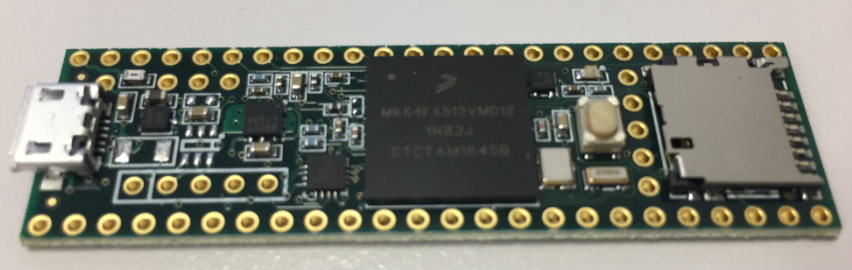
Teensy 3.5 with NXP K64F ARM Cortex-M4F
The only problem? it is not possible to debug it :-(. At least not in the traditional sense. This article is about how to change the board to use it with any normal SWD debugging tool e.g. Eclipse and the Segger J-Link :-).
MQTT is a lightweight and broadly used internet protocol (see “MQTT with lwip and NXP FRDM-K64F Board“). And probably the majority of IoT applications today are using Mosquitto as server (or ‘broker’ in MQTT language). By default, Mosquitto is using a protocol without encryption. In “Introduction to Security and TLS (Transport Layer Security)” I have covered the basics and needs for encryption. This article is about how to enable Mosquitto and clients to use the TLS protocol.

TLS Handshaking with certificates and keys
The Eclipse CDT build system automatically scans the files in my project folders and adds them to the list of files to be built. That works great if files are added through Eclipse and its plugins: That way Eclipse is notified and aware, and has the files added. But what if I have added files externally (outside of Eclipse)? how can I make Eclipse aware of it?

File added but not shown in Eclipse Project View
Many of my currently active projects are using Kinetis Design Studio (KDS) V3.2.0 from NXP (I have published many of my projects on GitHub). Now with the advent of the MCUXpresso IDE (see “MCUXpresso IDE: Unified Eclipse IDE for NXPs ARM Cortex-M Microcontrollers“), I have migrated several projects from KDS to MCUXpresso. This post is about how to easily get KDS projects ported and running in MCUXpresso IDE.

Debugging KDS Project in MCUXpresso IDE
One great thing with Eclipse compared to proprietary IDEs are the thousands of available plugins. Yes, not every plugin is probably on the ‘must have’ list (I have listed some in a series starting with “5 Best Eclipse Plugins: #1 (Eclox with Doxygen, Graphviz and Mscgen)“).
The ‘traditional’ approach to install Eclipse plugins is using the menu Help > Install New Software. Using that approach, I have to use or enter an Eclipse update site. An easier way is to use the Eclipse Marketplace plugin which allows me to search and browse for plugins and simplifies installation of it. But as this one does not come installed by default with MCUXpresso. But it is my preferred way to browse and install plugins into Eclipse:

Eclipse Marketplace under Eclipse Neon and MCUXpresso IDE
 MCU on Eclipse