McuOnEclipse Releases on SourceForge

When I started the McuOnEclipse project back in 2012, I did not expect that it would create that much of attention :-). So far I’m sharing the project files on GitHub (see “McuOnEclipse goes Git“). GitHub is excellent for sharing sources, but not a good way to share release (binary) files. It is somewhat ok for small/few files, and initially that worked well for the few Processor Expert files (see “Processor Expert Component *.PEupd Files on GitHub“). However, with the amount of components and binary releases, the GitHub repository gets bloated. So I’m performing some maintenance work, and so I’m moving binary releases to a new McuOnEclipse SourceForge site.

McuOnEclipse On SourceForge
McuOnEclipse On SourceForge

Continue reading

Enabling/Disabling FXOS8700CQ Device Needs a Delay

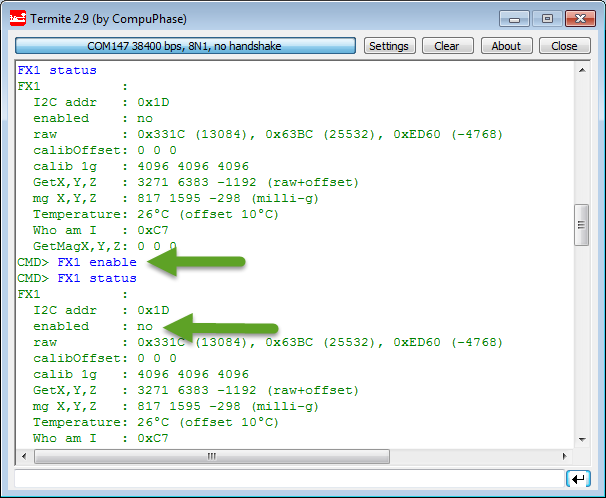
Found an interesting behaviour with the Freescale FXOS8700CQ on the new Sumo Robots (see “Sensor and Communication Shield for Sumo Robot“): when enabling the accelerometer/magnetometer, it actually did not work:

Failed to Enable FXOS8700 Accelerometer

Failed to Enable FXOS8700 Accelerometer

Continue reading

User Interrupt on NMI Pin with Kinetis and ExtInt Component

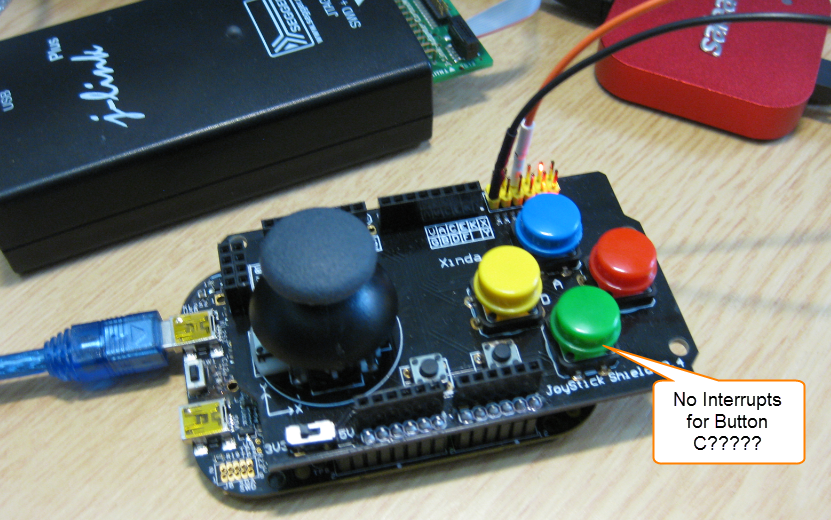
While my beef brisket (see “My First DIY Smoked Beef Brisket: Day 1“) is smoking on ;-), I have time to investigate a problem I was running on in my lecture on Friday: For the Joystick shield (see “JoyStick Shield with the FRDM Board“) on the FRDM-KL25Z board, I wanted to use an interrupt if I press the green button:

No Interrupts for Button C

No Interrupts for Button C

However, that did not work :-(.

Continue reading

RingBuffer Component with Put/Get/Clear Events

Sometimes I have a good idea how to extend one of my Processor Expert components with an extra feature, but then I step back because why implementing more than I need at the moment? Until another user of the component simply asks for the same thing, and here we go: if one or more can take advantage of a feature, that’s definitely a strong argument to add it :-). This happened with the RingBuffer Processor Expert component I’m using in many projects. And a reader of this blog asked to add some extra event methods: when an item is added or removed to the buffer.

RingBuffer used in USB Component with Extra Events

RingBuffer used in USB Component with Extra Events

Continue reading

XFormat, a Lightweight printf() and sprintf() Alternative

Frequent readers of this blog know that I do not like printf (see “Why I don’t like printf()“), because the standard printf() adds a lot of overhead and only causes troubles. But like small kids, engineers somehow get attracted by troubles ;-). Yes, printf() and especially sprintf() are handy for quick and dirty coding. The good news is that I have added a lightweight printf() and sprintf() implementation to my set of components: the XFormat component. And best of all: it supports floating point formatting :-).

XFormat Component

XFormat Component

Continue reading

Multi-Drive Support with FatFS

I admit: I’m sometimes a lazy person. In my projects, I only needed one ‘disk drive’ with the FatFS Processor Expert component: either a SD card or a USB MSD drive. But a reader of this blog wanted to use FatFS with multiple drives: using it with an SD card and a USB MSD drive. And actually FatFS does support this, I just had no need for it, thus I did not add anything special for it. But that reader let me think that I better add Multi-Drive support. Even if I do not need it now, that could be very handy in the future 🙂

FatFS Drive System (Source http://elm-chan.org/fsw/ff/en/appnote.html)

FatFS Drive System (Source http://elm-chan.org/fsw/ff/en/appnote.html)

Continue reading

printf() and scanf() with GNU ARM Libraries

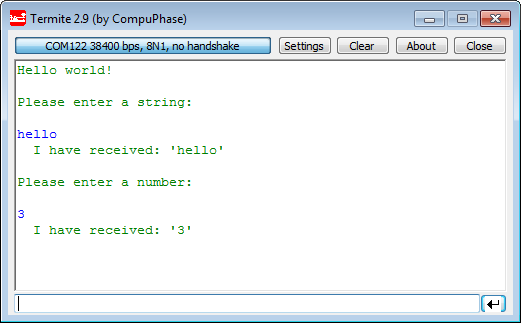
In “Semihosting with Kinetis Design Studio” I’m using the debugger with semihosting to output text with printf(). But how to use a physical serial connection instead?

printf() and scanf() in action

printf() and scanf() in action

This post is about how to enable and use printf() and scanf() with GNU ARM libraries. I show it both for the Freescale Kinetis Design Studio (KDS) and for stock Eclipse Kepler with the GNU GCC ARM Embedded (launchpad) toolchain and libraries. The principles are the same, just the details are different ;-).

Continue reading

Showcase of Student Project Exhibition 2014 in Horw

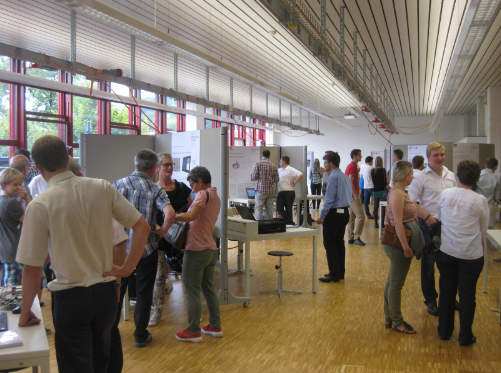
Yesterday Friday afternoon, the students at the Lucerne University of Applied Sciences and Arts in Horw showcased their last semester project work to the public at the university. There were many, many interesting projects, so here are a few to give an idea what has been accomplished …

Part of the Exhibition Area

Part of the Exhibition Area

Continue reading

Tutorial: Nordic Semiconductor nRF24L01+ with the Freescale FRDM-K64F Board

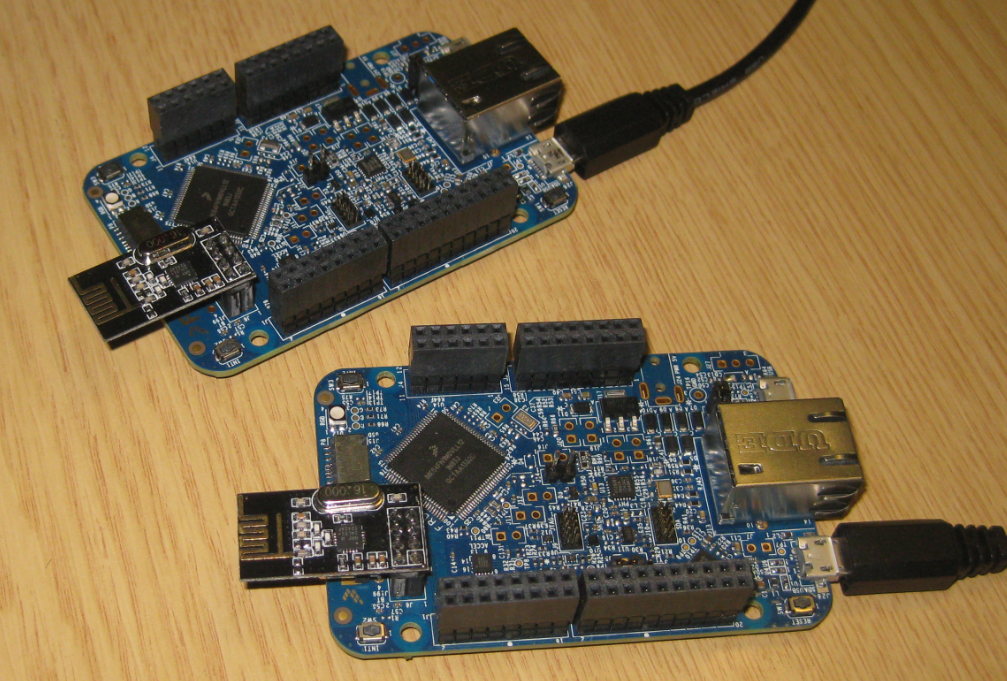
For some time I’m using the Nordic Semiconductor nRF24L01+ transceiver successfully in many projects (see “Tutorial: Ultra Low Cost 2.4 GHz Wireless Transceiver with the FRDM Board“). Since that tutorial things evolved a lot with the introduced RNet Stack. To honor the popularity of the Nordic Semiconductor nRF24L01+, Freescale has put a socket on the FRDM-K64F board. So time to make a new step-by-step tutorial how to use the nRF24L01+ with the FRDM-K64F.

Two FRDM-K64F Boards with nRF24L01+ Transceiver

Two FRDM-K64F Boards with nRF24L01+ Transceiver

Continue reading

Finding Settings in Processor Expert Components

Processor Expert components are making things very easy to configure: go a component, use the component inspector and change a setting. However, with the devices getting more and more complex, the list of settings or properties get longer and longer. To the point that it is hard to find a setting.

For example, where are the settings for the PLL in the CPU component?

Component with Settings

Component with Settings

Continue reading