I want to make some noise with this post!!! This tutorial is about adding music and sound capabilities to the Freescale Freedom board, and to have a lot of fun with it :-). I need this ability for a larger project working on for a while. But I thought I share that sub-part how to play sound files. So with this tutorial I can turn my Freescale Freedom board into a music or sound player :-). And adding sounds is a cool way for any project, and as the music is stored on an SD card it fits easily hours of music or sounds.
Category Archives: FreeRTOS
Updated McuOnEclipse Components: USB for KL24Z, FatFs v0.10c, Shell Backspace and FreeRTOS Trace Hook Configuration
I have received several requests to post a quick note when there is a new release (16-Nov-2014) of the McuOnEclipse components on SourceForge (see “McuOnEclipse Releases on SourceForge“). I have published today a new release, and with following major improvements:
- USB support for Kinetis KL24Z
- FatFs now features the latest Elm-Chan v0.10c release
- Backspace support in Shell
- Configuration item in FreeRTOS for Percepio Trace Hooks
Tutorial: FreeRTOS with the Kinetis SDK and Processor Expert
Freescale had announced at FTF back in April this year that they will use Kinetis Design Studio and the Kinetis SDK for all new Kinetis devices. The switch from CodeWarrior to Kinetis Design Studio (see “Comparing CodeWarrior with Kinetis Design Studio“) was not much of big deal for my projects (although CodeWarrior still has better features), and projects are rather easily portable. However, the move to the Kinetis SDK has been massively disruptive: Before it was easy to move projects from one device to another with Processor Expert, even from S08 to ColdFire to Kinetis. Now with the Kinetis SDK everything is very different. At least Freescale now officially supports FreeRTOS, and for myself as a big fan of that open source RTOS, that was some good news.
So in this tutorial I’m showing how FreeRTOS can be used with the Kinetis Design Studio. That makes at least using the Kinetis SDK bit more familiar to me :-).
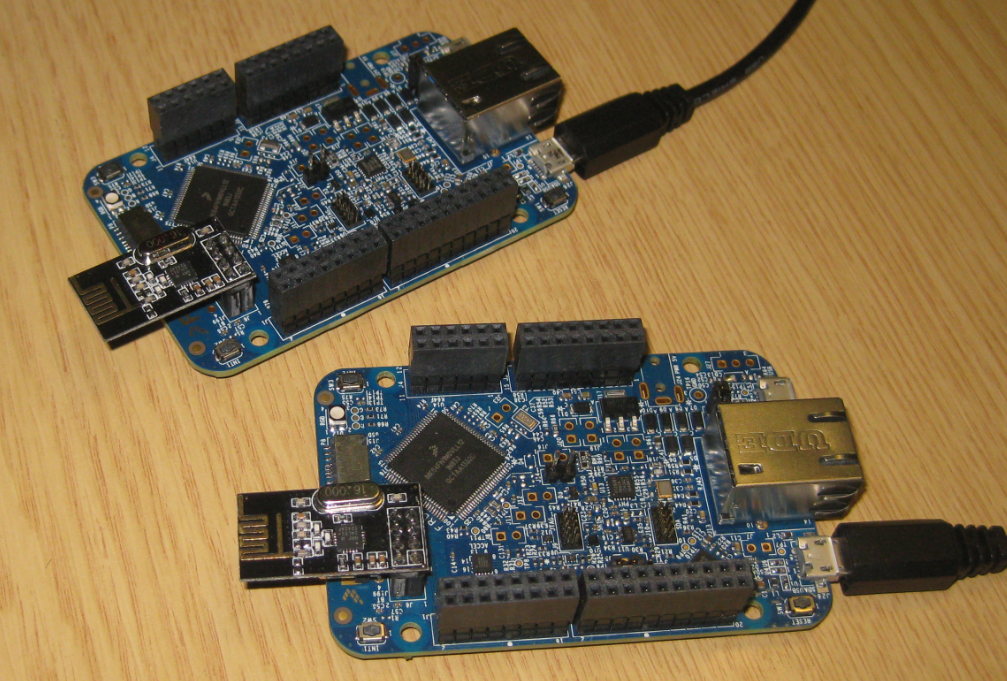
Tutorial: Nordic Semiconductor nRF24L01+ with the Freescale FRDM-K64F Board
For some time I’m using the Nordic Semiconductor nRF24L01+ transceiver successfully in many projects (see “Tutorial: Ultra Low Cost 2.4 GHz Wireless Transceiver with the FRDM Board“). Since that tutorial things evolved a lot with the introduced RNet Stack. To honor the popularity of the Nordic Semiconductor nRF24L01+, Freescale has put a socket on the FRDM-K64F board. So time to make a new step-by-step tutorial how to use the nRF24L01+ with the FRDM-K64F.
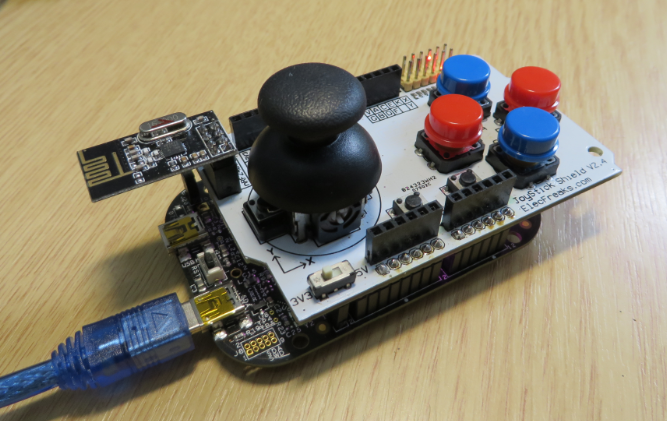
JoyStick Shield with the FRDM Board
The latest addition to my set of Arduino shields is a true fun thing: The ElecFreaks.com JoyStick Shield 🙂
ElecFreaks.com Joystick Board with FRDM-KL25Z and nRF24L01+
FreeRTOS, malloc() and SP check with GNU Tools
FreeRTOS has many memory allocation options (see Memory Management) with four ‘schemes’. One of it is the a simple wrapper over the library malloc() and free() routines. I admit, I have not used them, as usually I avoid to include such kind of libraries, as they have their own problems. Anyway, a discussion in the FreeRTOS forum raised my interest: obviously some malloc() implementation (as in the EWL library of CodeWarrior) are making a safety check against the current stack pointer.
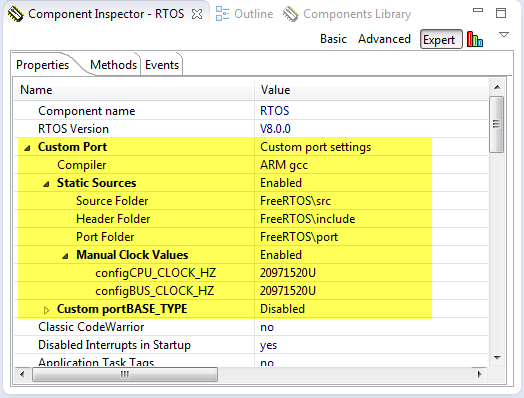
Generating Static FreeRTOS Source Code
Using Processor Expert is an awesome tool: it generates source code for me, and I can can ‘dynamically’ tune my projects to my needs. Still, sometimes it is better or desirable to have a ‘normal’ or ‘static’ project. This is very well possible with Processor Expert (see “Sneaking from Processor Expert” or “Disable my Code Generation“): I can generate the code one time, and then use it without Processor Expert.
To make this even easier, I have added an option to the FreeRTOS Processor Expert component to generate ‘static’ code I can copy-paste to projects and tool chains which are either not supported by Processor Expert, or just for ‘static’ projects.
First Steps with the Freescale TWR-K64F120M
Naturally, I have several project ideas lingering around. No time to make them all (for now). One of it is interfacing the Raspberry Pi camera with a microcontroller. To store the images, I need plenty of RAM on the device, and so far the Kinetis microcontroller did not have that. Finally, Freescale announced the K64F120 a few months back, and my ordered TWR-K64F120M board arrived on my desk, waiting to be used: Finally I get an ARM Cortex-M4F with 1 MByte of FLASH and 256 KByte of RAM :-).
FreeRTOS V8.0.0 Final Release available as Processor Expert Component
The final FreeRTOS V8.0.0 has been released last week: time to update the Processor Expert component for it, and this time it is really a major release 🙂 : from V7.5.0 to V8.0.0:
FreeRTOS V8.0.0 comes with many small changes, especially it now includes many of the extra casts I have contributed to avoid compiler warnings. And additionally it has a brand new feature: Event Groups.
IoT: FreeRTOS Down to the Micro Amps
University research projects can be a lot fun, and are very challenging the same time. The good thing is that there is always someting new to learn :-).
This week-end I was working on my Internet of Things (IoT) project, based on a Freescale KL15Z and a nRF24L01+ transceiver. In essence it is a wireless data logger. For this, I only can afford a few micro amps consumed by the whole board over an extended period of time. I mean 21 micro amps for running a whole board with sensor, EEPROM, wireless transceiver, operating system and an ARM Cortex-M0+ ready to crunch numbers at 20 MHz 🙂