DIY Free Toolchain for Kinetis: Part 4 – Processor Expert for Eclipse

I covered in a previous tutorial how add ARM gcc to Kepler Eclipse to build a DYI toolchain. I’m using Processor Expert a *lot* in my project, because it simplifies and speeds up the development of my embedded applications. What is missing so far is how Processor Expert can be added to Eclipse. As Kepler is as of this writing the latest Eclipse version, this tutorial is using that version.

Eclipse Luna is *NOT* supported in Processor Expert 10.4! Eclipse Luna is expected to be supported in Processor Expert 10.5 coming out in 2015! So if you are using Processor Expert 10.4, then make sure you are using Eclipse Kepler.

Processor Expert Project in Kepler Eclipse
Processor Expert Project in Kepler Eclipse

Continue reading

How to re-enable ‘Add to dictionary’ for the Eclipse Spell Checker

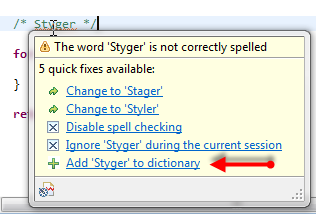
I love to have my sources ‘warning free’, so I spend an extra effort to have things clean and the way the compilers like it. In a similar way, I want to have my source comments spell-error free :-). For this, I love the Eclipse spell checker (see this post) which offers to add unknown words to the dictionary:

Add word to dictionary

Add word to dictionary

But what if that ‘Add’ action is missing? How to re-enable it?

Continue reading

DIY Free Toolchain for Kinetis: Part 3 – Debugger (GDB Server with P&E and Segger)

This is the third part of a tutorial series how to ‘do-it-yourself’ a tool chain for the Freescale Kinetis microcontroller, with the FRDM-KL25Z as example. The tool chain is using GNU ARM gcc plus Eclipse Kepler release. So far I have the following parts:

List of Tutorials

So far things are very generic. But with debugging it means different hardware, and different hardware connections. And for this connection we need a GDB Server.

GDB Server

Eclipse CDT features a GNU Debugger (GDB), and this is what I want to use here: debugging my microcontroller with GDB inside Eclipse. In order to debug the microcontroller, I need two other things: a GDB Server and a Debug Probe.

GDB with GDB Server

GDB with GDB Server

Continue reading

DIY Free Toolchain for Kinetis: Part 2 – Eclipse IDE

This is the second part of a multi-part tutorial about how to set up an open source tool chain with GNU ARM gcc + Eclipse to build and debug an application for Kinetis ARM devices.

List of Tutorials

Eclipse Kepler

Eclipse Kepler

Continue reading

Using the HC-06 Bluetooth Module

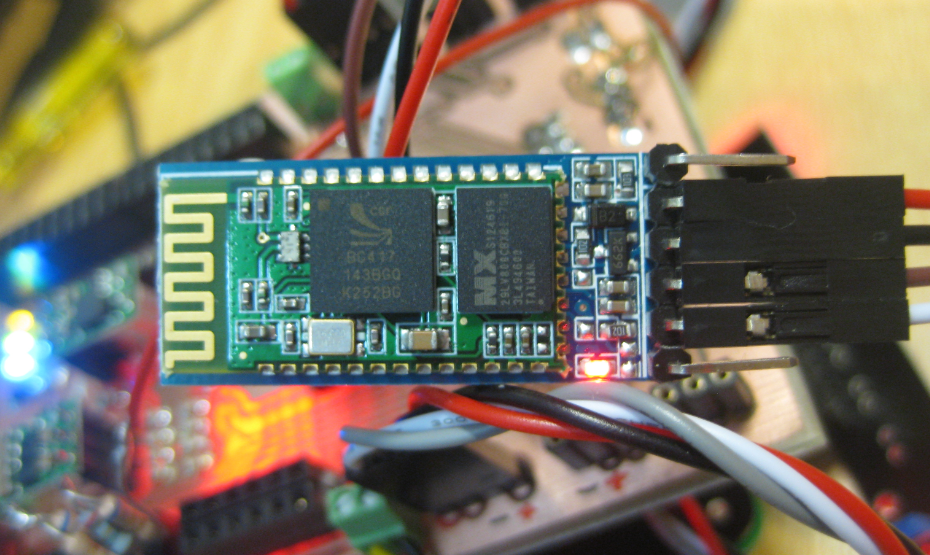
After my first post using a Bluetooth module, things have evolved a bit. The challenge with these Bluetooth modules is: they look the same, but having different firmware. I did not fully realize that until I have ordered another bluetooth module from dx.com:

DX.com Bluetooth Module (HC-06)

DX.com Bluetooth Module (HC-06)

That module comes already on a carrier, so I assumed I can use the same driver as for my other module. I was wrong :-(.

Continue reading

Eclipse Problems View: Only Show Problems for Project

Having many projects open the same time, and working on them in parallel is a challenge. Ok, the human brain is not built for multitasking, but I still try ;-). What I typically I end up in my Eclipse Problems View to have entries from multiple projects mixed up:

Problems View with Entries for multiple Projects

Problems View with Entries for multiple Projects

How to show it that I can fix the problems for ony project only, and not showing all problems from all projects?

Continue reading

Traps and Pitfalls: No Hex/Bin/S19 File Created with GNU?

I stumbled now twice over a problem, and only after a lot of head scratching (you should see my head now 😉 ) I have found the cause (and solution) for it. In the hope that I can save the readers of this blog some time, here is what happened.

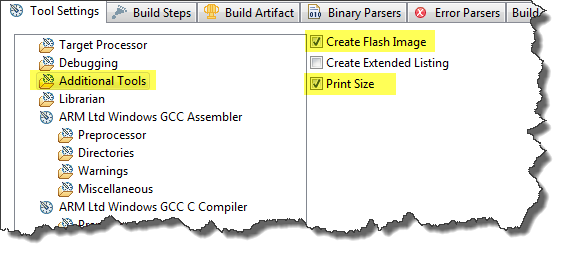
I described in earlier posts how to enable GNU build tools to generate hex/bin/S19 files, or to write the code size to the console view. That works fine for me. But then I received a project were obviously this does not work: even with the project settings configured properly, there is no S19 file, and no code size printed. What’s wrong?

Additional Tools in ARM GNU Eclipse Panel

Additional Tools in ARM GNU Eclipse Panel

Continue reading

Freedom Board with Segger OpenSDA Debug Firmware

Looks like there is some movement on the ‘OpenSDA Front’: After CodeRed has released their RedProbe OpenSDA firmware, now Segger has released an OpenSDA firmware.

With this, I get a low-cost debugging solution similar to the well-known J-Link run control devices. The OpenSDA Segger Firmware is something like a J-Link-lite.

FRDM-KL25Z with Segger OpenSDA Debug Firmware

FRDM-KL25Z with Segger OpenSDA Debug Firmware

Continue reading

Adding USBDM to CodeWarrior for MCU10.4

If you are following my recent posts, then you know I started using USBDM on OpenSDA as an alternative run control solution. Now with the advent of MCU10.4, the question is: how to use USBDM with it, because the USBDM installer obviously only knows the version up to MCU10.3?

USBDM 4.10.4a Installer

USBDM 4.10.4a Installer

Continue reading

Switching Processor Package – Simplified in MCU10.4

I continue to uncover new things in CodeWarrior in MCU10.4 :-). Remember my post “Switching Processor Package in Processor Expert” about the steps needed to switch from one microcontroller package to another? Although that’s not something I need to do on a daily base, this process is simplified in the new version 10.4 🙂

Select Package

Select Package

Continue reading