Reducing Compile Time in Eclipse with Parallel Build

Feeling that building a project in Eclipse (including Kinetis Design Studio) takes a long time? Then probably the ‘parallel build’ option is not enabled in your project: Using parallel build option reduces the needed time by factors. To give an example, to build a project with 56 source files takes 32 seconds without parallel build enabled:

no parallel build

no parallel build

With parallel build enabled this gets reduced down to less than 10 seconds:

Parallel Build Enabled

Parallel Build Enabled

🙂

Continue reading

Constructing a Classroom IDE with Eclipse for ARM

For the next semester I will do things differently in my advanced embedded systems programming course (INTRO) at the University of Lucerne: Instead of using the Freescale provided CodeWarrior, we will use a DIY tool chain for ARM with Eclipse Kepler.

Eclipse Kepler Ready for Classroom Usage

Eclipse Kepler Ready for Classroom Usage

That way we we can offer students an open and convenient tool chain for their lab work, course assignments and own projects both at work and at home. So this post is about spending about 30 minutes to build your own tool chain which then can passed to students and coworkers so they have a complete toolchain installed in a few minutes.

Continue reading

C/C++ Watchpoints with Eclipse Kepler

In “Watchpoints: Data Breakpoints” I used the Eclipse based CodeWarrior to set breakpoints so the debugger stops when my application is writing or reading a certain memory location. That CodeWarrior is based on an earlier Eclipse version, and things are different in Eclipse Kepler and not so easy to find. So here is how I can use watchpoints in Eclipse Kepler:

Watchpoints in Breakpoint View

Watchpoints in Breakpoint View

Continue reading

GNU ARM Eclipse & Segger J-Link Device Name Settings

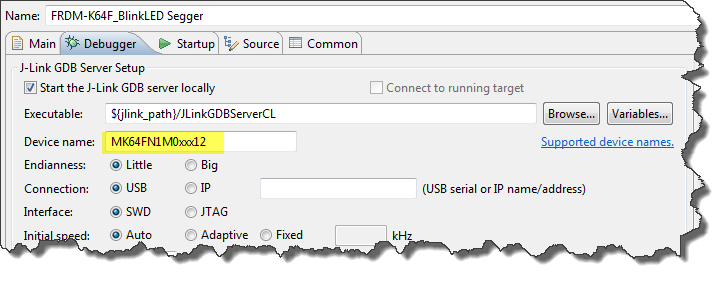
Thanks to the GNU ARM Eclipse plugins from Liviu it is easy to build and debug projects for all the different ARM cores. But I need to specify the device name in the debug configuration:

Device Name for Segger GDB Configuration

Device Name for Segger GDB Configuration

There must be an easier way for this? Yes, indeed, there is 🙂

Continue reading

Printing Code Size Information in Eclipse

For the GNU ARM tools it is easy to print out the code and date size information, see

But this is all for ARM cores. What if I use other architectures like S08 or ColdFire in Eclipse?

Code Size Information in Build Console

Code Size Information in Build Console

Continue reading

Segger J-Link Firmware for OpenSDAv2

Segger just has released their OpenSDAv2 firmware. The OpenSDAv2 firmware is different from the OpenSDAv1 as it is using a different memory map and bootloader. The OpenSDAv2 e.g. is present on the new FRDM-K64F board. The availability of the Segger firmware is definitely good news for any owner of the FRDM-K64F board: so far only the CMSIS-DAP firmware was available (on top of the mbed bootloader). With this, it was not possible to use the board with CodeWarrior, except with using an external P&E Multilink or Segger J-Link. With that new Segger J-Link OpenSDAv2 firmware, I can now use the FRDM-K64F with any IDE which supports the Segger J-Link :-).

FRDM-K64F with Segger OpenSDAv2 Firmware

FRDM-K64F with Segger OpenSDAv2 Firmware

Continue reading

FRDM with Arduino Ethernet Shield R3, Part 4: MinIni

I admit: my Ethernet Shield project got stuck because of too many urgent other priorities. I was not happy with the way the project was using configuration data from FLASH memory: I have now multiple ethernet shields in use, and configuring the IP address for each shield is a pain. I have not got DHCP working (yet), so why not using the SD card on the shield for configuration data? And right on time I received a tip from Marc about MinIni: perfect, exactly what I need!

Ethernet Shield with SD card

Ethernet Shield with SD card

Continue reading

Binary (and S19) Files for the mbed Bootloader with Eclipse and GNU ARM Eclipse Plugins

The existing OpenSDAv1 (see “OpenSDA on the Freedom KL25Z Board“) bootloader is using the industry standard Motorola S-Record (S19) Files. However, new FRDM-K64F board (see “FTF: FRDM-K64F, Kinetis Design Studio and Kinetis SDK“) has OpenSDAv2 on it, which is an mbed bootloader. So how to create files with an IDE other than mbed for that bootloader which is present on the FRDM-K64F board by default? Well, creating binary files is one thing, but to have it working with the mbed bootloader is another challenge :-(.

FRDM-K64F with mbed MSD bootloader

FRDM-K64F with mbed MSD bootloader

Continue reading

Using the FRDM-K64F with CodeWarrior

The new flagship of FRDM boards is the FRDM-K64F board. After FTF I have explored different ways debugging the board, and received many comments and questions about it (thanks!). Freescale announced the supports with the new Eclipse based Kinetis Design Studio (KDS). But until KDS is out, how can I use the FRDM-K64F board with CodeWarrior?

Debugging FRDM-K64F Board with CodeWarrior for MCU v10.6

Debugging FRDM-K64F Board with CodeWarrior for MCU v10.6

Continue reading

Pin Muxing: Using the NMI Pin as GPIO Pin

Many modern microcontroller have a cool feature: Pin Muxing. What it means is that I can ‘mux’ the pins for different purposes: such as I can use a SPI or I2C pin as GPIO (General Purpose Pin) or vice versa. In an ideal world, I would be able to ‘route’ or ‘mux’ pins freely around. In practice these ‘way switches’ are more or less limited.

In “Using the Reset Button on the Freedom Board as User Button” I muxed the FRDM-KL25Z reset pin as GPIO pin. The same approach can be used for muxing the NMI (Non-Maskable Interrupt) pin for the Freescale Kinetis devices. I’m showing it here how to do this with Processor Expert as this allows me to do this with a few mouse clicks.

NMI Pin Used as GPIO Pin

NMI Pin Used as GPIO Pin

Continue reading