LinkServer for Microcontrollers

GDB is the de-facto debugging engine and debug connection for micro-controllers these days: it is versatile and with its client-server architecture very flexible and powerful, and pretty much every debug probe and vendor (PEMICRO, SEGGER, OpenOCD, pyOCD, …) offers it. But a GDB server or command line implementation was not available for the NXP LinkServer family of debug probes (LPC-Link, MCU-Link, MCU-Link Pro). This has changed now: LinkServer is available as command line tool and can be used as GDB Server:

LinkServer as GDB Server with Eclipse

With the new LinkServer package I do not only get a gdb server implementation: I have now a command line tool I can use for automation and all kind of different things: programming boards, erasing flash, and so on.

Continue reading

Booting J-Link as CMSIS-DAP Debug Probe

Mostly unnoticed (at least for myself), SEGGER has enabled some of the J-Link debug probes to support the CMSIS-DAP debug protocol.

SEGGER J-Link as CMSIS-DAP Debug Probe

This greatly enhances the use of J-Link debug probes for CMSIS-DAP based tools.

Continue reading

Building a Triumvirate: From Eclipse CDT to CMake, CMD and Visual Studio Code

A Triumvirate is or Triarchy is built by three individuals which lead or rule something. In this article I want to rule a project with Eclipse CDT, Visual Studio Code and with building it from the command line for automated builds.

So what if I have an Eclipse project (say MCUXpresso IDE and SDK), and want to build it on a build server, and and I want to use the same time the project with Eclipse IDE and Visual Studio code?

Key to this is CMake: I’m keeping the Eclipse CDT features, adding CMake with Make and Ninja to the fix, and have it ‘ruled’ by three different ’emperor’: Eclipse, Visual Studio Code and from a shell console:

MCUXpresso SDK CDT project with CMake for Eclipse, Visual Studio Code and Command Line Building
Continue reading

Different Laser-Cut Enclosures for the MCU-Link

The MCU-Link debug probe comes without an enclosure. To protect the hardware against ESD issues, I had created a 3D printed enclosure for it. That one worked fine, but takes some time to print it. If you have to build many enclosures for a full classroom setup, then a laser cutter is much faster. And to create some variations, I have decided to cut it with different materials and colors. To be environment friendly, extra glue is needed, and with recycled PMMA, different colors are possible too.

Different laser-cut enclosure: wood, and red, transparent, blue and green PMMA
Continue reading

Open Source picoLink: Raspberry Pi RP2040 CMSIS-DAP Debug Probe

One essential part of embedded development is the ability to debug the target application. The good thing with the Raspberry Pi Pico RP2040 Eco-system is: One can use another RP2040 Pico board as a debug probe to debug other ARM Cortex-M devices.

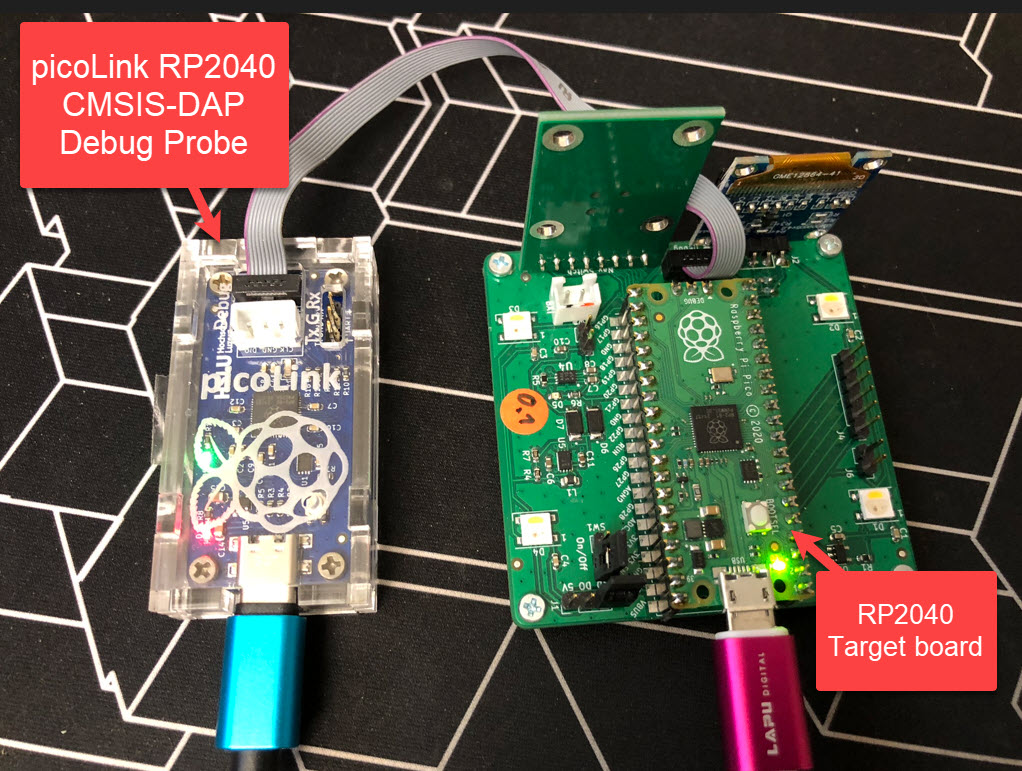
But instead using a Raspberry Pi Pico board with some wires, why not building a dedicated board? The result is a small, versatile and open source debugging probe which virtually can debug any ARM Cortex-M device as a standard ARM CMSIS-DAP probe:

picoLink Debug Probe debugging a Raspberry Pi Pico Board
Continue reading

Changing the Startup: Custom initial PC and SP Register Setting with the Debugger

By default, the debugger cares about the initial register settings after connecting to the target. But for special cases like using a bootloader combined with a loaded application, this requires a bit more than the usually ‘standard procedure’. For example I need to set both a custom program counter (PC) and stack pointer (SP).

How to set custom PC and SP for startup of the application
Continue reading

RP2040 with PIO and DMA to address WS2812B LEDs

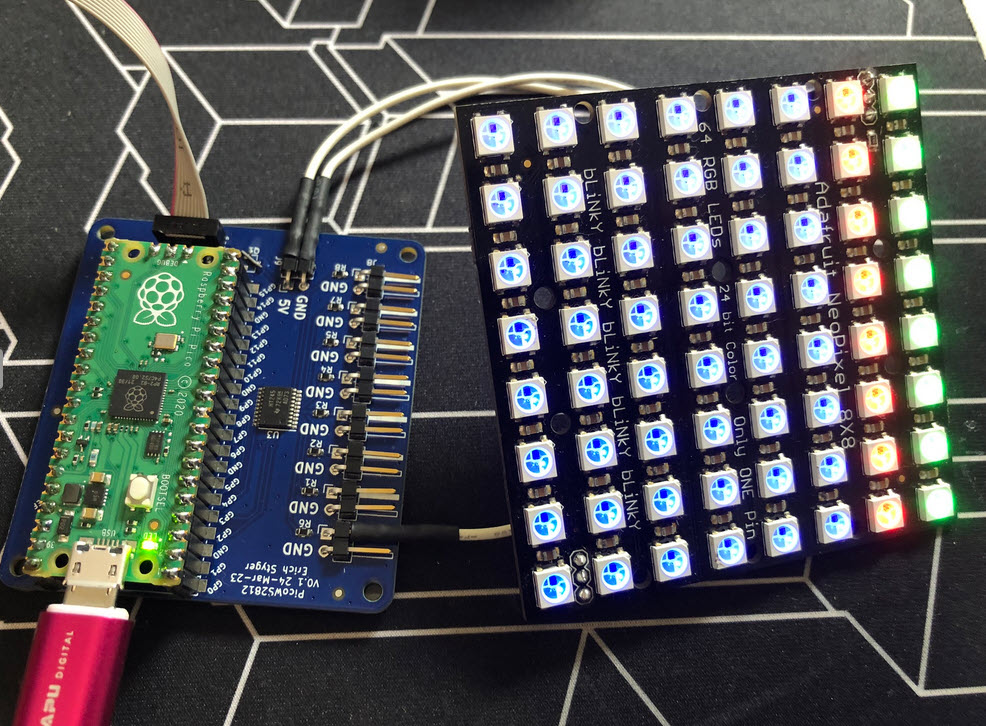
I love the WS2812B (aka SK6812) addressable LEDs: they are inexpensive and available in different packages. I have used them in different projects, including the MetaClockClock one. I used the NXP Kinetis for these projects, but because they are not available any more, for a new project we had to choose a new microcontroller, with the Raspberry Pi Pico RP2040 as the winner.

Raspberry Pi Pico RP2040 driving WS2812B with PIO and DMA
Continue reading

BLE with WiFi and FreeRTOS on Raspberry Pi Pico-W

The Raspberry Pi Pico RP2040 is a very versatile microcontroller. It is not the least expensive or the most powerful microcontroller, but it is one which is available and has an excellent software and tool ecosystem.

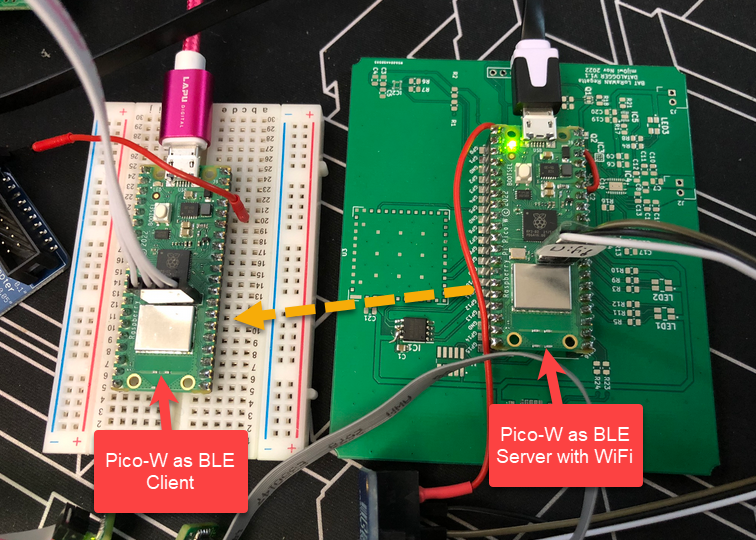
This article shows how to use the Raspberry Pi Pico-W with BLE and optional WiFi, running with FreeRTOS.

Continue reading

Using Semihosting the direct Way

Most embedded developers have probably used ‘semihosting’. And yes, it is generally seen as a bad thing. Maybe you have used it, without realizing what it really is and what it does. It is simple to add a printf() to the code (again: you should not use printf), and with the right standard library, it magically it shows up in a console view:

printf a hello world

That looks great, but what is behind this, to make it happen? Actually, it is really amazing technology. And it can be used for better things than just printing text.

Continue reading

Avoiding Stack Overflows: Application Monitoring the Stack Usage

One of the biggest fears of embedded systems developers are stack overflows. FreeRTOS includes a cool feature to monitor and catch task stack overflows. But what about the MSP (Main Stack Pointer) on ARM, or the interrupt stack? What if not using an RTOS and running a bare-metal application?

Checking stack size used

There is a simple way monitoring stack usage at runtime, and for this I want to share the routines and what is now available inside the McuArm module.

Continue reading